
PSTeams
A module for sending formatted messages to a Microsoft Teams Channel.
PSTeams - Microsoft Teams Notifications for PowerShell and .NET
PSTeams is available as a PowerShell module from PowerShell Gallery and is powered by a reusable C# library named TeamsX.
PowerShell Module




Project Information





Author and Social



What it's all about
PSTeams helps you send rich notifications to Microsoft Teams from PowerShell on Windows, Linux, and macOS. It can build and send classic Office 365 connector cards, Adaptive Cards, Hero Cards, List Cards, and Thumbnail Cards.
PSTeams uses a cleaner architecture:
TeamsXis the reusable C# library for composing and delivering Microsoft Teams messages.TeamsX.PowerShellexposes thin binary PowerShell cmdlets over that library.PSTeamsremains the PowerShell module users install and import.
Capabilities
- Send Microsoft Teams notifications through incoming webhooks and workflow webhooks.
- Compose classic connector-card messages with sections, facts, images, buttons, and activity fields.
- Compose Adaptive Cards with containers, columns, tables, images, media, mentions, rich text, actions, and fallback text.
- Compose Hero, Thumbnail, and List cards with typed cmdlets.
- Convert message objects to JSON before sending, which is useful for testing, logging, and CI validation.
- Use a starter Microsoft Graph delivery path for Teams chats and channels without adding a large Graph SDK dependency.
- Keep the PowerShell module surface familiar while moving implementation into reusable C# cmdlets.
Installing and Updating
PSTeams works on Windows, Linux, and macOS through PowerShell Gallery. Installation does not require administrative rights when you install for the current user.
Install for the current user:
Install-Module PSTeams -Scope CurrentUser
Install for all users from an elevated PowerShell session:
Install-Module PSTeams
Update an existing installation:
Update-Module -Name PSTeams
After updating, restart any PowerShell session that already imported PSTeams so the new binary module is loaded.
If PSTeams is used in production automations, test new versions before rolling them out broadly.
Runtime dependency on PSSharedGoods has been removed from the module shell. Development tooling may still use helper modules such as PSWriteColor, but the shipping module is being kept as self-contained as possible.
Quick Start
Send a classic connector-card notification through an incoming webhook:
$target = New-TeamsWebhookTarget -Uri $Env:TEAMS_WEBHOOK_URL
$section = New-TeamsSection `
    -ActivityTitle 'PSTeams' `
    -ActivitySubtitle 'Build notification' `
    -ActivityText 'The release pipeline completed successfully.' `
    -ActivityDetails @(
        New-TeamsFact -Name 'Environment' -Value 'Production'
        New-TeamsFact -Name 'Result' -Value 'Passed'
    )

$message = New-TeamsMessage -Title 'Deployment completed' -Text 'PSTeams notification' -Sections $section
Send-TeamsMessage -Message $message -Target $target
Render the same message as JSON when you want to validate payloads in tests or CI:
$message | ConvertTo-TeamsJson
Supported .NET and PowerShell Versions
TeamsX Library
- .NET 8.0 and .NET 10.0 for modern cross-platform use
- .NET Standard 2.0 for compatibility
- .NET Framework 4.7.2 for Windows PowerShell 5.1 scenarios
PowerShell Module
- PowerShell 7.x uses the .NET 8.0 binary build by default during development.
- Windows PowerShell 5.1 uses the .NET Framework 4.7.2 binary build during development.
- Packaged module builds are produced by
Module\PSTeams\Build\Build-Module.ps1, following the same module-build approach used by other Evotec modules such as DnsClientX.
Legacy Branch
The historical script-function implementation is preserved on the legacy branch for reference and maintenance history. New development should target TeamsX, TeamsX.PowerShell, and binary cmdlets rather than adding new PowerShell wrapper functions.
Links/Blogs
While I didn't spent much time creating WIKI, working on Get-Help documentation, I did write 4 articles that should help you get started.
First 3 articles are for version 0.X.X-1.X.X, and last one is small introduction to new versionF.
- PSTeams – PowerShell Module
- PSTeams – Send notifications to MS Teams from Mac / Linux or Windows
- Sending Messages to Microsoft Teams from PowerShell just got easier and better
- Introducing PSTeams 2.0 – Support for Adaptive Cards, Hero Cards, List Cards and Thumbnail Cards
Support This Project
If you find this project helpful, please consider supporting its development. Your sponsorship will help the maintainers dedicate more time to maintenance and new feature development for everyone.
It takes a lot of time and effort to create and maintain this project. By becoming a sponsor, you can help ensure that it stays free and accessible to everyone who needs it.
To become a sponsor, you can choose from the following options:
Your sponsorship is completely optional and not required for using this project. We want this project to remain open-source and available for anyone to use for free, regardless of whether they choose to sponsor it or not.
If you work for a company that uses our .NET libraries or PowerShell Modules, please consider asking your manager or marketing team if your company would be interested in supporting this project. Your company's support can help us continue to maintain and improve this project for the benefit of everyone.
Thank you for considering supporting this project!
Supported Cards
While WebHook Notifications in theory only support Office 365 Connector Card it's possible to do more than that.
- Supported in 0.X.0 - 1.0.X
- Office 365 Connector Card - The Office 365 Connector card provides a flexible layout with multiple sections, fields, images, and actions. This card encapsulates a connector card so that it can be used by bots. See the notes section for differences between connector cards and the O365 card.
- Supported in 2.X.X
Below you can find how to send them and what they display. You should be aware that while I've added some features, not all of them will work in Teams such as submitting data, or using inputs (they may display data but not really do anything). It's still work in progress and things may change and get new features.
Adaptive cards
Adaptive Cards are most advanced cards. There's lots of options available. Make sure to review:
Here's some code / output:
New-AdaptiveCard -Uri $Env:TEAMSPESTERID -VerticalContentAlignment center {
    New-AdaptiveContainer {
        New-AdaptiveColumnSet {
            New-AdaptiveColumn {
                New-AdaptiveImage -Url "https://adaptivecards.io/content/cats/3.png" -Size Medium -AlternateText "Shades cat team emblem" -HorizontalAlignment Center
                New-AdaptiveTextBlock -Weight Bolder -Text 'SHADES' -HorizontalAlignment Center
            } -Width Auto
            New-AdaptiveColumn {
                New-AdaptiveTextBlock -Text "Sat, Aug 31, 2019" -HorizontalAlignment Center -Wrap
                New-AdaptiveTextBlock -Text "Final" -Spacing None -HorizontalAlignment Center
                New-AdaptiveTextBlock -Text "45 - 7" -HorizontalAlignment Center -Size ExtraLarge
            } -Width Stretch -Separator -Spacing Medium
            New-AdaptiveColumn {
                New-AdaptiveImage -Url "https://adaptivecards.io/content/cats/2.png" -Size Medium -HorizontalAlignment Center -AlternateText "Skins cat team emblem"
                New-AdaptiveTextBlock -Weight Bolder -Text 'SKINS' -HorizontalAlignment Center
            } -Width Auto -Separator -Spacing Medium
        }
    }
} -Speak 'The Seattle Seahawks beat the Carolina Panthers 40-7'
Output

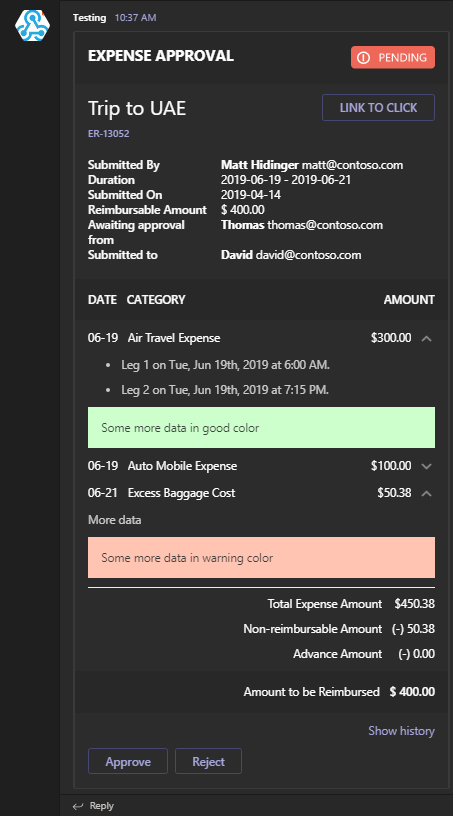
Or something more advanced with hidden data, multiple actions and so on:
New-AdaptiveCard -Uri $Env:TEAMSPESTERID {
    New-AdaptiveContainer -Style Emphasis -Bleed {
        New-AdaptiveColumnSet {
            New-AdaptiveColumn -Width Stretch {
                New-AdaptiveTextBlock -Text '**EXPENSE APPROVAL**' -Weight Bolder -Size Large
            }
            New-AdaptiveColumn -Width Auto {
                New-AdaptiveImage -Url "https://adaptivecards.io/content/pending.png" -AlternateText 'Pending' -HeightInPixels 30 #-HorizontalAlignment Right
            }
        }
    }

    New-AdaptiveContainer {
        New-AdaptiveColumnSet {
            New-AdaptiveColumn -Width Stretch {
                New-AdaptiveTextBlock -Text 'Trip to UAE' -Wrap -Size ExtraLarge
            }
            New-AdaptiveColumn -Width Auto {
                New-AdaptiveActionSet {
                    New-AdaptiveAction -Title 'LINK TO CLICK' -ActionUrl 'https://adaptivecards.io'
                }
            }
        }
    }
    New-AdaptiveTextBlock -Text "[ER-13052](https://adaptivecards.io)" -Spacing Small -Size Small -Weight Bolder -Color Accent

    New-AdaptiveFactSet -Spacing Large {
        New-AdaptiveFact -Title "Submitted By" -Value "**Matt Hidinger**  matt@contoso.com"
        New-AdaptiveFact -Title "Duration" -Value "2019-06-19 - 2019-06-21"
        New-AdaptiveFact -Title "Submitted On" -Value "2019-04-14"
        New-AdaptiveFact -Title "Reimbursable Amount" -Value '$ 400.00'
        New-AdaptiveFact -Title "Awaiting approval from" -Value "**Thomas**  thomas@contoso.com"
        New-AdaptiveFact -Title "Submitted to" -Value "**David**  david@contoso.com"
    }

    New-AdaptiveContainer -Style Emphasis -Spacing Large {
        New-AdaptiveColumnSet {
            New-AdaptiveColumn {
                New-AdaptiveTextBlock -Text 'DATE' -Weight Bolder
            } -Width Auto
            New-AdaptiveColumn {
                New-AdaptiveTextBlock -Text 'CATEGORY' -Weight Bolder
            } -Width Stretch
            New-AdaptiveColumn {
                New-AdaptiveTextBlock -Text 'AMOUNT' -Weight Bolder
            } -Width Auto
        }
    } -Bleed

    New-AdaptiveColumnSet {
        New-AdaptiveColumn -Width Auto -Spacing Medium {
            New-AdaptiveTextBlock -Text '06-19' -Wrap
        }
        New-AdaptiveColumn -Width Stretch {
            New-AdaptiveTextBlock -Text 'Air Travel Expense' -Wrap
        }
        New-AdaptiveColumn -Width Auto {
            New-AdaptiveTextBlock -Text '$300.00' -Wrap
        }
        # Special column with Action and hidden items
        # Notice ActionTargetElement which triggers automatically ToggleVisibility for those mentioned
        New-AdaptiveColumn -Spacing Small -VerticalContentAlignment Center -Width Auto {
            New-AdaptiveImage -Id 'chevronDown1' -Url "https://adaptivecards.io/content/down.png" -WidthInPixels 20 -AlternateText "Details collapsed"
            New-AdaptiveImage -Id 'chevronUp1' -Url "https://adaptivecards.io/content/up.png" -WidthInPixels 20 -AlternateText "Details collapsed" -Hidden
        } -SelectActionTargetElement 'cardContent1', 'chevronDown1', 'chevronUp1'
    }

    # Notice this will be hidden initially and shown with the action from above
    New-AdaptiveContainer -Hidden -Id 'cardContent1' {
        New-AdaptiveTextBlock -Text '* Leg 1 on Tue, Jun 19th, 2019 at 6:00 AM.' -Subtle -Wrap
        New-AdaptiveTextBlock -Text '* Leg 2 on Tue, Jun 19th, 2019 at 7:15 PM.' -Subtle -Wrap
        New-AdaptiveContainer -Style Good {
            # This should be an input type, but not yet added - not sure if it makes sense, as inputs are not working for webhooks
            New-AdaptiveTextBlock -Text 'Some more data in good color' -Subtle -Wrap
        }
    }

    New-AdaptiveColumnSet {
        New-AdaptiveColumn -Width Auto -Spacing Medium {
            New-AdaptiveTextBlock -Text '06-19' -Wrap
        }
        New-AdaptiveColumn -Width Stretch {
            New-AdaptiveTextBlock -Text 'Auto Mobile Expense' -Wrap
        }
        New-AdaptiveColumn -Width Auto {
            New-AdaptiveTextBlock -Text '$100.00' -Wrap
        }
        # Special column with Action and hidden items
        # Notice ActionTargetElement which triggers automatically ToggleVisibility for those mentioned
        New-AdaptiveColumn -Spacing Small -VerticalContentAlignment Center -Width Auto {
            New-AdaptiveImage -Id 'chevronDown2' -Url "https://adaptivecards.io/content/down.png" -WidthInPixels 20 -AlternateText "Details collapsed"
            New-AdaptiveImage -Id 'chevronUp2' -Url "https://adaptivecards.io/content/up.png" -WidthInPixels 20 -AlternateText "Details collapsed" -Hidden
        } -SelectActionTargetElement 'cardContent2', 'chevronDown2', 'chevronUp2'
    }

    # Notice this will be hidden initially and shown with the action from above
    New-AdaptiveContainer -Hidden -Id 'cardContent2' {
        New-AdaptiveTextBlock -Text '* Contoso Car Rentrals, Tues 6/19 at 7:00 AM' -Subtle -Wrap
        New-AdaptiveContainer -Style Warning {
            # This should be an input type, but not yet added - not sure if it makes sense, as inputs are not working for webhooks
            New-AdaptiveTextBlock -Text 'Some more data in warning color' -Subtle -Wrap
        }
    }

    New-AdaptiveColumnSet {
        New-AdaptiveColumn -Width Auto -Spacing Medium {
            New-AdaptiveTextBlock -Text '06-21' -Wrap
        }
        New-AdaptiveColumn -Width Stretch {
            New-AdaptiveTextBlock -Text 'Excess Baggage Cost' -Wrap
        }
        New-AdaptiveColumn -Width Auto {
            New-AdaptiveTextBlock -Text '$50.38' -Wrap
        }
        # Special column with Action and hidden items
        # Notice ActionTargetElement which triggers automatically ToggleVisibility for those mentioned
        New-AdaptiveColumn -Spacing Small -VerticalContentAlignment Center -Width Auto {
            New-AdaptiveImage -Id 'chevronDown3' -Url "https://adaptivecards.io/content/down.png" -WidthInPixels 20 -AlternateText "Details collapsed"
            New-AdaptiveImage -Id 'chevronUp3' -Url "https://adaptivecards.io/content/up.png" -WidthInPixels 20 -AlternateText "Details collapsed" -Hidden
        } -SelectActionTargetElement 'cardContent3', 'chevronDown3', 'chevronUp3'
    }

    # Notice this will be hidden initially and shown with the action from above
    New-AdaptiveContainer -Hidden -Id 'cardContent3' {
        New-AdaptiveTextBlock -Text 'More data' -Subtle -Wrap
        New-AdaptiveContainer -Style Attention {
            # This should be an input type, but not yet added - not sure if it makes sense, as inputs are not working for webhooks
            New-AdaptiveTextBlock -Text 'Some more data in warning color' -Subtle -Wrap
        }
    }

    New-AdaptiveColumnSet -Spacing Large -Separator {
        New-AdaptiveColumn {
            New-AdaptiveTextBlock -Text "Total Expense Amount" -Wrap -HorizontalAlignment Right
            New-AdaptiveTextBlock -Text 'Non-reimbursable Amount' -Wrap -HorizontalAlignment Right
            New-AdaptiveTextBlock -Text 'Advance Amount' -Wrap -HorizontalAlignment Right
        } -Width Stretch
        New-AdaptiveColumn {
            New-AdaptiveTextBlock -Text '$450.38' -HorizontalAlignment Right
            New-AdaptiveTextBlock -Text '(-) 50.38' -HorizontalAlignment Right
            New-AdaptiveTextBlock -Text '(-) 0.00' -HorizontalAlignment Right
        } -Width Auto
    }

    New-AdaptiveContainer -Style Emphasis {
        New-AdaptiveColumnSet {
            New-AdaptiveColumn {
                New-AdaptiveTextBlock -Text 'Amount to be Reimbursed' -Wrap -HorizontalAlignment Right
            } -Width Stretch
            New-AdaptiveColumn {
                New-AdaptiveTextBlock -Text '$ 400.00' -Weight Bolder
            } -Width Auto
        }
    } -Bleed

    New-AdaptiveColumnSet {
        New-AdaptiveColumn -VerticalContentAlignment Center -WidthInWeight 1 {
            New-AdaptiveTextBlock -Text 'Show history' -Wrap -HorizontalAlignment Right -Id 'showHistory' -Color Accent
            New-AdaptiveTextBlock -Text 'Hide history' -Wrap -HorizontalAlignment Right -Id 'hideHistory' -Color Accent -Hidden
        } -SelectActionTargetElement 'cardContent4', 'showHistory', 'hideHistory'
    }

    New-AdaptiveContainer -id 'cardContent4' -Hidden {
        New-AdaptiveTextBlock -Text '* Expense submitted by **Matt Hidinger** on Mon, Jul 15, 2019' -Subtle -Wrap
        New-AdaptiveTextBlock -Text '* Expense approved by **Thomas** on Mon, Jul 15, 2019' -Subtle -Wrap
    }
} -Action {
    # This won't really work as submit doesn't work in
    New-AdaptiveAction -Type Action.Submit -Title 'Approve'
    New-AdaptiveAction -Type Action.Submit -Title 'Reject'
} -Verbose
Output
List Cards
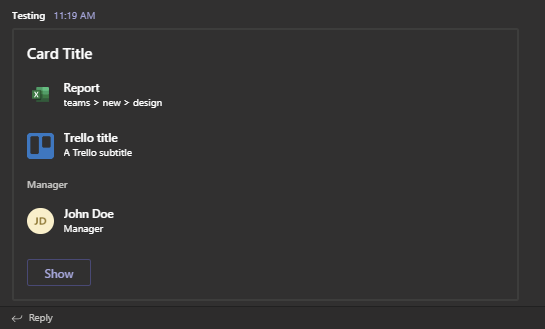
Here's a simple way to send List Cards to Teams using WebHook
- List Items do not support
tapTypeimBack. When clicked action is not taken - List Items do not support
tapAction. It's there, but doesn't work. - List Items do not support type
file. It displays, but no action is taken. It's better to useresultItem
Code
New-CardList {
    New-CardListItem -Type file -Title 'Report' -SubTitle 'teams > new > design' -TapType openUrl -TapValue "https://contoso.sharepoint.com/teams/new/Shared%20Documents/Report.xlsx" -TapAction editOnline
    New-CardListItem -Type resultItem -Title 'Report' -SubTitle 'teams > new > design' -TapType openUrl -TapValue "https://contoso.sharepoint.com/teams/new/Shared%20Documents/Report.xlsx"
    New-CardListItem -Type resultItem -Title 'Trello title' -SubTitle 'A Trello subtitle' -TapType openUrl -TapValue "http://trello.com" -Icon "https://cdn2.iconfinder.com/data/icons/social-icons-33/128/Trello-128.png"
    New-CardListItem -Type section -Title 'Manager'
    New-CardListItem -Type person -Title "John Doe" -SubTitle 'Manager' -TapType imBack -TapValue "JohnDoe@contoso.com" -TapAction whois
    New-CardListButton -Type openUrl -Title 'Show' -Value 'https://evotec.xyz'
} -Uri $Env:TEAMSPESTERID -Title 'Card Title'
Output
Hero Cards
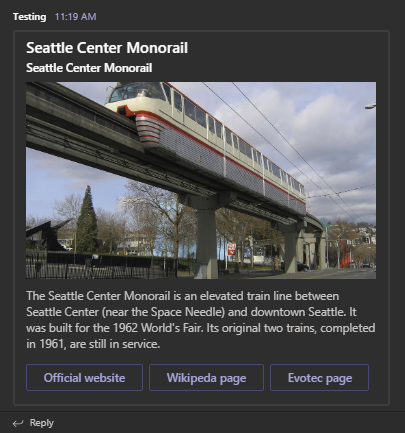
Here's a simple way to send List Cards to Teams using WebHook
- Hero Buttons (
New-HeroButton)do not support button type other thenopenUrl- When using Type
imBackaction is not taken - When using Type
filebutton is not displayed
- When using Type
- Using more than 3 buttons causes carousel for card. I've blocked it out, as all that happens is text is doubled/image is doubled but buttons don't show up over 3
Code
New-HeroCard -Title 'Seattle Center Monorail' -SubTitle 'Seattle Center Monorail' -Text "The Seattle Center Monorail is an elevated train line between Seattle Center (near the Space Needle) and downtown Seattle. It was built for the 1962 World's Fair. Its original two trains, completed in 1961, are still in service." {
    New-HeroImage -Url 'https://upload.wikimedia.org/wikipedia/commons/thumb/4/49/Seattle_monorail01_2008-02-25.jpg/1024px-Seattle_monorail01_2008-02-25.jpg'
    New-HeroButton -Type openUrl -Title 'Official website' -Value 'https://www.seattlemonorail.com'
    New-HeroButton -Type openUrl -Title 'Wikipeda page' -Value 'https://www.seattlemonorail.com'
    New-HeroButton -Type openUrl -Title 'Evotec page' -Value 'https://www.evotec.xyz'
} -Uri $Env:TEAMSPESTERID
Output
Thumbnail Cards
Here's a simple way to send Thumbnail Cards to Teams using WebHook
- Images are not supported in buttons, you can send them but it's not displayed
- imBack action is not supported in buttons, you can send them but once you click it an notification message appears
Code
New-ThumbnailCard -Title 'Bender' -SubTitle "tale of a robot who dared to love" -Text "Bender Bending Rodríguez is a main character in the animated television series Futurama. He was created by series creators Matt Groening and David X. Cohen, and is voiced by John DiMaggio" {
    New-ThumbnailImage -Url 'https://upload.wikimedia.org/wikipedia/en/a/a6/Bender_Rodriguez.png' -AltText "Bender Rodríguez"
    New-ThumbnailButton -Type imBack -Title 'Thumbs Up' -Value 'I like it' -Image "http://moopz.com/assets_c/2012/06/emoji-thumbs-up-150-thumb-autox125-140616.jpg"
    New-ThumbnailButton -Type openUrl -Title 'Thumbs Down' -Value 'https://evotec.xyz'
    New-ThumbnailButton -Type openUrl -Title 'I feel luck' -Value 'https://www.bing.com/images/search?q=bender&qpvt=bender&qpvt=bender&qpvt=bender&FORM=IGRE'
} -Uri $Env:TEAMSPESTERID
Output

Office 365 Connector Card - pre 2.X.X version
$TeamsID = 'YourCodeGoesHere'
$Button1 = New-TeamsButton -Name 'Visit English Evotec Website' -Link "https://evotec.xyz"
$Fact1 = New-TeamsFact -Name 'PS Version' -Value "**$($PSVersionTable.PSVersion)**"
$Fact2 = New-TeamsFact -Name 'PS Edition' -Value "**$($PSVersionTable.PSEdition)**"
$Fact3 = New-TeamsFact -Name 'OS' -Value "**$($PSVersionTable.OS)**"
$CurrentDate = Get-Date
$Section = New-TeamsSection `
    -ActivityTitle "**PSTeams**" `
    -ActivitySubtitle "@PSTeams - $CurrentDate" `
    -ActivityImage Add `
    -ActivityText "This message proves PSTeams Pester test passed properly." `
    -Buttons $Button1 `
    -ActivityDetails $Fact1, $Fact2, $Fact3
Send-TeamsMessage `
    -URI $TeamsID `
    -MessageTitle 'PSTeams - Pester Test' `
    -MessageText "This text won't show up" `
    -Color DodgerBlue `
    -Sections $Section
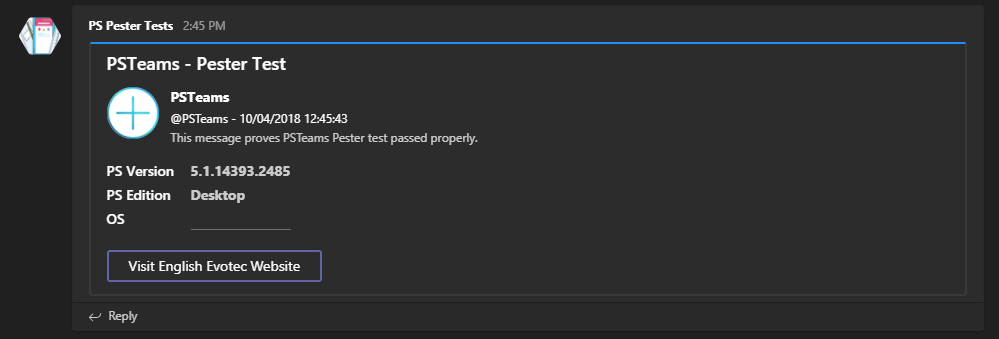
- When executed from Linux
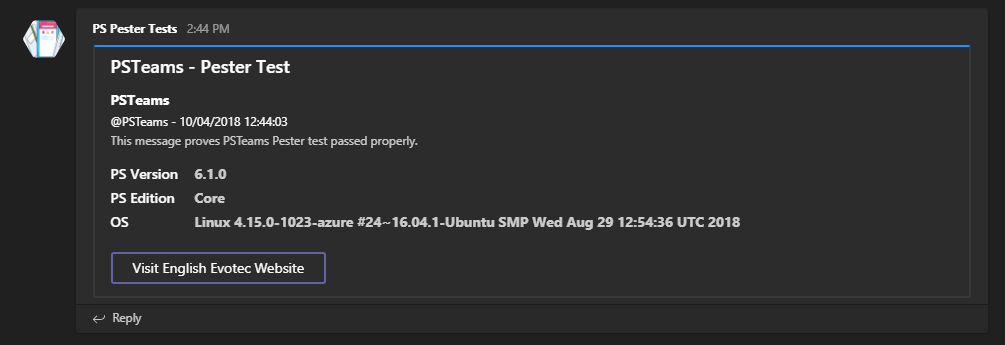
- When executed from Windows
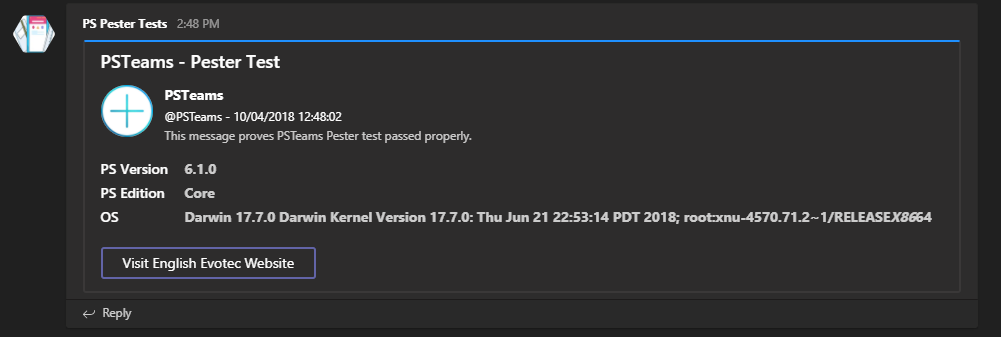
- When executed from MacOS
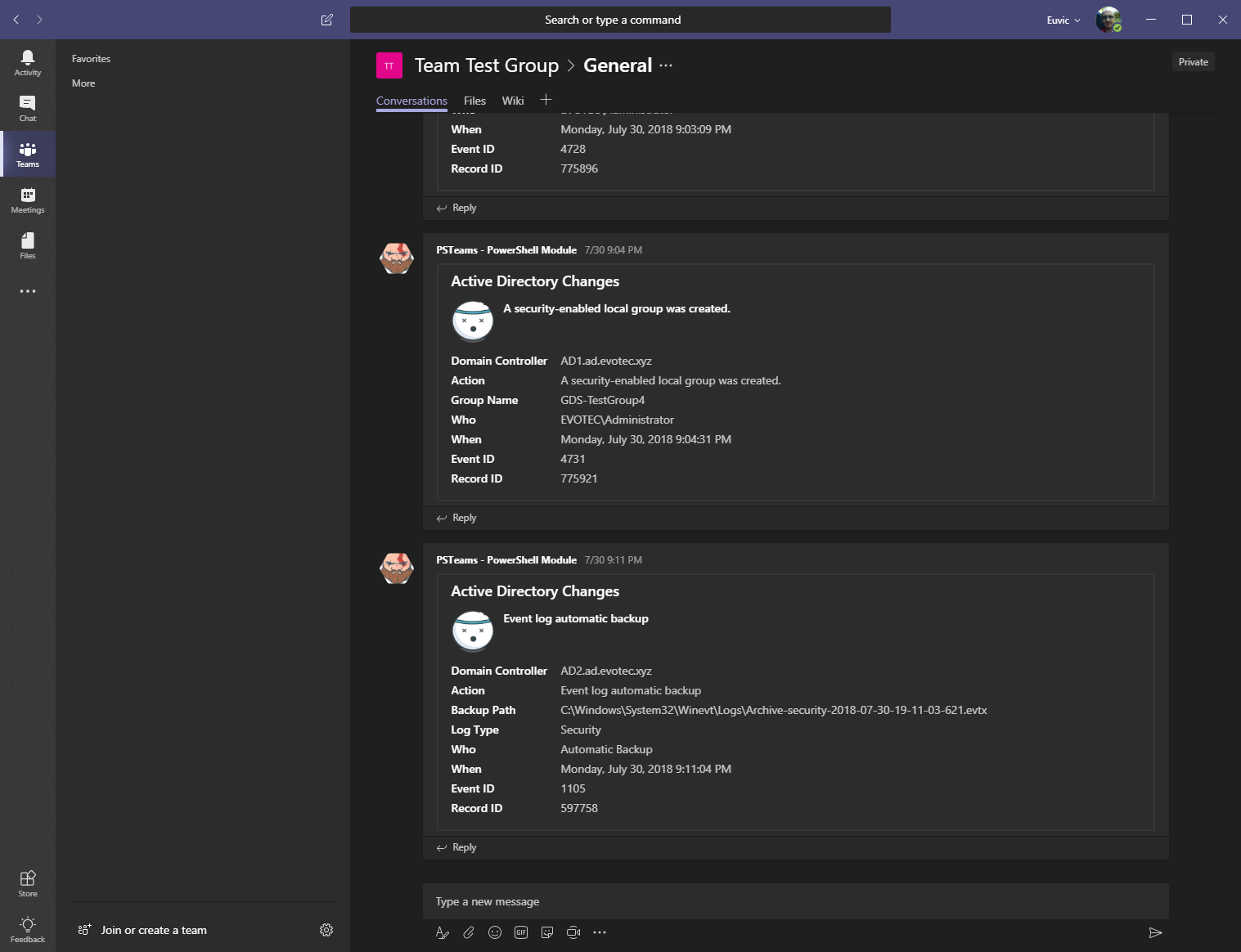
- And this is more advanced option sent by PSWinReporting
Typed Adaptive Cards
The public adaptive surface is binary-backed through TeamsX.PowerShell. Commands such as New-AdaptiveCard, New-AdaptiveContainer, New-AdaptiveColumn, New-AdaptiveColumnSet, New-AdaptiveTable, and the rest of the New-Adaptive* family are cmdlets rather than script functions.
If you prefer the typed surface directly, the New-TeamsAdaptive* cmdlets now expose the richer card and layout options too:
$card = New-TeamsAdaptiveCard `
    -FallbackText 'Build failed' `
    -MinimumHeight 140 `
    -Language 'en' `
    -VerticalContentAlignment center `
    -BackgroundUrl 'https://example.test/background.png' `
    -BackgroundFillMode Cover `
    -AllowImageExpand `
    -FullWidth `
    -Body @(
        New-TeamsAdaptiveContainer `
            -Style Emphasis `
            -Bleed `
            -MinimumHeight 120 `
            -Spacing Medium `
            -Items @(
                New-TeamsAdaptiveColumnSet `
                    -Style Good `
                    -Bleed `
                    -Columns @(
                        New-TeamsAdaptiveColumn -WidthInWeight 2 -Items @(
                            New-TeamsAdaptiveTextBlock -Text 'Pipeline failed' -Weight Bolder -Color Attention
                        )
                        New-TeamsAdaptiveColumn -Width auto -Items @(
                            New-TeamsAdaptiveImage -Url 'https://example.test/status.png' -AltText 'Status'
                        )
                    )
            )
    ) `
    -Actions @(
        New-TeamsAdaptiveOpenUrlAction -Title 'Open build' -Url 'https://example.test/build/42'
        New-TeamsAdaptiveSubmitAction -Title 'Acknowledge'
        New-TeamsAdaptiveShowCardAction -Title 'Details' -Body @(
            New-TeamsAdaptiveTextBlock -Text 'Nested details'
        ) -Actions @(
            New-TeamsAdaptiveSubmitAction -Title 'Confirm'
        )
    )

$message = New-TeamsMessage -Summary 'Build notification' -AdaptiveCard $card
$json = $message | ConvertTo-TeamsJson
Dedicated typed examples live under Examples\MessageCard\MessageCard-Typed.ps1 and Examples\Adaptive Card\AdaptiveCard-TypedActions.ps1.
Typed Wrapper Cards
Typed wrapper-card models are now available as well:
$target = New-TeamsWebhookTarget -Uri 'https://example.test/webhook'
$heroCard = New-TeamsHeroCard -Title 'Seattle Center Monorail' -Images @(
    New-TeamsCardImage -Url 'https://example.test/monorail.jpg' -AlternateText 'Monorail'
) -Buttons @(
    New-CardListButton -Type OpenUrl -Title 'Official website' -Value 'https://example.test'
)

Send-TeamsMessage -HeroCard $heroCard -Target $target

$json = $heroCard | ConvertTo-TeamsJson
$wrapped = $json | Send-TeamsMessageBody -Uri 'https://example.test/webhook' -Wrap -Supress:$false -WhatIf
Typed wrapper-card direct sending currently targets incoming and workflow webhooks. Graph delivery remains limited to typed messages and adaptive-card attachments.
Microsoft Graph Delivery
PSTeams includes a starter Microsoft Graph delivery path in TeamsX, exposed through New-TeamsGraphTarget. This lets the typed Send-TeamsMessage -Message ... -Target ... path post to Teams chats and channels without introducing large SDK dependencies.
For Graph chat or channel delivery, the starter flow looks like this:
$message = New-TeamsMessage -Title 'Build failed' -Text 'Pipeline 42 stopped in the release stage.'
$target = New-TeamsGraphTarget -ChatId '19:testchat@thread.v2' -AccessTokenVariableName 'TEAMSX_GRAPH_TOKEN'

Send-TeamsMessage -Message $message -Target $target
Current Graph scope:
- plain typed messages render to Graph HTML message bodies
- adaptive cards render as Graph attachments
- adaptive-card actions should currently be limited to
Action.OpenUrl - Graph targets can use a plain token, a secure string, or an environment-variable-backed token provider
- normal chat/channel posting should use delegated Microsoft Graph tokens; application permissions on these endpoints are documented as migration-only
Documentation for Message Cards (for development)
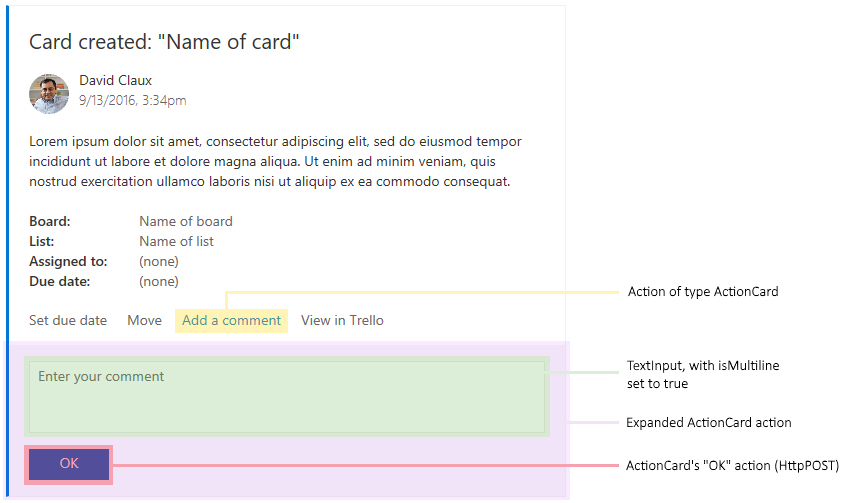
This module uses Message Cards to send information to Teams. You can find out what is supported in Legacy actionable message card reference just in case you would like to help out with development of this module.
Additional links:
- https://docs.microsoft.com/en-us/microsoftteams/platform/concepts/cards/cards-format
- https://docs.microsoft.com/en-us/outlook/actionable-messages/message-card-reference
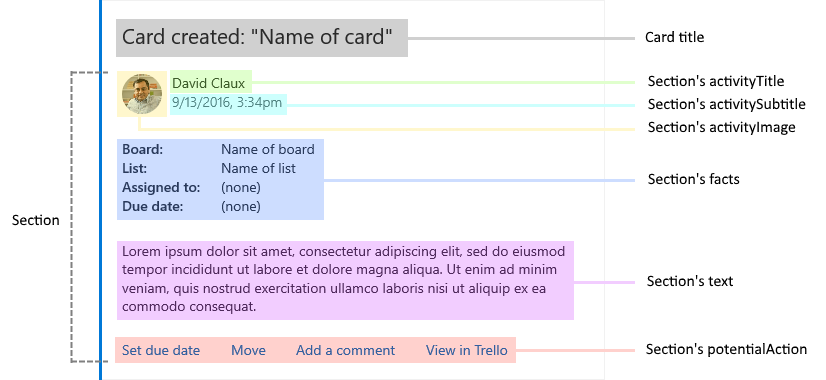
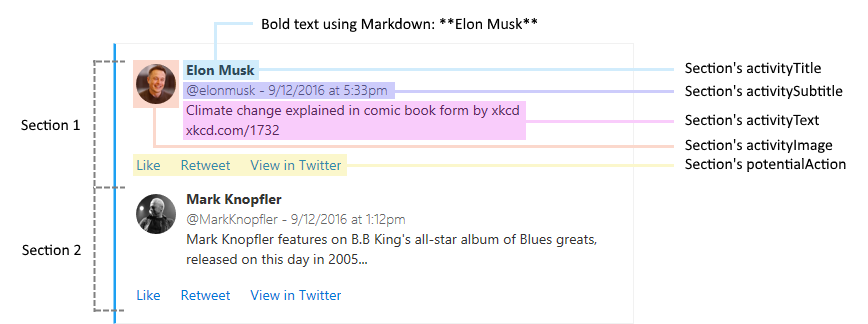
Send-TeamsMessage -Verbose {
    New-TeamsSection -ActivityTitle "**Elon Musk**" -ActivitySubtitle "@elonmusk - 9/12/2016 at 5:33pm" -ActivityImageLink "https://pbs.twimg.com/profile_images/782474226020200448/zDo-gAo0.jpg" -ActivityText "Climate change explained in comic book form by xkcd xkcd.com/1732"
    New-TeamsSection -ActivityTitle "**Mark Knopfler**" -ActivitySubtitle "@MarkKnopfler - 9/12/2016 at 1:12pm" -ActivityImageLink "https://pbs.twimg.com/profile_images/1042367841117384704/YvrqQiBK_400x400.jpg" -ActivityText "Mark Knopfler features on B.B King's all-star album of Blues greats, released on this day in 2005..."
    New-TeamsSection -ActivityTitle "**Elon Musk**" -ActivitySubtitle "@elonmusk - 9/12/2016 at 5:33pm" -ActivityImageLink "https://pbs.twimg.com/profile_images/782474226020200448/zDo-gAo0.jpg" -ActivityText "Climate change explained in comic book form by xkcd xkcd.com/1732"
} -Uri $TeamsID -MessageSummary 'Tweet'