
Unit Test, Testing > bbt
Simple tool to black box check the behavior of an executable through the command line.
bbt README







- Overview
- What does the behavior description look like?
- A small example
- Partial parsing
- Installation
- First use
- Some projects using bbt
- Help and comments
- Further reading
- References
Overview
bbt is a simple tool for black box check the behavior of an executable through the Command Line Interface (CLI).
Hence the name: bbt stands for Black Box Tester.
bbt targets both behavior specification and end-to-end test automation for the very common case of apps taking some input and producing some output.
It enables developers to write and execute comprehensive test scenarios in just a few minutes.
The standout feature of btt is that it directly uses your documentation in plain english.
There is no script or other file to write.
bbt does not care about the type of document: call it Acceptance test, feature or behavior description, test scenario, README file or user guide, that's the same.
bbt makes no distinction between running a scenario in a test file and checking an example in a README, as long as it recognizes a behavior description.
What does the behavior description look like?
Here is a minimal example:
### Scenario: I want to know the gcc version

- When I run `gcc --version`
- Then the output contains `14.2.0`
The behavior is described in almost natural English, using the usual BDD / Gherkin pattern: Given / When / Then.
It's in Markdown [^1], so that the text above render as:
Scenario: I want to know gcc version
- When I run
gcc --version - Then the output contains
14.2.0
bbt being about documentation and simplicity, Markdown is a perfect fit.
A small example
Let's consider a slightly more complete example:
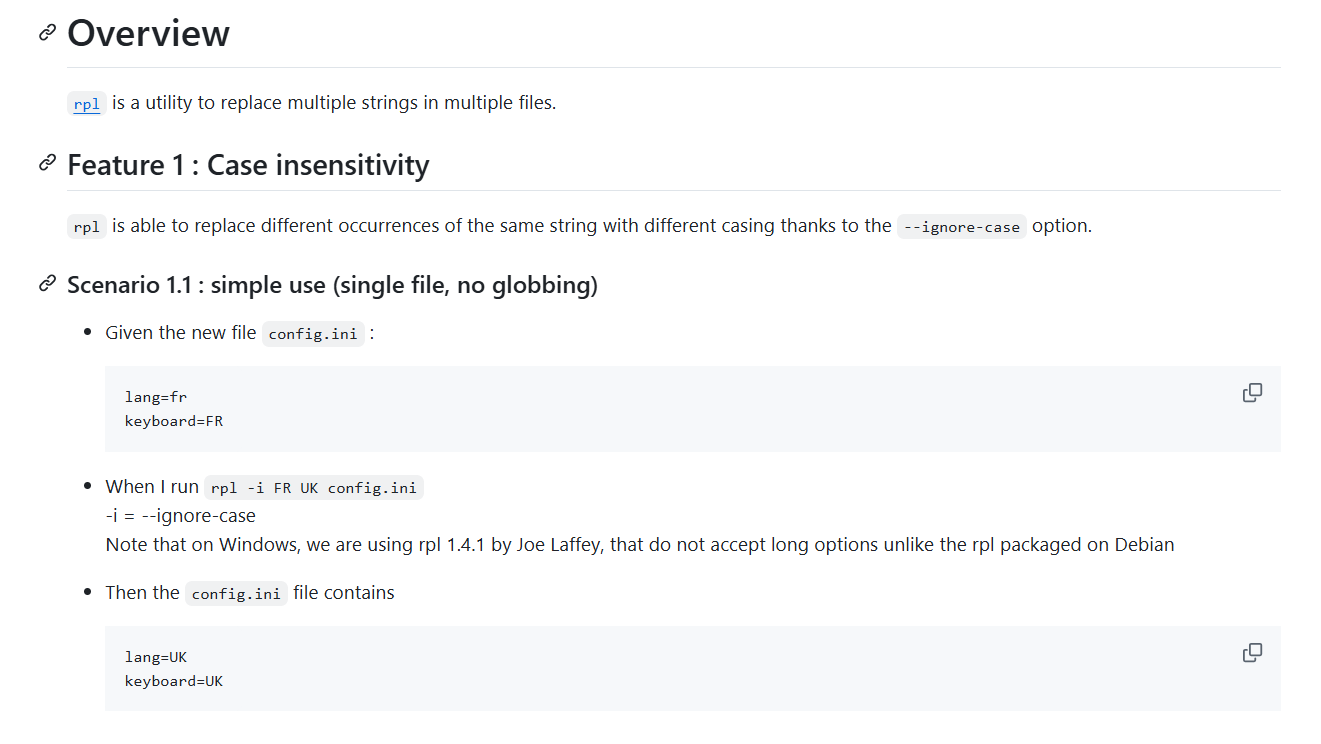
(Markdown source here)
We have:
A Feature and a Scenario header (followed by the feature/scenario name)
bbt processes only headers starting with Gherkin keywords:
- # Features
- # Background
- # Scenario or # Example
In this example, the Overview Header is ignored.
Note also that the header's level doesn't matter (#### Scenario, is equal to # Scenario for bbt), so that you're free to structure the file as you want.Steps
Within Scenarios, bbt reads Steps—that is lines starting with:
- - Given
- - When
- - Then
- - And
- - But
Those lines contains the things to check or do.
Note that the only possible list marker for Steps is-, so that other list markers like '*' or '+' may be used for comments and will be ignored by bbt.Step arguments
Within or after step lines, a Step's argument may be:
- strings for file name, command to run, etc. (for example here
config.ini) - or multiline text for expected output, file content, etc. (for example here the config.ini file content).
As per MDG, strings uses Markdown code span (that is a string between backticks), and multiline text uses fenced code blocks (that is a text between two
```lines).- strings for file name, command to run, etc. (for example here
Everything else in the file is ignored. bbt stays out of your way, so you are free to use Markdown almost without constraints to draft nice documentations.
And in any case, to see what is taken into account by bbt in your file, and what will be checked, just run:
bbt explain my_scenario.md
Partial parsing
A distinctive feature of bbt is that it appears to directly understand those almost natural English sentences like:
- When I run `sut --quiet input.txt`
- Then there is no output
This is achieved using a partial parser. The parser ignores everything that is not relevant to it and only looks for specific keywords to recognize the skeleton of the sentence.
When you write:
- Then I should get
version 15.0.0(Fix #2398 and #2402)
bbt only sees two keywords and a parameter:
- Then
I shouldgetversion 15.0.0(Fix #2398 and #2402)
As a result, the writer enjoys a lot of flexibility and is not constrained by a rigid grammar as with a scripting language, enabling steps to be written in almost natural language.
The complete grammar with examples is available here (also available with the command bbt help grammar).
Installation
btt is available and tested on Linux, Windows and Mac OS.
NB : On old version of Darwin, you may need to set the environment variable GNAT_FILE_NAME_CASE_SENSITIVE to 1 to avoid small glitches on file names, cf. discussion here
Stable version
Install
Install bbt :
alr install bbtThe executable will be in ~/.alire/bin.
Alternatively, you may choose another installation directory with:
alr install --prefix=/path/to/installation bbtEnsure that the installation directory is in your PATH.

Latest version
Building from sources
git clone https://github.com/LionelDraghi/bbt
cd bbt
alr build
AppImage (Linux only)
Download the AppImage here, and:
chmod +x bbt-0.3.0-dev-x86_64.AppImage
ln -s bbt-0.3.0-dev-x86_64.AppImage bbt
(Thanks to @mgrojo and Alr2AppImage).
Note that the project is still under development, and subject to interface and behavior changes, keep an eyes on the changelog before updating.
First use
To get started, you can either draw inspiration from one of the examples, or have bbt generate a sample scenario for you :
bbt help example > my_scen.md
A short but comprehensive tutorial can be generated with
bbt help tutorial
Some projects using bbt
- Kudos to the first adopter, Raffle, an Ada compiler with a LLVM backend (not yet public) by Paul Jarret
- CoAP-SPARK, by Manuel Gomez
- ada-caser, by Simon Wright
- GRBL Parser, by Rolf Ebert
Help and comments
- Comments your features suggestions are welcomed in bbt discussions;
- new features are added regularly: latest updates can be found in the Changelog;
Further reading
- A very short intro to the genesis of the project: My dream way of testing.
- How to get off to a good start with the README and bbt: Giving README-Driven Development Superpowers with bbt
References
User Guide: concepts, commands, features...
References: syntax, grammar, and more details on non obvious behavior
Project status: changelog, tests, TDL...
Developer Guide: design overview, issues, fixme...
[^1]: More precisely, bbt complies (mostly) with Markdown with Gherkin (MDG), a convention to embed Gherkin scenarios in GitHub Flavored Markdown files.