
Utility > Jctx
Reads a Java project and generates a structured context file so AI tools can understand and help plan the codebase.
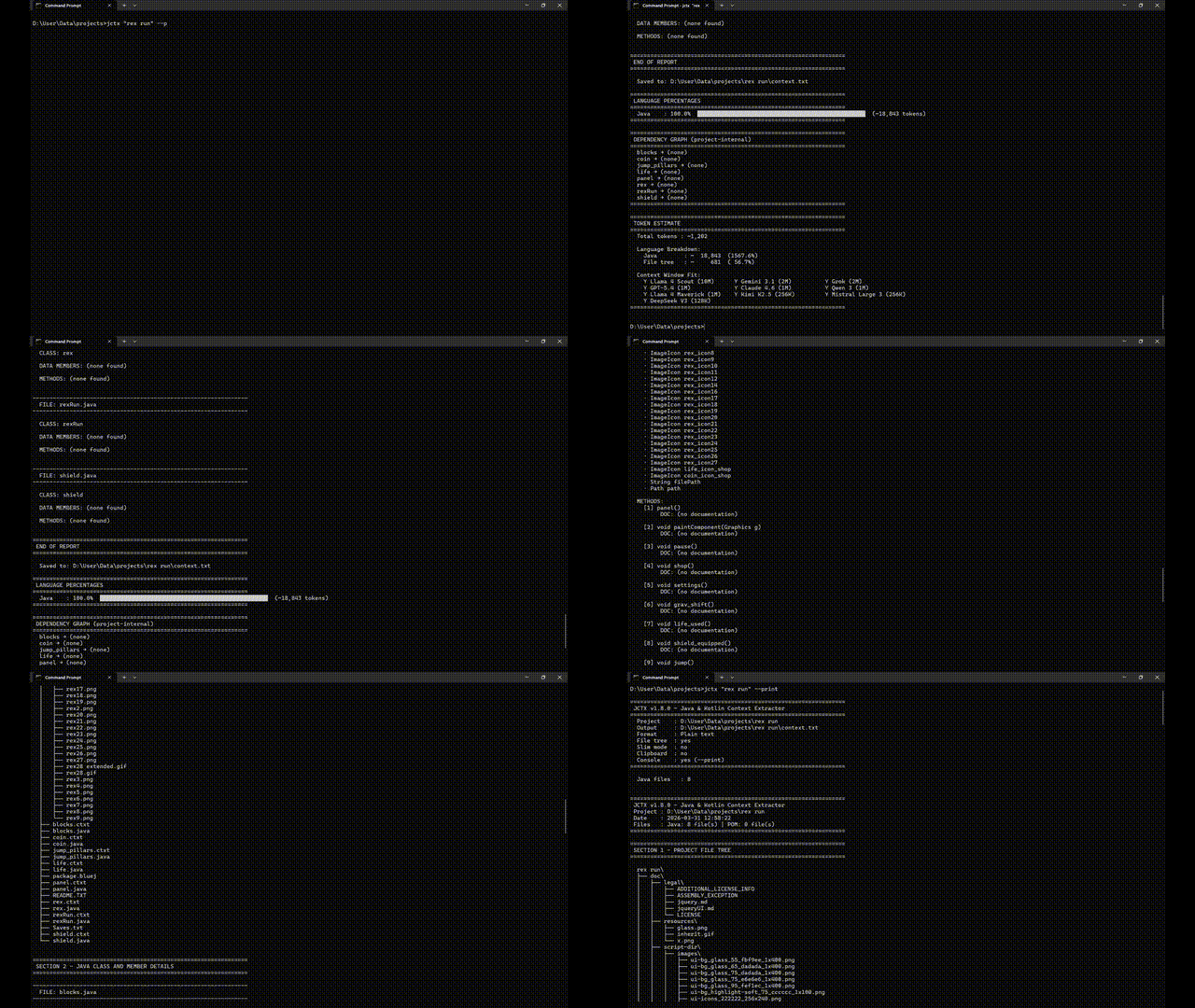
Jctx — Give AI full understanding of your Java, Kotlin & Python codebase
Stop pasting files. Get real architecture-aware answers.
Generate complete project context in seconds.
Turn any Java, Kotlin, or Python project into a single AI-ready context.txt (or context.md) in seconds.
Jctx "C:\projects\MyApp"
→  context.txt written  (Java: 39 files | Kotlin: 12 files | Python: 15 files | POM: 1 file | Gradle: 1 file)
No config. No dependencies. Just Python and a folder.
Why it exists
You're working on a Java, Kotlin, or Python project. You open an AI chat to get help. Before you can even ask your question, you spend 10 minutes copy-pasting files, explaining your class structure, summarising what each module does.
Before: ChatGPT suggests random classes
After: ChatGPT tells exactly which class to modify and why
Jctx does all of that in one command.
It scans your project and writes a clean, structured context.txt (or context.md) — every class, every field, every method signature, every Javadoc/KDoc/docstring comment, and your build files — formatted so an AI can immediately understand your entire codebase.
It also provides Token Count Estimation, Language Percentages, and a Dependency Graph — all printed to your console automatically.
Paste it. Ask your question. Get useful answers.
Output (real example)
Click to expand sample context.txt (Plain Text - Default)
================================================================
 JCTX v2.1.0 - Java, Kotlin & Python Context Extractor
 Project : C:\projects\Talken
 Date    : 2026-03-31 12:00:00
 Files   : Java: 39 file(s) | Kotlin: 5 file(s) | Python: 2 file(s) | POM: 1 file(s) | Gradle: 1 file(s)
================================================================

================================================================
 SECTION 1 - PROJECT FILE TREE
================================================================

  Talken\
  ├── src\
  │   └── main\
  │       ├── java\
  │       │   └── org\
  │       │       └── flexstudios\
  │       │           └── talken\
  │       │               ├── Controls.java
  │       │               └── TalkenClient.java
  │       └── kotlin\
  │           └── org\
  │               └── flexstudios\
  │                   └── talken\
  │                       └── UserProfile.kt
  ├── build.gradle
  └── pom.xml

================================================================
 SECTION 2 - POM.XML CONTENT
================================================================

----------------------------------------------------------------
  FILE: pom.xml
----------------------------------------------------------------

  <?xml version="1.0" encoding="UTF-8"?>
  <project>
      <modelVersion>4.0.0</modelVersion>
      <groupId>org.flexstudios</groupId>
      <artifactId>talken</artifactId>
      <version>1.0.0</version>
  </project>

================================================================
 SECTION 3 - KOTLIN CLASS AND MEMBER DETAILS
================================================================

----------------------------------------------------------------
  FILE: src\main\kotlin\org\flexstudios\talken\UserProfile.kt
----------------------------------------------------------------

  CLASS: UserProfile
  DOC  : Represents the user's local profile settings.

  DATA MEMBERS:
    · private val String displayName
    · private val String email

  METHODS:
    [1] String getAboutSection()
         DOC: (no documentation)

================================================================
 END OF REPORT
================================================================
Install
Option 1: PyPI (Recommended) The easiest way to install Jctx on any OS (Windows, macOS, Linux) is via pip:
pip install jctx
The jctx command will be instantly available in your terminal.
Option 2: Manual Download (Windows)
- Download The Latest Release Zip.
- Unzip it
- Right-click
Setup.bat→ Run as administrator - Open a new terminal
jctx "C:\path\to\your\java\project"
No admin rights? Copy
jctx.py+jctx.batanywhere and runjctx.batdirectly.
Not on Windows? Run
python jctx.py "path/to/project"on any OS with Python 3.8+.
Usage
Jctx <project_folder> [--md] [--slim] [--no-tree] [--clipboard] [--print] [--version] [--help]
| Flag | Effect |
|---|---|
| (none) | Saves context.txt into your project folder and prints token estimates |
--md |
Outputs a cleanly formatted Markdown file (context.md) instead of plain text |
--slim |
Slim mode: output only class names and method signatures (omits fields and docs) to save tokens |
--no-tree |
Skips the file tree section (shorter output) |
--clipboard |
Copies the generated report directly to your clipboard |
--print |
Also prints to the console |
--version |
Shows the Jctx version |
--help |
Shows help |
How to use the output
Paste context.txt (or the contents of context.md) into any AI chat and ask your question:
"Here's my Java/Kotlin/Python project structure: [paste]. I want to refactor the messaging module to use WebSockets — where should I start?"
Works great with Claude, ChatGPT, Gemini, and any other AI that accepts long text input.
Console Metrics
After generating the file, Jctx prints a full analytics dashboard to your console:
Language Percentages
Shows the exact split of Java vs Kotlin vs Python code by lines of code:
================================================================
 LANGUAGE PERCENTAGES
================================================================
  Java    :  60.2%  ██████████████████████████████░░░░░░░░░░░░░░░░░░░░  (4,120 lines)
  Kotlin  :  28.1%  ██████████████░░░░░░░░░░░░░░░░░░░░░░░░░░░░░░░░░░░░  (1,920 lines)
  Python  :  11.7%  █████░░░░░░░░░░░░░░░░░░░░░░░░░░░░░░░░░░░░░░░░░░░░░  (800 lines)
================================================================
Dependency Graph
Automatically maps which of your project classes depend on which — scans both import statements and in-body type references (catches same-package dependencies too). Only shows project-internal references, no external library noise:
================================================================
 DEPENDENCY GRAPH (project-internal)
================================================================
  EncryptionModule → (none)
  MessagingModule → EncryptionModule, UserProfile
  TalkenClient → EncryptionModule, MessagingModule, UserProfile
  UserProfile → (none)
================================================================
Token Count Estimate
Shows the total token count with a breakdown by section and checks whether your context fits each major AI model's context window:
================================================================
 TOKEN ESTIMATE
================================================================
  Total tokens : ~34,767

  Language Breakdown:
    Java        : ~  23,400  ( 59.3%)
    Kotlin      : ~  10,910  ( 27.6%)
    Python      : ~   4,560  ( 11.6%)
    Build files : ~     290  (  0.7%)
    File tree   : ~     312  (  0.8%)

  Context Window Fit:
    Y Llama 4 Scout (10M)      Y Gemini 3.1 (2M)          Y Grok (2M)
    Y GPT-5.4 (1M)             Y Claude 4.6 (1M)          Y Qwen 3 (1M)
================================================================
.jctxignore — Custom Exclusions
Place a .jctxignore file in the project root to exclude additional directories or files from context extraction:
# Skip test directories
**/test/**

# Skip generated code
generated/

# Skip specific file patterns
*.test.java
| Pattern | Meaning |
|---|---|
dirname/ |
Skip any directory named dirname |
**/test/** |
Skip any directory named test anywhere in the tree |
*.test.java |
Skip files matching the glob pattern |
# comment |
Lines starting with # are ignored |
When a .jctxignore is detected, the console banner shows:
.jctxignore: yes (2 dirs, 1 patterns)
What it extracts
| What | Detail |
|---|---|
| File tree | Full project structure, build folders excluded |
| Build Files | Full content of your pom.xml, build.gradle, requirements.txt, and pyproject.toml |
| Classes | Java/Kotlin classes and interfaces, Python classes, plus all docstrings/JavaDocs/KDocs |
| Fields | Type, name, access modifier, val/var (Kotlin), instance vars (self.x), inline comments |
| Methods | Numbered list — return type, name, params, decorators, top-level Python/Kotlin functions |
Auto-ignored: build/, target/, .idea/, .git/, node_modules/, .gradle/, .class, .jar, and all other build artifacts. Customize further with .jctxignore.
Requirements
- Python 3.8 or newer — python.org
- Works on Windows, macOS, Linux
GitHub Actions — Automatic Context Reports
Jctx ships with a ready-made GitHub Actions workflow that automatically generates a context report on every push or pull request, saving you from running the tool manually.
What the workflow does
- Checks out your repository.
- Installs Jctx from PyPI (with pip caching so repeated runs are fast).
- Runs
jctxon your project and prints the analytics dashboard to the Actions log. - Uploads the generated
context.md(orcontext.txt) as a downloadable workflow artifact (retained for 30 days). - Comments a preview of the report on the pull request (when triggered by
pull_request). Subsequent pushes to the same PR update the existing comment instead of creating a new one. - Optionally commits the report back to the repository (disabled by default; see configuration below).
Quick start — copy the workflow into your own repository
# From the root of your repository:
mkdir -p .github/workflows
curl -o .github/workflows/jctx-context-report.yml \
  https://raw.githubusercontent.com/Shashwat-Gupta57/Jctx/main/.github/workflows/jctx-context-report.yml
Then commit and push. The workflow will run on your next push.
Configuration
All options are controlled via repository variables (Settings → Secrets and variables → Variables → New repository variable). No workflow file edits are needed.
| Variable | Default | Description |
|---|---|---|
JCTX_PROJECT_PATH |
. |
Path to the project folder to analyse, relative to the repo root. Example: ./my-java-app |
JCTX_OUTPUT_FORMAT |
md |
Output format: md (Markdown) or txt (plain text). |
JCTX_SLIM_MODE |
false |
Set to true to use slim mode (class names + method signatures only). |
JCTX_NO_TREE |
false |
Set to true to omit the file-tree section. |
JCTX_COMMIT_REPORT |
false |
Set to true to automatically commit the report back to the repo (see below). |
JCTX_COMMIT_PATH |
docs/context-report |
Folder where the committed report is stored (only used when JCTX_COMMIT_REPORT=true). |
Committing the report back to the repository
To enable automatic commits of the generated report:
- Set the repository variable
JCTX_COMMIT_REPORTtotrue. - Add
contents: writeto the workflow permissions (edit thepermissions:block in the workflow file):
permissions:
  contents: write        # needed to commit the report
  pull-requests: write   # needed for PR comments
The commit message is chore: update Jctx context report [skip ci] (the [skip ci] tag prevents the commit from triggering another workflow run).
Required permissions
| Feature | Permission needed |
|---|---|
| Artifact upload | (none — included by default) |
| PR comment | pull-requests: write (already set in the workflow) |
| Commit report | contents: write (must be added manually if you enable JCTX_COMMIT_REPORT) |
Using the reusable composite action
If you prefer a more modular approach, use the composite action directly in your own workflow:
jobs:
  context:
    runs-on: ubuntu-latest
    steps:
      - uses: actions/checkout@v4

      - name: Generate Jctx context report
        id: jctx
        uses: Shashwat-Gupta57/Jctx/.github/actions/generate-context@main
        with:
          project-path: '.'        # folder to analyse
          output-format: 'md'      # 'md' or 'txt'
          slim: 'false'            # 'true' for slim mode
          no-tree: 'false'         # 'true' to skip file tree
          # jctx-version: '2.1.0' # pin a specific version (optional)

      - name: Upload report
        uses: actions/upload-artifact@v4
        with:
          name: context-report
          path: ${{ steps.jctx.outputs.report-path }}
Action inputs
| Input | Default | Description |
|---|---|---|
project-path |
. |
Project folder to analyse. |
output-format |
md |
md or txt. |
slim |
false |
Slim mode (class names + signatures only). |
no-tree |
false |
Omit file-tree section. |
jctx-version |
(latest) | Pin a specific PyPI version of jctx. |
Action outputs
| Output | Description |
|---|---|
report-path |
Path to the generated report file inside the runner workspace. |
More GitHub Actions ideas
Here are additional ways to integrate Jctx (and GitHub Actions in general) to make your workflow even more powerful:
| Idea | How |
|---|---|
| Scheduled context snapshots | Add a schedule trigger (see example below the table) to generate a weekly context report automatically. |
| Publish to GitHub Pages | Use actions/deploy-pages to host the latest context.md as a browsable site for the project. |
| Generate a changelog | Combine Jctx with tools like git-cliff or release-drafter to auto-create changelogs on release. |
| Release automation | Trigger a release workflow on version-tag pushes (v*) that publishes to PyPI or GitHub Releases and attaches the context report as a release asset. |
| PR labeling | Use actions/labeler to automatically label PRs based on which files changed (e.g., java, kotlin, python). |
| Security scanning | Add github/codeql-action to scan your Java/Kotlin/Python source files for vulnerabilities on every push. |
| Dependency review | Use actions/dependency-review-action on PRs to catch newly introduced vulnerable dependencies. |
| Issue/PR templates validation | Enforce PR descriptions with a custom action that checks the PR body against a template. |
| Stale issue management | Use actions/stale to automatically close issues and PRs that have been inactive for a configurable number of days. |
| Notify on Slack/Discord | Send a webhook notification with a link to the generated context report artifact after each run. |
| Matrix builds | Run Jctx across multiple project sub-folders in a single workflow using a matrix strategy. |
Example — weekly scheduled run (add to the on: block of the workflow):
on:
  schedule:
    - cron: '0 0 * * 1'   # every Monday at midnight UTC
  push:
    branches: ['**']
  workflow_dispatch:
Roadmap
- Kotlin support
- Markdown output mode (
context.md) - Multi-language project estimations (mixed Java + Kotlin percentages)
- Token count estimate alongside output
- Clipboard support and Slim mode
- Dependency graph (project-internal)
-
.jctxignorecustom exclusions - Cross-platform packaging (PyPI / pip)
- Python language support
- Architecture diagram generation (
--diagram)
License
MIT — free to use, modify, and share.