
Code Quality > eslint-plugin-ai-guard
Detects bugs and security issues commonly introduced by AI-generated code (async misuse, empty catch, auth gaps, SQL concat, secrets).
eslint-plugin-ai-guard
🛡️ ESLint plugin that catches the code patterns AI tools get wrong most often.




AI-generated code has 1.7× more issues and 2.74× more security vulnerabilities than human code (CodeRabbit 2025). Existing linters catch human mistakes — ai-guard catches the patterns AI tools consistently get wrong: empty catch blocks, floating promises, async array misuse, and more.
Install
npm install --save-dev eslint-plugin-ai-guard
🚀 Quick Start – CLI (no config needed)
npx ai-guard run          # recommended preset (lowest noise)
npx ai-guard run --strict
npx ai-guard run --security
npx ai-guard init         # auto-creates ESLint config for you
npx ai-guard init --dry-run
npx ai-guard doctor       # diagnoses setup issues
npx ai-guard baseline     # track only *new* issues going forward
That's it. Zero configuration required.
🤖 Set Up AI Agent Rules
Generate instruction files so Claude Code, Cursor, and GitHub Copilot automatically avoid the 17 most common AI-generated anti-patterns:
npx ai-guard init-context
Follow the prompts to select your agent(s). Or generate all at once:
npx ai-guard init-context --all
This writes:
CLAUDE.md— read automatically by Claude Code.cursorrules— read automatically by Cursor.github/copilot-instructions.md— read automatically by GitHub Copilot
Your AI tools will now avoid these patterns before you even run the linter.
Use --force to regenerate after upgrading to a new version with new rules.
🧪 Real-World Usage Philosophy
ai-guard is designed for production adoption in existing codebases:
- Recommended preset is intentionally low-noise to avoid overwhelming teams on day one.
- Strict preset enables full enforcement for mature teams that want maximum coverage.
- Security preset focuses only on security rules with critical issues as errors.
🛠️ Safe Autofix Support
ai-guard now includes safe autofixers for selected high-confidence rules:
ai-guard/no-empty-catch→ inserts{ /* TODO: handle error */ }ai-guard/no-await-in-loop→ rewrites simple independent loops toawait Promise.all(...)ai-guard/no-hardcoded-secret→ replaces hardcoded literals withprocess.env.*ai-guard/no-floating-promise→ marks intentional fire-and-forget withvoidai-guard/no-async-without-await→ insertsawait (...)for simple function bodies
These fixes are intentionally conservative and avoid complex transformations when confidence is low.
🎬 Real Workspace Demo
See how ai-guard catches a common AI-generated async bug that silent failures in production:
// ❌ BAD: AI often forgets to await or wrap in Promise.all
const userIds = [1, 2, 3];
userIds.map(async (id) => {
  return await fetchUser(id);
});
// ⚠️ ai-guard flags: Async callback passed to Array.map(). Returns Promise[], not values.

// ✅ GOOD: ai-guard recommended fix
const users = await Promise.all(userIds.map(async (id) => {
  return await fetchUser(id);
}));
// ✨ ai-guard: No issues found.
Terminal Output
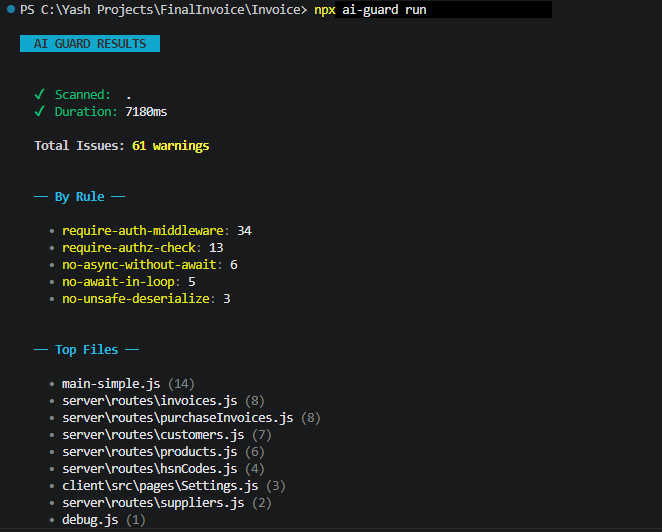
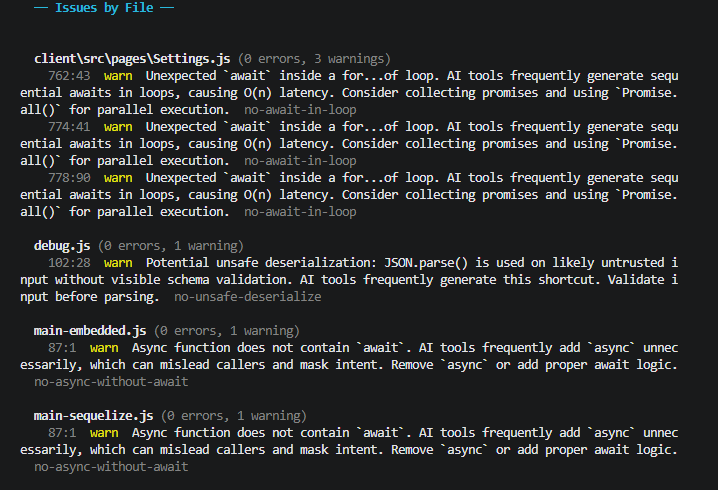
The terminal output above shows ai-guard catching multiple AI-generated anti-patterns in a single run.
Rules (Recommended Preset)
🎯 Error Handling
ai-guard/no-empty-catch(Error) Disallow empty catch blocks. Includes safe autofix that inserts an explicit placeholder handler comment.ai-guard/no-broad-exception(Warn) Disallow catchinganyorunknownwithout instance narrowing. AI tools default tocatch (e: any)which obscures the underlying failure.ai-guard/no-catch-log-rethrow(Off inrecommended, Error instrict) Disallow catch blocks that only log and rethrow the same error. AI tools often generate this noisy pattern without adding recovery or context.ai-guard/no-catch-without-use(Off inrecommended, Error instrict) Disallow unused catch parameters. AI tools frequently addcatch (e)while ignoring the error object entirely.ai-guard/no-duplicate-logic-block(Off inrecommended, Error instrict) Disallow consecutive duplicated logic blocks. AI tools often copy-paste identical code that should be consolidated.
⏱️ Async Stability
ai-guard/no-async-array-callback(Warn) Disallow async functions in.map(),.filter(), etc. AI tools frequently suggestarray.map(async ...)expecting resolved values, creating silent bugs.ai-guard/no-floating-promise(Error) Require awaiting or handling promises. Includes safe autofix that marks floating calls withvoid.ai-guard/no-await-in-loop(Warn) Disallow independent sequentialawaitinside loops. Intent-aware suppression protects retry/fallback loops, and safe autofix is available for simple independent cases.ai-guard/no-async-without-await(Warn) Disallow async functions that do not useawait. Includes safe autofix for simple bodies by inserting explicit await.ai-guard/no-redundant-await(Off inrecommended, Error instrict) Disallow redundantreturn awaitoutside try/catch/finally. AI tools often emit this pattern even when returning the Promise directly is equivalent.
🛡️ Security
ai-guard/no-hardcoded-secret(Error) Disallow hardcoded keys/passwords. Includes safe autofix that rewrites values toprocess.env.*.ai-guard/no-eval-dynamic(Error) Disallow dynamiceval()ornew Function().ai-guard/no-sql-string-concat(Warn inrecommended, Error insecurity/strict) Disallow variable concatenation/interpolation in SQL queries. Now context-aware for known query builders (Knex, Drizzle, Prisma, Kysely, Sequelize, TypeORM, Mikro-ORM) to reduce false positives while staying strict for non-builder sinks.ai-guard/no-unsafe-deserialize(Warn inrecommended/security, Error instrict) DisallowJSON.parse()on likely untrusted inputs (likereq.body) without visible validation.ai-guard/require-auth-middleware(Warn) Enforce authentication middleware on Express/Fastify routes. AI tools frequently generate unprotected endpoints exposing sensitive data.ai-guard/require-authz-check(Warn inrecommended/security, Error instrict) Require visible ownership/authorization checks when handlers access resource identifiers (likereq.params.id).
🧹 Code Quality
ai-guard/no-console-in-handler(Off inrecommended, Error instrict) Disallowconsole.*inside HTTP route handlers. AI tools often leave debug logs in handlers that leak internals and pollute production logs.
Configs
| Config | Description |
|---|---|
recommended |
Adoption-first preset: high-confidence issues as error, context-sensitive rules as warn/off |
strict |
All rules at error — for teams that want maximum coverage |
security |
Security-only rules: critical issues at error, contextual checks at warn |
Config Examples
Flat Config: strict
import aiGuard from "eslint-plugin-ai-guard";

export default [
  {
    plugins: { "ai-guard": aiGuard },
    rules: { ...aiGuard.configs.strict.rules }
  }
];
Flat Config: security
import aiGuard from "eslint-plugin-ai-guard";

export default [
  {
    plugins: { "ai-guard": aiGuard },
    rules: { ...aiGuard.configs.security.rules }
  }
];
Why This Exists
AI coding assistants generate code that looks correct but has subtle structural issues:
- 🕳️ Empty catch blocks — errors vanish silently
- ⏳
array.map(async ...)— returnsPromise[], not resolved values - 🔥 Floating promises —
fetchData()withoutawait= silent failures
These patterns pass TypeScript and existing linters. ai-guard catches them.
Supported Environments
- ESLint 8.x and 9.x (flat config)
- Node.js ≥ 18
- TypeScript and JavaScript
Development
git clone https://github.com/YashJadhav21/eslint-plugin-ai-guard.git
cd eslint-plugin-ai-guard
npm install
npm run test        # Run test suite
npm run build       # Build CJS + ESM
npm run typecheck   # TypeScript check
Contributing
Contributions are welcome! Please see CONTRIBUTING.md for guidelines.
Rule requests: Open an issue using the Rule Request template.
False positive reports: Open an issue using the False Positive template — we take zero false positives seriously.
License
MIT — free forever. No rules behind a paywall.
Built to make AI-assisted development safer. ⚡