
Zenburn
(dark) Vim's "Zenburn theme" ported to Emacs.
zenburn-theme for Emacs


About
Zenburn for Emacs is a direct port of the popular Zenburn theme for vim, developed by Jani Nurminen. It's my personal belief (and that of its many users I presume) that it's one of the best low contrast color themes out there and that it is exceptionally easy on the eyes.
This theme uses the "new"[^1] built-in theming support available starting with Emacs 24.1.
[^1]: It used to be new in 2010 when I created this package.


You can support the development of Zenburn for Emacs via GitHub Sponsors, ko-fi, PayPal and Patreon.
Installation
Manual
Download zenburn-theme.el to the directory ~/.emacs.d/themes/. Add this to your
.emacs (or init.el):
(add-to-list 'custom-theme-load-path "~/.emacs.d/themes/")
Now you can load the theme with the interactive function load-theme like this:
M-x load-theme RET zenburn
Package.el
Zenburn is available in NonGNU ELPA, MELPA Stable and MELPA.
You can install zenburn with the following command:
M-x package-install zenburn-theme
To load it automatically on Emacs startup add this to your init file:
(load-theme 'zenburn t)
If you prefer to use use-package just add the following:
(use-package zenburn-theme
  :config
  (load-theme 'zenburn t))
Emacs Prelude
Zenburn for Emacs is already bundled into
Emacs Prelude. If you're a
Prelude user - you're probably already using Zenburn, since it's
Prelude's default color theme. You can load Zenburn at any time by
M-x load-theme zenburn.
Debian and Ubuntu
Users of Debian 9 or later or Ubuntu 16.10 or later may simply
apt-get install elpa-zenburn-theme.
Customization
Custom faces
If you want to change some faces you can do it
with custom-theme-set-faces or use-package. Here's an example:
(use-package zenburn-theme
  :preface
  (setq my/zenburn-colors-alist
        '((fg . "#DCDCCC") (bg . "#1C1C1C") (cyan . "#93E0E3")))
  :custom-face
  (region ((t (:background ,(alist-get my/zenburn-colors-alist 'cyan)))))
  :config
  (load-theme 'zenburn t))
See this article for more details.
Custom colors
If you'd like to tweak the theme by changing just a few colors, you can
do so by defining new values in the zenburn-override-colors-alist
variable before loading the theme.
For example, to customize just the lighter background colors, you could add to your init file:
(setq zenburn-override-colors-alist
      '(("zenburn-bg+05" . "#282828")
        ("zenburn-bg+1"  . "#2F2F2F")
        ("zenburn-bg+2"  . "#3F3F3F")
        ("zenburn-bg+3"  . "#4F4F4F")))
(load-theme 'zenburn t)
To see the full list of color names you can override, consult the
zenburn-theme.el source file.
Scaled headings
The theme supports scaling the font size for some headings and titles as well
as using a variable-pitch font for those. To enable this, use the following
settings before loading zenburn-theme:
;; use variable-pitch fonts for some headings and titles
(setq zenburn-use-variable-pitch t)

;; scale headings in org-mode
(setq zenburn-scale-org-headlines t)

;; scale headings in outline-mode
(setq zenburn-scale-outline-headlines t)
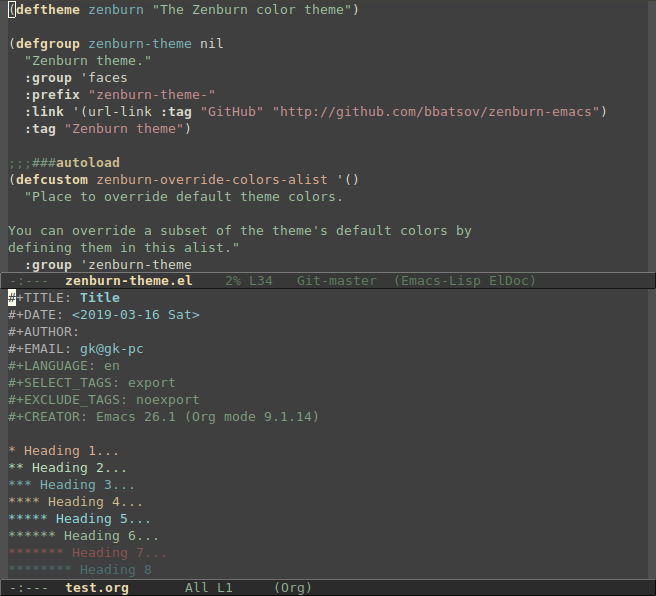
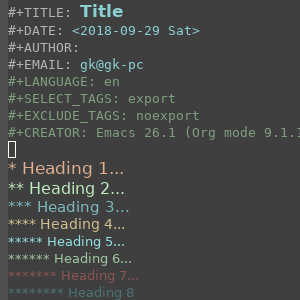
The screenshot above shows the default setting with no scaled or variable-pitch fonts. With scaled headings and variable-pitch fonts it looks like this:
FAQ
Wrong colors in the terminal Emacs version
If your Emacs looks considerably uglier in a terminal (compared to the
GUI version) try adding this to your .bashrc or .zshrc:
export TERM=xterm-256color
Source the .bashrc (or .zshrc) file and start Emacs again.
Bugs & Improvements
Please, report any problems that you find on the project's integrated issue tracker. If you've added some improvements and you want them included upstream don't hesitate to send me a patch or even better - a GitHub pull request. These contributors have done so.
Donate
You can support my work on Zenburn and all my other OSS projects via the following platforms:
Contributors
Here's a list of all the people who have contributed to the development of Zenburn for Emacs.
Changelog
A fairly extensive changelog is available here.
License
Copyright © 2010-2026 Bozhidar Batsov and contributors.
Distributed under the GNU General Public License, version 3