
Stepper > micropython-rp2-smartStepper
RP2040/RP2350 library using PIO and DMA to control a stepper motor.
smartStepper — MicroPython stepper motor library for RP2040
A MicroPython library for smooth, non-blocking stepper motor control on the Raspberry Pi Pico (RP2040) and Pico2 (RP2350). Uses PIO state machines and DMA for precise, CPU-independent pulse generation and position counting.
Features
- Non-blocking absolute and relative moves (
moveTo) - Non-blocking continuous jog (
jog) with configurable speed - Async homing with configurable sensor polarity; handles pre-asserted sensor (
homing.py) - Smooth acceleration and deceleration (4 curves: linear, smooth1, smooth2/smootherstep, sine — see Acceleration curves)
- Graceful stop with deceleration, or emergency hard stop
- Dynamic parameter adjustment (speed, acceleration) mid-move with automatic motion replan
- NOTE: re-plan currently suffers from a ~50ms gap; I'm still thinking about how to do this better.
- Position tracking via PIO pulse counter
- Active-low enable pin support (auto-enabled on move start)
- Move timeout with automatic emergency stop
- Up to 4 simultaneous stepper instances (limited by RP2040 PIO state machines)
- Multi-axis synchronized motion (
Axis+MultiAxis): hardware-simultaneous DMA start via a single register write
Installation
On the Pico (via mip)
From the MicroPython REPL:
import mip
mip.install("github:bikeNomad/micropython-rp2-smartStepper")
Or from the host via mpremote:
mpremote mip install github:bikeNomad/micropython-rp2-smartStepper
This installs the smartstepper package into /lib/smartstepper/ on the Pico.
Host-side test tools
pip install -e .
This installs logic2-automation and mpremote, which are required to run the HIL test suite (tests/test_hil.py).
Files
Library files are in smartstepper/ (installed as a package on the Pico):
| File | Description |
|---|---|
smartstepper/__init__.py |
Package entry point; re-exports SmartStepper, SmartStepperError, Axis, AxisError, MultiAxis, Arc, ArcError |
smartstepper/smartStepper.py |
High-level SmartStepper class |
smartstepper/axis.py |
Axis wrapper with hard speed/acceleration limits; supports deferred DMA start |
smartstepper/multiaxis.py |
MultiAxis synchronized multi-axis planner |
smartstepper/arc.py |
Arc 2-axis circular arc motion (chord linearization; G02/G03 compatible) |
smartstepper/homing.py |
Async homing routine (three-phase, handles pre-asserted sensor) |
smartstepper/pulseGenerator.py |
PIO + DMA pulse generator (internal) |
smartstepper/pulseCounter.py |
PIO-based pulse counter for position tracking (internal) |
package.json |
MicroPython mip package descriptor |
pyproject.toml |
Host-side test tool dependencies (pip install -e .) |
Test scripts are in tests/:
| File | Description |
|---|---|
tests/test_config.py |
Pin assignments for all Pico-side test scripts |
tests/test_smartStepper.py |
Manual test / demo for SmartStepper |
tests/test_pulseGenerator.py |
Manual test / demo for PulseGenerator |
tests/test_pulseCounter.py |
Manual test / demo for PulseCounter |
tests/hil_moveto.py |
Pico-side script used by the HIL test suite |
tests/hil_config.py |
HIL wiring / port configuration |
tests/test_hil.py |
Host-side hardware-in-the-loop test runner |
Testing
Manual tests (run on the Pico)
Each module has a standalone demo script. Deploy the library and the test script, then run it:
PORT=/dev/cu.usbmodem1

# SmartStepper demo
mpremote connect $PORT cp -r smartstepper/ : + cp tests/test_config.py tests/test_smartStepper.py :
mpremote connect $PORT run tests/test_smartStepper.py

# PulseGenerator demo
mpremote connect $PORT cp -r smartstepper/ : + cp tests/test_config.py tests/test_pulseGenerator.py :
mpremote connect $PORT run tests/test_pulseGenerator.py

# PulseCounter demo
mpremote connect $PORT cp -r smartstepper/ : + cp tests/test_config.py tests/test_pulseCounter.py :
mpremote connect $PORT run tests/test_pulseCounter.py
Adjust the port (/dev/cu.usbmodem1) and pin numbers in tests/test_config.py
to match your hardware.
Hardware-in-the-loop (HIL) tests
The HIL suite runs on the host PC. It deploys scripts to the Pico via
mpremote, captures the step and direction signals with a
Saleae Logic analyzer, and asserts correctness
against the raw edge data.
Prerequisites:
- Logic 2 open with Automation enabled (Settings → Automation, port 10430)
- Saleae channels wired to the Pico per
tests/hil_config.py - Pico connected via USB
- Python package:
pip install logic2-automation
Configuration:
Edit tests/hil_config.py to match your wiring and USB port:
STEP_CHANNEL = 0      # Saleae ch 0  →  Pico GPIO 13
DIR_CHANNEL  = 1      # Saleae ch 1  →  Pico GPIO 14
STEP_PIN     = 13     # Pico GPIO for step signal
PICO_PORT    = '/dev/cu.usbmodem314201'
Run:
python tests/test_hil.py
Tests:
| Test | What it checks |
|---|---|
test_pulse_generator |
PulseGenerator timing: edge count and inter-pulse gaps for a two-speed sequence |
test_moveto_pulse_count |
moveTo(50) produces the expected step count; Saleae edge count matches on-board PulseCounter |
test_accel_profile |
Step frequency is monotonically increasing at the start and decreasing at the end of a move |
test_replan_profile |
Mid-move maxSpeed change triggers _replan(); verifies the step frequency drops from the fast cruise speed to the new lower speed |
Usage
Basic setup
from smartstepper import SmartStepper

stepper = SmartStepper(
    stepPin=27,       # step pulse output pin number (or machine.Pin)
    dirPin=26,        # direction output pin number (or machine.Pin)
    enablePin=25,     # optional active-low enable pin (or None)
    accelCurve='smooth2'  # 'linear', 'smooth1', 'smooth2', or 'sine'
)

stepper.stepsPerUnit = 96.   # microsteps per mm (or whatever unit you use)
stepper.minSpeed     = 1     # units/s — starting/stopping speed
stepper.maxSpeed     = 50    # units/s — peak speed
stepper.acceleration = 300   # units/s²
Absolute move
stepper.moveTo(100)          # move to 100 mm (absolute)
stepper.waitEndOfMove()      # block until done

stepper.moveTo(0)            # return to origin
stepper.waitEndOfMove()
Relative move
stepper.moveTo(50, relative=True)   # move forward 50 mm
stepper.waitEndOfMove()

stepper.moveTo(-20, relative=True)  # move back 20 mm
stepper.waitEndOfMove()
Triangular move (no constant-velocity phase)
A triangular move accelerates directly to its peak speed and then immediately decelerates, with no constant-velocity cruise section. This is useful for short, precise point-to-point moves or where a symmetric speed profile is required.
stepper.moveTo(10, triangular=True)   # accel → decel, no cruise
stepper.waitEndOfMove()
If the natural peak speed for the given distance would exceed maxSpeed, the
acceleration is automatically reduced so the move remains triangular at
maxSpeed (still no cruise section).
Move with a fixed acceleration time
accel_time specifies how long the acceleration phase should last (in
seconds). The peak speed is minSpeed + acceleration × accel_time, clamped
to maxSpeed. Any remaining distance is covered at that peak speed before
decelerating.
stepper.moveTo(100, accel_time=0.5)   # accelerate for exactly 0.5 s, then cruise and decel
stepper.waitEndOfMove()
This is primarily used for multi-axis synchronization: compute the longest
acceleration time across all axes, then give every axis the same accel_time
so all acceleration phases take identical durations.
Multi-axis synchronized moves
Axis wraps a SmartStepper and adds hard speed/acceleration limits that
cannot be exceeded even when properties are changed at runtime. MultiAxis
plans a coordinated move across any number of axes so that every axis
completes its acceleration phase at the same instant, then uses a single
hardware register write to start all DMA channels simultaneously.
import asyncio
from smartstepper import SmartStepper, Axis, MultiAxis

stepper_x = SmartStepper(stepPin=2, dirPin=3, enablePin=4)
stepper_x.stepsPerUnit = 96
stepper_x.minSpeed = 2
stepper_x.maxSpeed = 100
stepper_x.acceleration = 400

stepper_y = SmartStepper(stepPin=5, dirPin=6, enablePin=7)
stepper_y.stepsPerUnit = 96
stepper_y.minSpeed = 2
stepper_y.maxSpeed = 80      # Y axis is slower
stepper_y.acceleration = 300

x = Axis(stepper_x, hard_max_speed=100, hard_max_accel=400)
y = Axis(stepper_y, hard_max_speed=80,  hard_max_accel=300)

ma = MultiAxis([x, y])

async def main():
    # Both axes start their accel phase simultaneously and finish it
    # at the same time, then cruise and decel independently.
    ma.move({x: 100, y: 50})
    await ma.wait_done()

asyncio.run(main())
MultiAxis.move() computes the natural triangular peak speed for each
axis and derives its acceleration time. The longest of these becomes the
common accel time; every axis is given that same accel_time so their
ramps finish together. The move is then started with a single write to
the RP2040/RP2350 DMA_MULTI_CHAN_TRIGGER register — a hardware guarantee
of simultaneous start within the same AHB bus cycle.
Circular arc motion (G02/G03)
Arc linearizes a circular arc into chord segments and executes each segment
as a synchronized MultiAxis.move(). The chord tolerance controls the
maximum deviation between the ideal arc and the straight-line chords.
import asyncio
from smartstepper import SmartStepper, Axis, Arc

stepper_x = SmartStepper(stepPin=2, dirPin=3, enablePin=4)
stepper_x.stepsPerUnit = 100
stepper_x.minSpeed = 2
stepper_x.maxSpeed = 20
stepper_x.acceleration = 10

stepper_y = SmartStepper(stepPin=5, dirPin=6, enablePin=7)
stepper_y.stepsPerUnit = 100
stepper_y.minSpeed = 2
stepper_y.maxSpeed = 20
stepper_y.acceleration = 10

x = Axis(stepper_x, hard_max_speed=20, hard_max_accel=10)
y = Axis(stepper_y, hard_max_speed=20, hard_max_accel=10)

arc = Arc(x, y)

async def main():
    # Quarter-circle CCW (G03) from (0, 0) to (0, 100).
    # Center offset i=-0, j=0 => center=(0, 0).
    # Same as G03 X0 Y100 I0 J0 (starting at X100 Y0).
    x.position = 100
    y.position = 0
    await arc.move(0, 100, i=-100, j=0, direction='ccw', chord_tol=0.1)

asyncio.run(main())
direction='ccw' corresponds to G03; direction='cw' to G02. The i and
j parameters are the center offset from the current axis position (same
convention as G-code I/J). chord_tol is the maximum allowed deviation
between the chord and the arc (in user units); smaller values produce more
segments and a smoother path.
You can also use Axis standalone with a deferred start:
ch_x = x.prepare_move(100)
ch_y = y.prepare_move(50)
# ... set up other things ...
x.start_move()   # fires only x; use MultiAxis for simultaneous start
Move with timeout
from smartstepper import SmartStepper, SmartStepperError

try:
    stepper.moveTo(200, timeout=5.0)   # fail if not done in 5 seconds
    stepper.waitEndOfMove()
except SmartStepperError as e:
    print("Error:", e)   # "Move timed out" if motor stalled
Alternatively, poll without blocking:
stepper.moveTo(200, timeout=5.0)
while stepper.moving:
    if stepper.timedOut:
        stepper.stop(emergency=True)
        break
    # ... do other work
Jog (continuous motion)
stepper.jog(maxSpeed=30, direction='up')   # start jogging
# ... application loop ...
stepper.stop()                             # decelerate and stop
stepper.waitEndOfMove()                    # wait for decel to finish
Enable/disable motor driver
The enable pin is driven automatically when a move starts. You can also control it manually:
stepper.disable()   # de-energize coils (reduce heat / allow manual movement)
stepper.enable()    # re-energize coils
Dynamic parameter changes mid-move
Speed and acceleration can be updated while the motor is moving. The motion profile is automatically rebuilt and handed to the DMA controller without stopping (~10 µs transition):
stepper.moveTo(500)
time.sleep(0.5)
stepper.maxSpeed = 20     # slow down on the fly
time.sleep(0.5)
stepper.maxSpeed = 80     # speed back up
stepper.waitEndOfMove()
Position
print(stepper.position)    # current position in units (read from PIO counter)
stepper.position = 0       # reset/home position (only when not moving)
Emergency stop
stepper.stop(emergency=True) # cut pulses immediately (may lose steps)
Homing
homing.py provides an async homing routine that works with any sensor that
has a value() method (e.g. machine.Pin).
Phase 0 — initial backoff (if needed): if the sensor is already asserted
when homing starts, jog away from it at slowSpeed until it de-asserts, then
stop. This makes homing repeatable regardless of starting position.
Phase 1 — fast approach: jog toward the sensor at fastSpeed. When the
sensor asserts, decelerate smoothly to a stop.
Phase 2 — slow backoff: jog away from the sensor at slowSpeed. The
instant the sensor de-asserts, stop immediately and define that position as
home (position = 0).
import asyncio
from smartstepper import homing

sensor = machine.Pin(15, machine.Pin.IN, machine.Pin.PULL_UP)

async def main():
    await homing.home(
        stepper,
        sensor,
        fastSpeed  = 40,     # units/s, approach speed
        slowSpeed  = 2,      # units/s, backoff speed
        direction  = 'down', # direction toward home sensor
        activeState= 0,      # 0 = active-low (pull-up wiring)
        timeout    = 10.0,   # raise HomingError if not done in 10 s
    )
    print("Homed at", stepper.position)  # always 0

asyncio.run(main())
activeState=1 for active-high sensors (pull-down or open-collector with
external pull-up to logic level). timeout=None disables the timeout.
minSpeed and maxSpeed are saved and restored after homing completes
or times out. HomingError is raised on timeout; import it from
smartstepper.homing:
from smartstepper.homing import HomingError

async def main():
    try:
        await homing.home(stepper, sensor, timeout=10.0)
    except HomingError as e:
        print("Homing failed:", e)
Acceleration curves
The accelCurve constructor argument selects the shape of the speed ramp
used during acceleration and deceleration. All four curves cover the same
distance in the same time for a given speed change — they differ in how
smoothly they distribute jerk (rate of change of acceleration).
| Curve | Description |
|---|---|
linear |
Constant acceleration; abrupt jerk spike at ramp start and end |
smooth1 |
Hermite smoothstep — zero acceleration at endpoints, moderate jerk |
smooth2 |
Smootherstep (default) — zero acceleration and zero jerk at endpoints |
sine |
Half-cosine ramp — similar to smooth1, slightly different mid-ramp shape |
The plot below shows a 100-unit move with min_speed=5, max_speed=50,
acceleration=200 for all four curves. Speed and position are nearly
identical; the differences appear in the acceleration and jerk subplots.
smooth2 (green) is the recommended default: its zero-jerk endpoints
produce the smoothest motor behaviour and the least mechanical stress.
linear (red) has the fastest transition through the ramp but imposes
sharp jerk at the start and end of every phase.
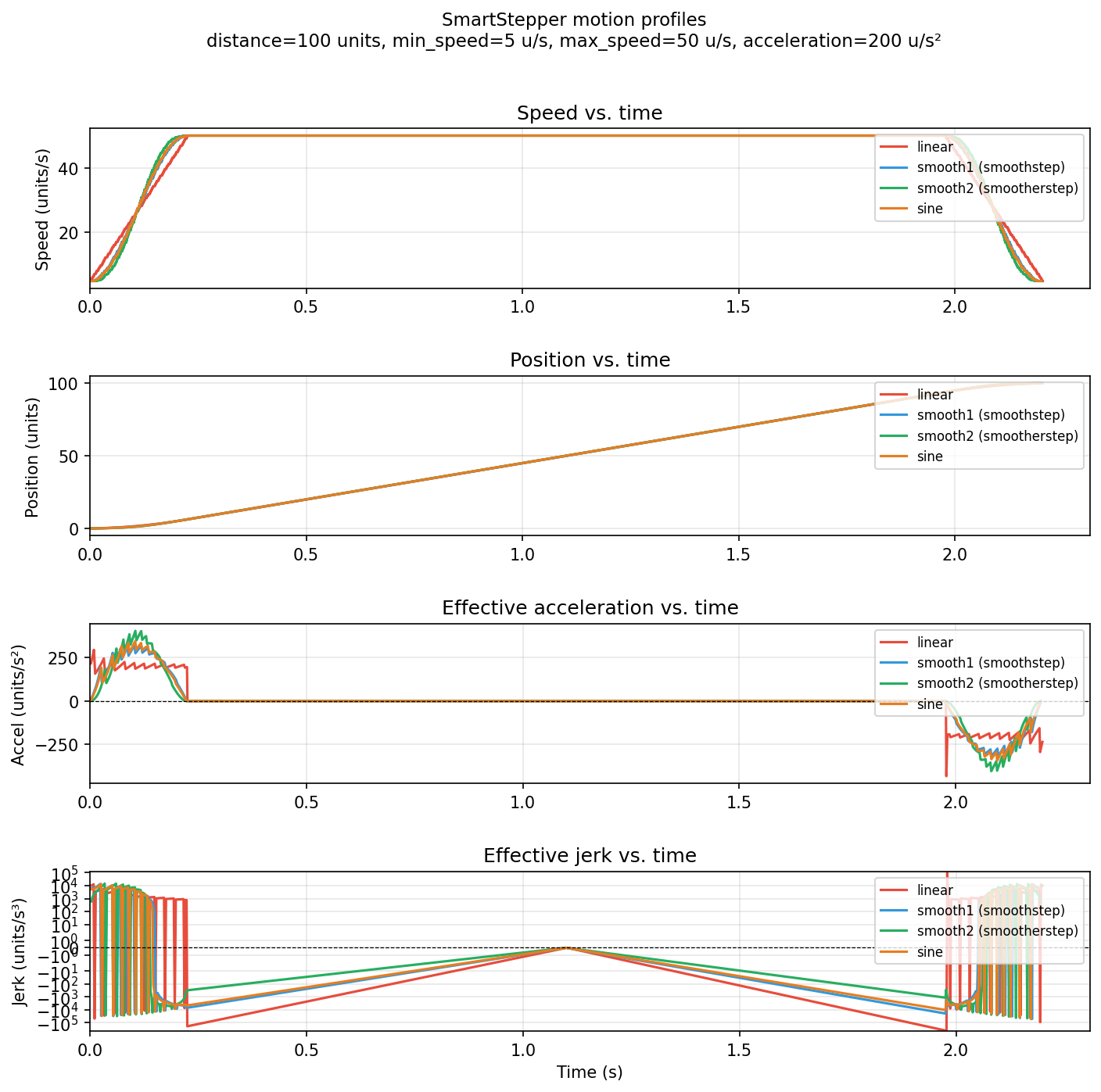
To regenerate this diagram after changing parameters:
python tools/plot_profiles.py --output docs/accel_curves.png
API reference
Constructor
SmartStepper(stepPin, dirPin, enablePin=None, accelCurve='smooth2')
Properties
| Property | Writable | Description |
|---|---|---|
position |
yes (stopped only) | Current position in units |
target |
no | Target position set by last moveTo() |
speed |
no | Current speed in units/s |
direction |
no | 'up', 'down', or None |
moving |
no | True while motor is running |
timedOut |
no | True if move deadline has passed |
minSpeed |
yes | Start/stop speed in units/s (triggers replan if moving) |
maxSpeed |
yes | Peak speed in units/s (triggers replan if moving) |
acceleration |
yes | Acceleration in units/s² (triggers replan if moving) |
stepsPerUnit |
yes (stopped only) | Microsteps per unit |
reverse |
yes (stopped only) | Invert direction pin polarity |
Methods
| Method | Description |
|---|---|
moveTo(target, relative=False, timeout=None, triangular=False, accel_time=None) |
Start a move; non-blocking |
jog(maxSpeed=None, direction='up') |
Start continuous jogging; non-blocking |
stop(emergency=False) |
Stop with decel (default) or immediately |
waitEndOfMove() |
Block until stopped; raises on timeout |
enable() |
Assert enable pin (active-low) |
disable() |
Release enable pin |
Axis
Axis(stepper, hard_max_speed=None, hard_max_accel=None)
Wraps a SmartStepper. hard_max_speed and hard_max_accel are immutable
after construction (default to the stepper's current maxSpeed /
acceleration). AxisError is raised if a property setter or motion method
would exceed these limits.
| Property | Writable | Description |
|---|---|---|
hard_max_speed |
no | Immutable upper bound on maxSpeed |
hard_max_accel |
no | Immutable upper bound on acceleration |
stepper |
no | The underlying SmartStepper |
position |
yes (stopped) | Delegates to stepper.position |
speed |
no | Delegates to stepper.speed |
moving |
no | Delegates to stepper.moving |
target |
no | Delegates to stepper.target |
minSpeed |
yes | Delegates to stepper.minSpeed |
maxSpeed |
yes | Validated against hard_max_speed; raises AxisError if exceeded |
acceleration |
yes | Validated against hard_max_accel; raises AxisError if exceeded |
stepsPerUnit |
yes (stopped) | Delegates to stepper.stepsPerUnit |
reverse |
yes (stopped) | Delegates to stepper.reverse |
| Method | Description |
|---|---|
prepare_move(target, relative=False, accel_time=None, triangular=False) |
Configure DMA without starting; returns DMA channel number |
start_move() |
Trigger a previously prepared move (single-axis deferred start) |
moveTo(target, relative=False, timeout=None, triangular=False, accel_time=None) |
Immediate move (validates hard limits first) |
stop(emergency=False) |
Delegates to stepper.stop() |
enable() / disable() |
Delegates to stepper.enable() / disable() |
async wait_done() |
Async wait until this axis finishes moving |
MultiAxis
MultiAxis(axes)
axes is a list of Axis objects.
| Method | Description |
|---|---|
move(targets) |
Synchronized move; targets is a {axis: position} dict or a list parallel to the axes |
async wait_done() |
Async wait until all axes finish moving |
stop(emergency=False) |
Stop all moving axes |
move() algorithm:
- For each axis, compute the natural triangular accel time over its distance
(clamped to
hard_max_speed). t_common = max(all accel times).- Call
axis.prepare_move(target, accel_time=t_common)for each axis. - Write a DMA channel bitmask to
DMA_MULTI_CHAN_TRIGGER— a single AHB write that starts all channels in the same bus cycle.
Arc
Arc(x_axis, y_axis)
x_axis and y_axis are Axis objects. ArcError is raised if the arc
radius is zero or chord_tol is too small relative to the radius.
| Method | Description |
|---|---|
async move(x_end, y_end, i=0, j=0, direction='ccw', chord_tol=None, segment_min_speed=None) |
Execute arc from current position; awaits each chord segment |
async wait_done() |
Async wait until the current chord segment completes |
stop(emergency=False) |
Stop all axes |
chord_segments(x_end, y_end, i=0, j=0, direction='ccw', chord_tol=None) |
Return list of (x, y) waypoints without moving |
move() parameters:
| Parameter | Description |
|---|---|
x_end, y_end |
Arc endpoint in user units |
i, j |
Center offset from current position (G-code I, J convention) |
direction |
'ccw' (G03, default) or 'cw' (G02) |
chord_tol |
Max chord-to-arc deviation in user units (default: Arc.DEFAULT_CHORD_TOL = 0.1) |
segment_min_speed |
minSpeed used during arc segments; defaults to ¼ of the axes' minSpeed |
Tools
Host-side Python scripts in tools/ for visualizing motion profiles and
captured signals. Both require matplotlib (pip install matplotlib).
tools/plot_profiles.py
Simulates the SmartStepper motion planner in standard Python (no hardware required) and plots speed, position, acceleration, and jerk vs. time for all four acceleration curves side-by-side.
python tools/plot_profiles.py [options]
| Option | Default | Description |
|---|---|---|
--distance F |
100 |
Move distance in units |
--min-speed F |
5 |
Min speed in units/s |
--max-speed F |
50 |
Max speed in units/s |
--acceleration F |
200 |
Acceleration in units/s² |
--steps-per-unit F |
96 |
Steps per unit |
--triangular |
off | Triangular profile (no constant-velocity phase) |
--accel-time F |
— | Fixed acceleration phase duration in seconds |
--output FILE |
profiles.png |
Save figure to FILE |
--show |
off | Display interactively instead of saving |
--triangular and --accel-time are mutually exclusive.
tools/plot_motion.py
Reads a digital.csv exported by the HIL test suite (via Saleae Logic 2)
and reconstructs each axis's position over time. Produces two plots: the
X–Y spatial trajectory and each axis's position vs. time. Optionally
overlays an ideal arc for radial error analysis.
python tools/plot_motion.py <capture_dir_or_csv> [options]
<capture_dir_or_csv> is either a directory containing digital.csv (as
produced by run_capture() in test_hil.py) or the path to the CSV file
itself.
| Option | Default | Description |
|---|---|---|
--steps-per-unit F |
96 |
Steps per unit for both axes |
--x-init F |
0 |
Initial X position in units |
--y-init F |
0 |
Initial Y position in units |
--step-ch N |
0 |
Saleae channel for axis-1 STEP |
--dir-ch N |
1 |
Saleae channel for axis-1 DIR |
--step-ch2 N |
2 |
Saleae channel for axis-2 STEP |
--dir-ch2 N |
3 |
Saleae channel for axis-2 DIR |
--dir-high-positive |
on | DIR=1 → positive direction |
--dir-high-negative |
off | DIR=1 → negative direction |
--arc-cx F |
— | Arc center X for ideal arc overlay |
--arc-cy F |
— | Arc center Y for ideal arc overlay |
--arc-r F |
— | Arc radius for ideal arc overlay |
--output FILE |
motion.png |
Save figure to FILE |
--show |
off | Display interactively instead of saving |
Example — visualize an arc capture with ideal arc overlay:
python tools/plot_motion.py tests/captures/hil_arc/ \
    --steps-per-unit 100 --x-init 100 --y-init 0 \
    --arc-cx 0 --arc-cy 0 --arc-r 100 --show
Hardware notes
- Enable pin: Most stepper drivers use an active-low enable signal. The pin is driven high (disabled) at startup and low (enabled) automatically when a move begins.
- Direction pin setup time: The RP2040 PIO begins pulsing immediately
after direction is set. If your driver requires a direction-setup hold time,
add a short
time.sleep_us()before callingmoveTo(). - Step pulse width: The PIO generates a 50% duty-cycle square wave. Pulse
width =
1 / (2 × freq). At 10 kHz step rate this is 50 µs per half-cycle, which is compatible with all common stepper drivers.
Credits
Original library by Frédéric (fma@gbiloba.org) (2023), posted at framagit.org/fma38/micropython-lib, and licensed under the GNU Affero General Public License v3.
pulseCounter.py is based on original work by
Dave Hylands.
Changes by Ned Konz (ned@metamagix.tech) (2026)
- Fixed garbage-collector bug in
pulseGenerator.py: DMA sequence array is now pinned as an instance variable to prevent it from being collected while DMA is active. - Added
PulseGenerator.update()for non-blocking mid-run DMA replacement. - Generalized
_accelPoints()to handle both acceleration and deceleration (reversal of a symmetric smoothstep curve), replacing the separate_decelPoints()method. - Added
_buildProfile()unified motion planner used bymoveTo()and_replan(). - Added
_replan()to rebuild the motion profile in-flight when speed or acceleration is changed mid-move. - Made
minSpeed,maxSpeed, andaccelerationsetters trigger_replan()instead of raising an error when the motor is moving. - Added
stop(emergency=False)with smooth deceleration by default. - Added active-low enable pin support (
enablePinconstructor argument,enable()/disable()methods, auto-enable on move start). - Added
timeoutparameter tomoveTo(),timedOutproperty, and timeout handling inwaitEndOfMove(). - Fixed
positionsetter unit-conversion bug. - Fixed
waitEndOfMove()self-reference bug. - Fixed multi-instance bug in
pulseGenerator.py: SM index is now captured as an instance variable at construction time rather than read from the class variable (which could have been incremented by later instances). - Replaced custom
dma.pywith MicroPython's built-inrp2.DMA: usespack_ctrl()/config()API, dropsimport uctypes(array passed directly via buffer protocol), and is inherently RP2350-compatible. - Extracted test/demo code into
test_smartStepper.py. - Added
homing.py: async three-phase homing with configurable sensor polarity, speed parameters, and timeout. - Added
triangular=Trueparameter tomoveTo(): produces a profile with no constant-velocity section; if the natural peak would exceedmaxSpeed, acceleration is automatically reduced. - Added
accel_timeparameter tomoveTo(): fixes the duration of the acceleration phase, enabling precise multi-axis synchronization. - Refactored
_accelPoints()to accept an explicitacceloverride so that triangular andaccel_timemoves can use a per-move effective acceleration without altering the stepper'saccelerationproperty.