
PaperVault
Offline paper-based secret storage using AES-256-GCM and Shamir's Secret Sharing. Create printable encrypted backups of seed phrases with threshold key splitting.
PaperVault - Store secrets on paper using threshold encryption
PaperVault 📄🔐 is a free open source tool for creating offline paper-based data vaults for your foundational secrets, such as passwords, 2FA recovery codes, digital asset keys, hard drive encryption keys, and other critical data.
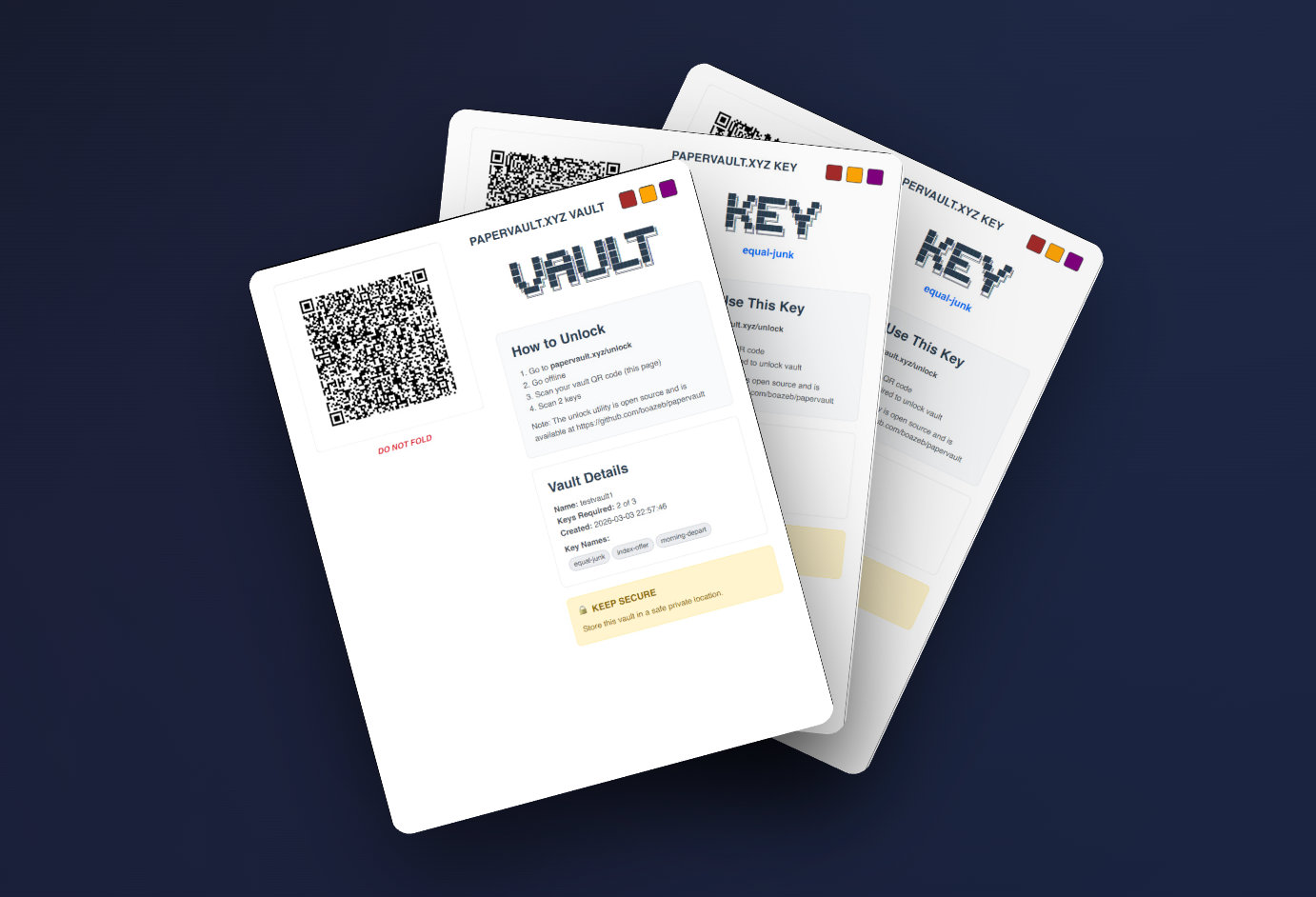
🔐 Overview
PaperVault encrypts your secrets and splits the decryption key into shards that can be printed on paper or saved to digital media. Keys are split using Shamir's Secret Sharing. Choose how many keys to create and how many are needed to unlock—for example, 5 keys with any 3 required (3-of-5).
🚀 Quick Start
Visit papervault.xyz to use PaperVault directly from your browser.
Self-Hosted Installation (recommended for maximum security)
# Clone the repository
git clone https://github.com/boazeb/papervault.git
cd papervault

# Install dependencies
npm install
# or
yarn install

# Start the app
npm start
# or
yarn start
Open http://localhost:3000 in your browser.
Docker
docker build -t papervault .
docker run -p 3000:3000 papervault
🔑 Key Features
- Works offline - No internet required after installation; run it yourself, designed for air-gapped use.
- Client-side only - No data ever leaves your device.
- Printable - Vault and keys are printable and downloadable to digital media for offline distributed storage.
- Flexible thresholds - Any M-of-N combination (up to 20 keys).
- Social recovery & digital inheritance - Keys can be distributed for recovery in emergencies.
📄 Vault vs key shares (social recovery)
PaperVault does not split your secret amongst keyholders. Instead, the encrypted vault and the key shares are separate documents. This gives you extra degrees of configuration when using PaperVault for social recovery:
- Keyholders hold key shares (e.g. family, friends, co-trustees). They can combine enough shares to reconstruct the decryption key—but keys alone are not enough. They also need the vault page.
- Vault holders hold the vault page. Without enough key shares, the vault page is useless.
So even if keyholders collude, they cannot unlock the vault unless they also get the vault page. You can keep the vault page yourself, give it to a different person, or store copies in a different locations from the keys.
🔍 Audit with AI
This is open source software. Security researchers are encouraged to review the implementation and report security issues. To run a quick AI-assisted audit yourself, select your preferred assistant:
🛡️ Security Model
Cryptographic Foundation
- Algorithm: Shamir's Secret Sharing over GF(2^8). Vaults use shamir-secret-sharing.
- Encryption: AES-256-GCM (authenticated) for v2 vaults via the Web Crypto API; legacy v1 vaults use AES-256-CTR and remain supported for unlock and backwards compatability.
- Key Generation: Cryptographically secure random number generation via
crypto.getRandomValues()(Web Crypto API). - QR Codes: Version 6-8 QR codes with level-M error correction (~15% damage recovery) for reliable scanning from paper.
See SECURITY.md for detailed security details, vault versions, and vulnerability reporting.
Security Best Practices
- Air-Gapped Usage: Run PaperVault.xyz from an offline computer for maximum security
- Source Code Review: Audit the code before using with critical secrets
- Physical Security: Store paper keys in separate, secure locations
- Test Recovery: Always test your recovery process
- Durable storage: For maximum durability, consider archive-grade paper in tamper-evident envelopes with an insert to keep the paper flat and protected
Threat Model
PaperVault does NOT protect against:
- ❌ Physical compromise of threshold number of keys + vault
- ❌ Shoulder surfing during secret entry
- ❌ Malicious modifications to the source code
- ❌ Social engineering
📖 How It Works
- Create Vault: Enter your secret data (passwords, seed phrases, etc.)
- Configure Shares: Choose number of keys and recovery threshold
- Generate Keys: Cryptographically split your decryption key using Shamir's algorithm
- Print & Distribute: Generate vault backups and distribute keys securely
- Recovery: Use any threshold number of keys to decrypt your vault
🔧 Technical Details
Architecture
- Frontend: React 17 with Bootstrap UI
- Cryptography: JavaScript implementation of Shamir's Secret Sharing
- PDF Generation: React-PDF for document output
- QR Codes: Optimized for mobile scanning and printing
- Storage: Client-side only, no external dependencies
Limits
- Maximum Keys: 20 (cryptographic library constraint)
- Storage Limit: 300 characters per vault (QR code optimization)
🤝 Contributing
Contributions are welcome!
📄 License
This project is licensed under the MIT License - see the LICENSE file for details.
🙏 Acknowledgments
- Shamir's Secret Sharing algorithm by Adi Shamir
- shamir-secret-sharing (v2 vaults)
- secrets.js (legacy v1 vaults)
📞 Support
- Issues: Report bugs via GitHub Issues
⚠️ Disclaimer
This software is provided "as is" without warranty. Users are responsible for:
- Verifying the security of their implementation
- Testing recovery procedures before relying on them
- Maintaining physical security of printed keys
- Understanding the cryptographic principles involved
Always test with non-critical data first!
Made in Tel Aviv