
Polymerium
️ A next-generation Minecraft instance manager that thinks differently about game management.
Polymerium
A next-generation Minecraft instance manager that thinks differently about game management.





🌐 中文介绍 • 📥 Download • 📖 Documentation • 🐛 Report Bug • 💡 Request Feature
🎮 Experience Polymerium in Action
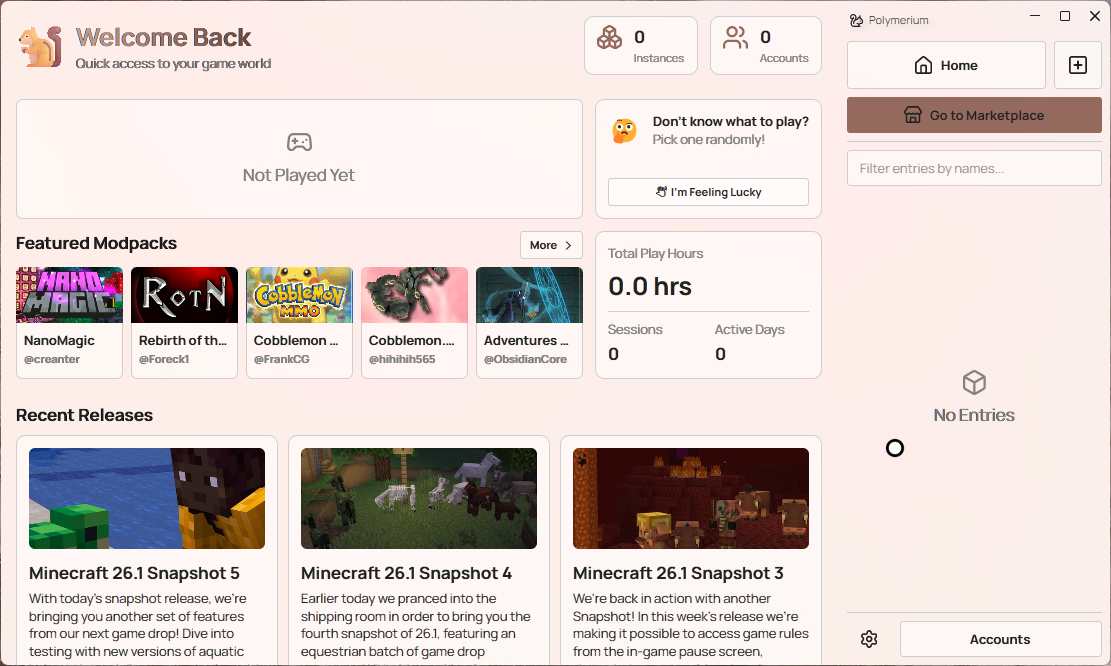
From launch to gameplay in seconds ⚡
🌟 What Makes Polymerium Different
Traditional Minecraft launchers manage files. Polymerium manages experiences.
🚀 The Evolution of Minecraft Launchers
| Generation | Management Focus | Representative Approach |
|---|---|---|
| 1st Gen | 📁 Versions | "Version Isolation" mechanism |
| 2nd Gen | 📦 Instances | Isolated game environments with copied resources |
| 3rd Gen | 🧬 Metadata | Declarative configuration with on-demand deployment |
Polymerium is a third-generation launcher. Instead of copying and storing thousands of mod files for each instance, Polymerium describes your game setup as lightweight metadata and builds the actual game files on-demand. This revolutionary approach brings several game-changing benefits:
🎯 Smart Resource Management
- Zero Duplication: Multiple instances sharing the same mods? Only one copy exists on disk
- Symlink Magic: Files are intelligently linked, not copied, saving gigabytes of storage
- Instant Switching: Change between completely different modpacks in seconds
📦 Portable Game Experiences
- Metadata-Driven: Your entire game setup fits in a tiny configuration file
- Version Control Ready: Use Git to collaborate on modpack development
- True Portability: Share your exact game experience with a simple file transfer
🔧 Effortless Maintenance
- Integrity Guaranteed: Every deployment validates file completeness and correctness
- Dependency Resolution: Automatically handles mod dependencies and conflicts
- One-Click Updates: Upgrade individual mods or entire modpacks seamlessly
🎮 Player-Focused Design
- No Java Hunting: Configure Java once, works everywhere
- Account Flexibility: Multiple accounts, each linked to specific instances
- Clean Uninstall: Remove Polymerium completely by deleting two folders
✨ Key Features
🏗️ Modern Architecture
- 🎨 Avalonia UI: Beautiful, responsive interface that works across platforms
- 📋 Metadata Engine: Lightweight instance descriptions that rebuild perfectly every time
- 🚀 Deployment System: Intelligent file management with integrity checking
- 🔗 Resource Pooling: Shared file storage with symlink distribution
🌐 Platform Integration
- 🎟️ CurseForge & Modrinth: Native integration with major mod repositories
- 📦 Modpack Publishing: Export your instances as distributable modpacks
- 📝 Automatic Changelogs: Generated documentation for your modpack versions
👨💻 Developer Experience
- 📸 Instance Snapshots: Save and restore complete game states
- 📜 Layered Configuration: Separate user settings from core game data
- 🔄 Build Reproducibility: Identical deployments from the same metadata
Getting Started
Prerequisites
[!IMPORTANT] Windows Developer Mode Required
Polymerium uses symbolic links for efficient file management. Enable Developer Mode to allow symlink creation without administrator privileges.
📋 How to Enable Developer Mode
Windows 11
Settings → System → For developers → Developer Mode
Windows 10
Settings → Update & Security → For developers → Developer Mode
Windows 7/8
Upgrade to Windows 10+ first 💥
📥 Installation
[!NOTE] Polymerium is currently in active development. Features and UI may change between releases.
| Platform | Package | Direct Download |
|---|---|---|
| Windows x64 | Installer | Download |
| Linux x64 | AppImage | Download |
| macOS Apple Silicon | PKG installer | Download |
已有 Mirror酱 CDK?前往 Mirror酱 高速下载
📥 Download -> 🚀 Run -> ⚙️ Setup
- Download the package for your platform
- Run the installer or executable
- Follow the setup wizard to configure your first instance
🚀 Quick Start
🎮 Create → 📦 Add Content → 🔧 Deploy → ▶️ Play
- Create Instance: Define your Minecraft version and mod loader
- Add Content: Browse and install mods from CurseForge or Modrinth
- Deploy: Let Polymerium build your game files
- Play: Launch directly or export as a modpack
🏗️ Architecture Overview
| 🛠️ Technology | 📋 Purpose | 🔗 Integration |
|---|---|---|
| .NET 10.0 | Latest runtime with C# preview features | Core platform |
| Avalonia 11 | Cross-platform XAML UI framework | Presentation layer |
| MVVM Pattern | Clean separation of concerns | Architecture pattern |
| Dependency Injection | Modular, testable architecture | Service management |
| Reactive Extensions | Responsive data handling | Data flow |
📁 Project Structure
Polymerium/
├── 📚 docs/                   # Documentation
├── 🎨 src/Polymerium.App/     # UI application layer
├── 🔗 submodules/             # Shared components
└── 📦 Releases/               # Build artifacts
Development
🔨 Building from Source
# Clone with submodules
git clone --recursive https://github.com/d3ara1n/Polymerium.git
cd Polymerium

# Build the solution
dotnet build

# Run in development mode
./Development.ps1
🛠️ Development Commands
# Development mode
./Development.ps1

# Production mode
./Production.ps1

# Build and publish
./Publish.ps1

# Get version info
dotnet gitversion

# Generate changelog
git cliff
🤝 Contributing
We welcome contributions! Please ensure your code follows the established patterns:
| Aspect | Requirement |
|---|---|
| 🏗️ Architecture | MVVM pattern with clear separation of concerns |
| 💉 Dependency Injection | Use constructor injection throughout |
| 🔥 Modern C# | Leverage latest language features and patterns |
| ✨ Code Style | Follow the .editorconfig guidelines |
We use resx for localization. If you want to contribute to the translation, you can edit the Resources.resx file in
src/Polymerium.App/Properties and add your language file in the same directory. Rider and Visual Studio have built-in
editors for resx files.
🖥️ Platform Support
| Platform | Status |
|---|---|
 |
✅ Stable |
 |
✅ Stable |
 |
✅ Stable |
Privacy & Security
Polymerium respects your privacy:
- Minor Telemetry: Collect least necessary data for debugging
- Local Storage: All data stays on your machine
- Minimal Footprint: Clean uninstall leaves no traces
- Open Source: Transparent, auditable codebase
License
This project is licensed under the MIT License - see the LICENSE file for details.
📊 Project Statistics
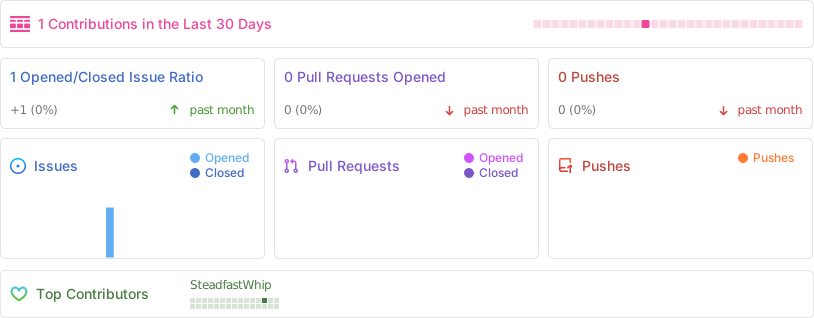
📚 References & Acknowledgments
🔗 Technical References
- Inside a Minecraft Launcher - Game launch process and Fabric/Quilt deployment
- Tutorial: Writing a Launcher - Game launch process guide
- ForgeWrapper - Forge integration reference
- Microsoft Authentication Scheme - Authentication implementation
🙏 Special Thanks
- Minecraft Community - For the incredible modding ecosystem
- Avalonia Team - For the excellent cross-platform UI framework
- API Providers - CurseForge and Modrinth for their public APIs
- Contributors - Everyone who helps make Polymerium better
📄 License
This project is licensed under the MIT License - see the LICENSE file for details.
Polymerium: Rethinking Minecraft instance management for the modern era ✨
Made with ❤️ by the Polymerium team