
error311/wayfinder.nvim
Guided code exploration from the current symbol with a keepable trail.
wayfinder.nvim
wayfinder.nvim is a guided code exploration tool for the current symbol.
Wayfinder is not a general search tool. It does not try to replace Telescope or grep. It replaces the manual loop of jump, grep, back, open, back, and "where was that test again?"
From the current symbol or file, Wayfinder gathers the most relevant nearby code:
- definitions
- references
- callers
- likely tests
- recent commits
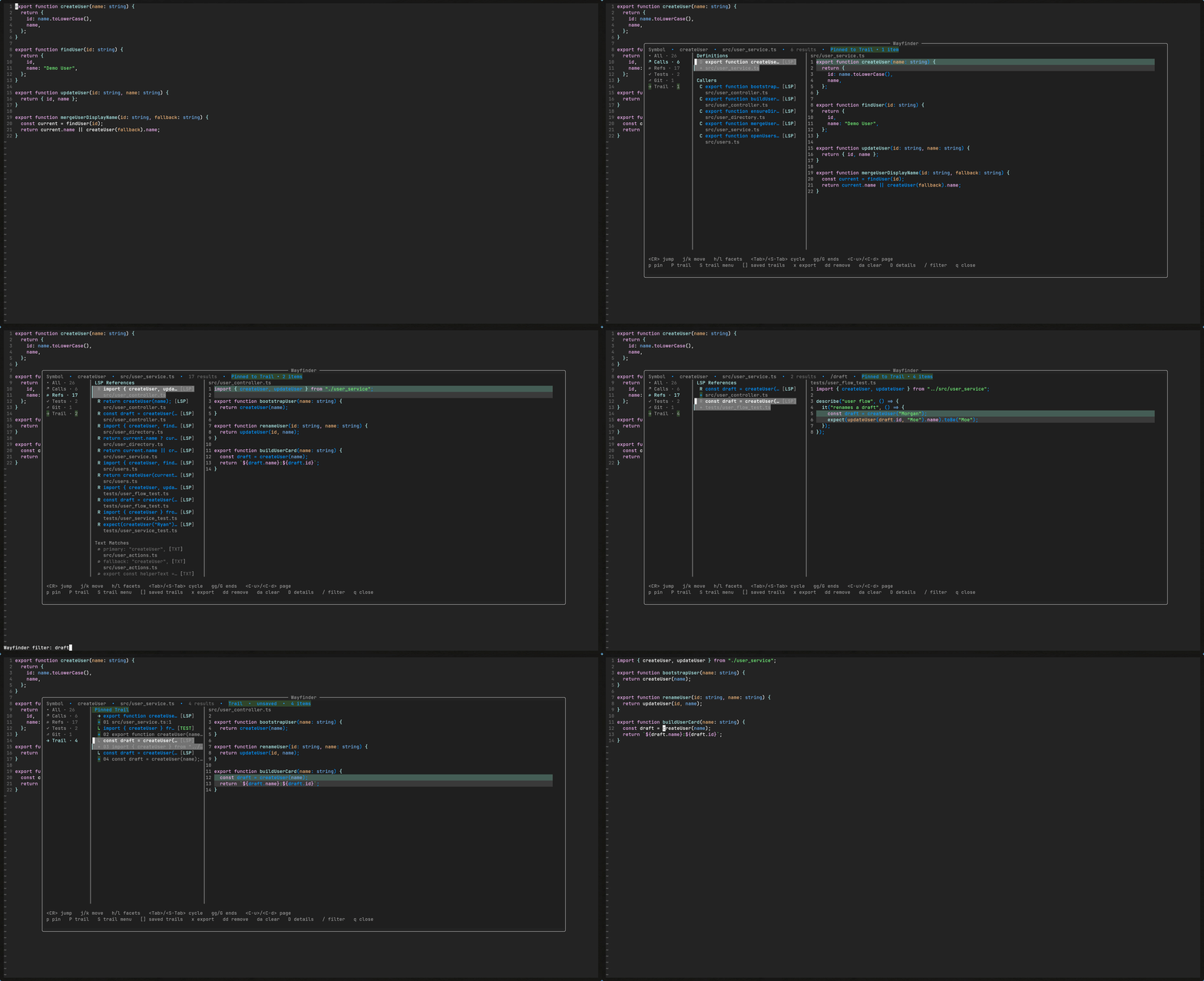
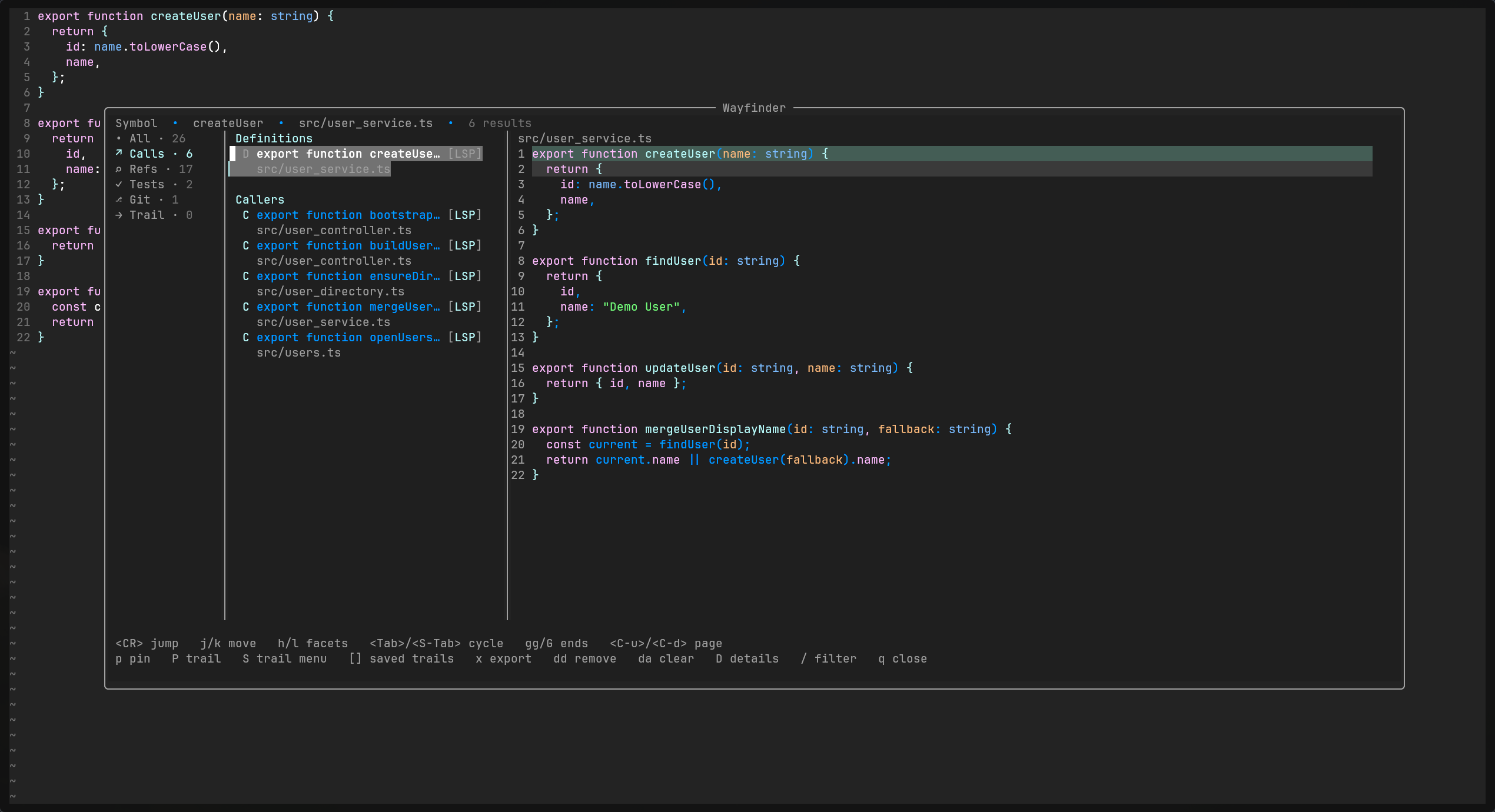
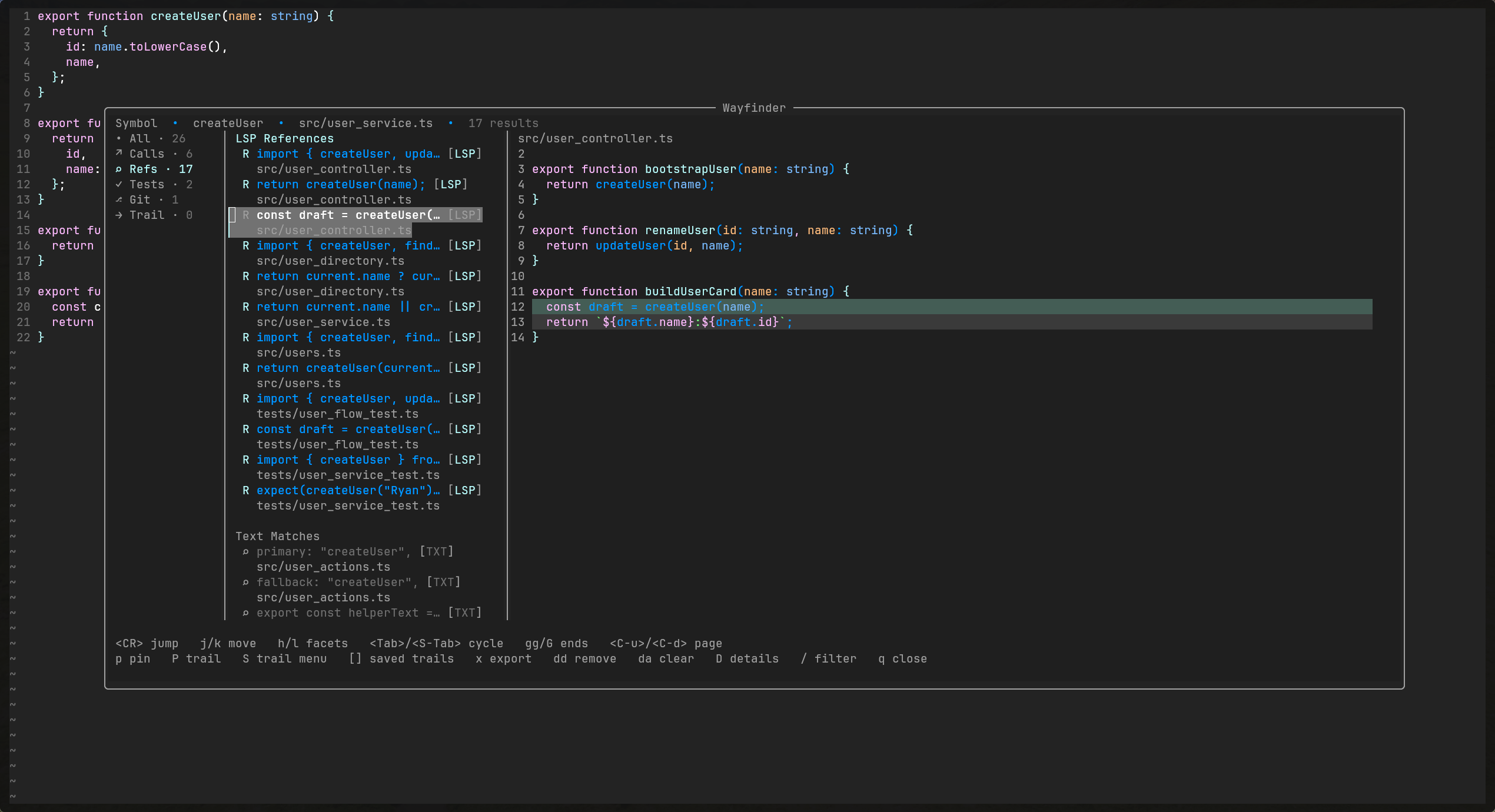
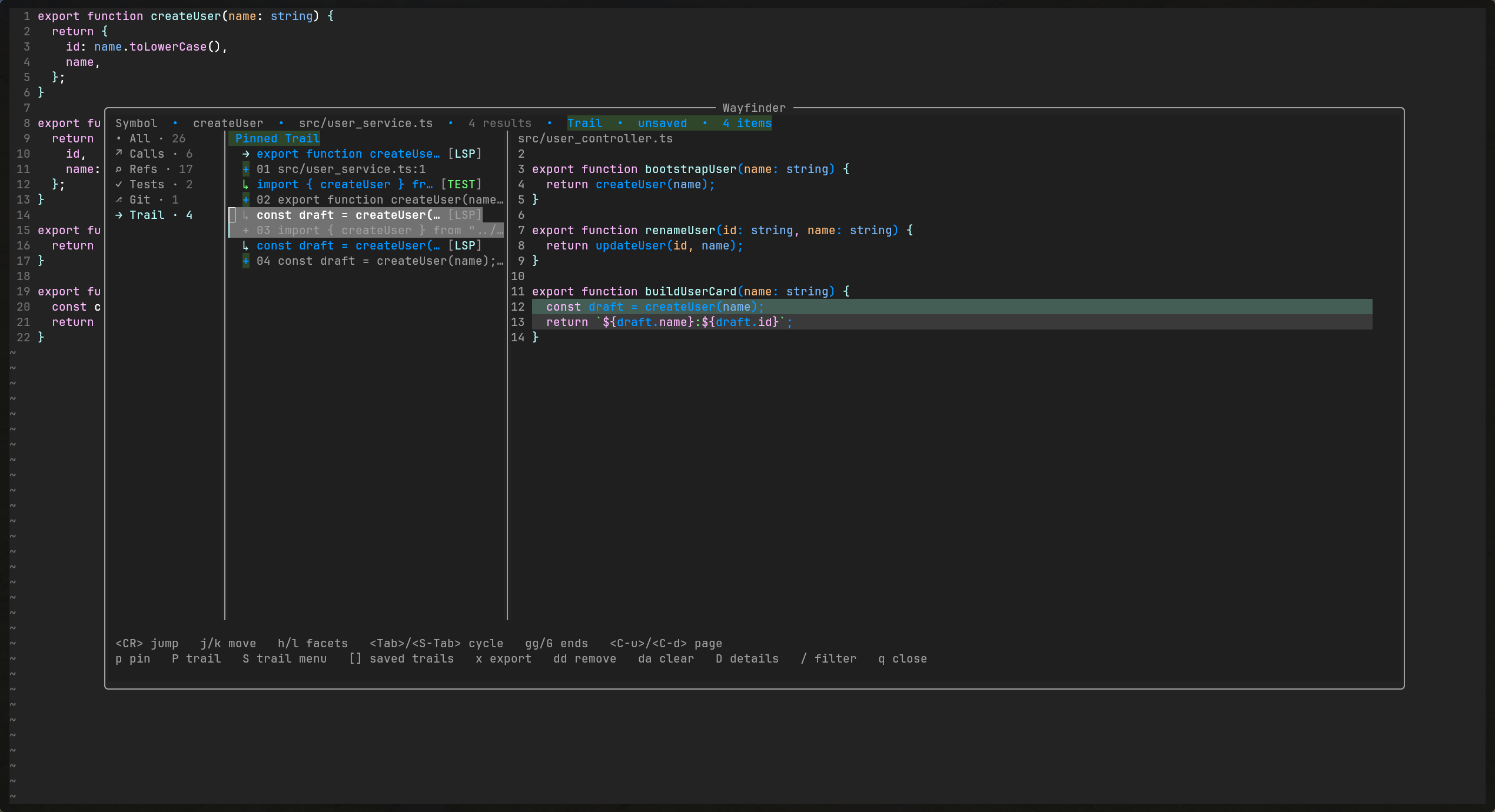
It opens as a centered 3-pane picker, loads sources progressively, and keeps the screen focused on facets, rows, badges, previews, and a Trail you can keep.
Features
- Centered 3-pane floating layout
- Facet rail with counts
- Dense result list with badges and grouped headers
- Syntax-highlighted preview
- Trail facet for pinned breadcrumbs
- Async, cancelable LSP loading plus async tests and git loading
- Local filter with negation and phrase matching
- Jump actions
Requirements
- Neovim
0.10+
Installation
With lazy.nvim:
{
  "error311/wayfinder.nvim",
  opts = {},
}
Quick Start
Wayfinder works with the default setup:
require("wayfinder").setup({})
vim.keymap.set("n", "<leader>wf", "<Plug>(WayfinderOpen)", { desc = "Wayfinder" })
Open it on a symbol for definitions, references, callers, likely tests, and recent commits. If there is no symbol under the cursor, it falls back to the current file.
Optional Setup
If you want to tune the layout, keep it small:
require("wayfinder").setup({
  layout = {
    width = 0.88,
    height = 0.72,
  },
})
Large Repos and Monorepos
You do not need to set any scope or performance options for normal repos.
If you work in a large repo or monorepo, Wayfinder can narrow broad sources like text matches, likely tests, and git history, while keeping slow LSP work bounded.
Mental model:
project: search the whole project, usually the git rootpackage: search the nearest app/package/module rootcwd: search from the current Neovim working directoryfile_dir: search from the current file directory
Common monorepo setup:
require("wayfinder").setup({
  performance = "fast",
  scope = {
    mode = "package",
    package_markers = {
      "package.json",
      "tsconfig.json",
      "pyproject.toml",
      "go.mod",
      "Cargo.toml",
      ".git",
    },
  },
  limits = {
    refs = { max_results = 200, timeout_ms = 1200 },
    text = { enabled = true, max_results = 100, timeout_ms = 800 },
    tests = { max_results = 50, timeout_ms = 700 },
    git = { enabled = true, max_commits = 15, timeout_ms = 400 },
  },
})
Those package_markers are just common defaults. They are not required files, and you can override them if your repo uses different boundaries.
performance presets:
fast: tighter limits and shorter timeoutsbalanced: default behaviorfull: broader limits and looser timeouts
Recommended Mappings
vim.keymap.set("n", "<leader>wf", "<Plug>(WayfinderOpen)", { desc = "Wayfinder" })
vim.keymap.set("n", "<leader>wtn", "<Plug>(WayfinderTrailNext)", { desc = "Wayfinder Trail Next" })
vim.keymap.set("n", "<leader>wtp", "<Plug>(WayfinderTrailPrev)", { desc = "Wayfinder Trail Prev" })
vim.keymap.set("n", "<leader>wto", "<Plug>(WayfinderTrailOpen)", { desc = "Wayfinder Trail Open" })
vim.keymap.set("n", "<leader>wts", "<Plug>(WayfinderTrailShow)", { desc = "Wayfinder Trail Show" })
Commands
:Wayfinder:WayfinderExportQuickfix:WayfinderExportTrailQuickfix:WayfinderTrailNext:WayfinderTrailPrev:WayfinderTrailOpen:WayfinderTrailShow<Plug>(WayfinderOpen)<Plug>(WayfinderTrailNext)<Plug>(WayfinderTrailPrev)<Plug>(WayfinderTrailOpen)<Plug>(WayfinderTrailShow)
Default Keys
j/kmovegg/Gfirst / last result<PageUp>/<PageDown>page movement<C-u>/<C-d>move by half a pageh/lswitch facet<Tab>next facet<S-Tab>previous facet<CR>jumpsopen in splitvopen in vsplittopen in tabppin into TrailPopen Trail immediatelyxexport current facet to quickfixddremove pinned trail itemdaclear Trail/filter<C-l>clear filterDtoggle detailsrrefreshqclose- mouse wheel scrolls results
Filter examples:
usermatchesuseruser testrequires both termsuser !specexcludes matches containingspec"user service"matches that exact phrasecreate !"git status"excludes that exact phrase
Pinning behavior:
- the first
ppins the current item Popens the Trail facet explicitly- the top bar shows a short Trail hint when you pin an item, then keeps a steady Trail item count once Trail is non-empty
Trail commands outside Wayfinder:
:WayfinderTrailNextopens the next Trail item:WayfinderTrailPrevopens the previous Trail item:WayfinderTrailOpenopens the current Trail item:WayfinderTrailShowopens Wayfinder on the Trail facet
Quickfix export:
:WayfinderExportQuickfixexports the current visible facet in its current order:WayfinderExportTrailQuickfixexports Trail in Trail order
Result Types
Callsshows LSP definitions and callersRefsis split intoLSP ReferencesandText Matches- weak-source reasons now show up in the top bar for the current selection
Testsis heuristic and intentionally ranked below calls and refsTestscan show a small heuristic reason like filename or symbol-text matchingGitshows recent commits touching the current fileGitcan show a small file-touch reason while commit metadata stays in details
Scope and Performance
scope.modecontrols how far Wayfinder searches:projectuses the project rootcwduses the current Neovim working directorypackageuses the nearest package/module markerfile_diruses the current file directory
limitscan cap expensive sources without changing the UI model:refs.max_results,refs.timeout_mstext.enabled,text.max_results,text.timeout_mstests.max_results,tests.timeout_msgit.enabled,git.max_commits,git.timeout_ms
With package scope enabled, Wayfinder keeps text matches, likely tests, and other broad searches inside the nearest app or module instead of spilling across the full repo.
Demo Fixture
The repo includes a small fixture app plus a tiny demo LSP so screenshots and gifs are reproducible.
nvim -u demo/minimal_init.lua demo/fixture-app/src/user_service.ts
Move the cursor onto createUser, then run :Wayfinder.
More demo notes are in demo/README.md.
Health
:checkhealth wayfinder reports:
- Neovim version
- plugin load status
ripgrepavailability for Text Matchesgitavailability for the Git facet- active LSP clients for the current buffer
- resolved scope root for the current buffer
- current
performanceandscope.modeconfig
:checkhealth wayfinder
License
MIT