
hotplex
AI Agent runtime engine with long-lived sessions for Claude Code, OpenCode, pi-mono and other CLI AI tools. Provides full-duplex streaming, multi-platform integrations, and secure sandbox.
HotPlex Gateway
The Unified Bridge for AI Coding Agents
A high-performance Go gateway providing a single WebSocket interface
to access any AI Coding Agent across Web, Slack, and Feishu.
简体中文 | English






🧭 Table of Contents
- Highlights
- Quick Start
- Architecture
- SDKs & Libraries
- Configuration
- Documentation
- Contributing
- License
✨ Highlights
- 🌐 Unified WebSocket interface — 23+ AEP v1 event types for streaming, permissions, and MCP Elicitation
- 🔌 Multi-channel bridge — bidirectional support for Slack (Socket Mode) and Feishu (WebSocket)
- 🤖 Agent config injection — personality, rules, and memory auto-injected via B/C dual-channel XML system
- 🛡️ Production-hardened — 5-state session lifecycle, JWT ES256 auth, SSRF protection, crash recovery
- 📊 Full observability — Prometheus metrics, OpenTelemetry tracing, structured JSON logging
- 🛠️ Self-contained CLI —
onboard,doctor,security,statusin a single binary - 🌍 Multi-language SDKs — Go, TypeScript, Python, Java clients ready to use
⚡ Quick Start
Install from Source
git clone https://github.com/hrygo/hotplex.git
cd hotplex
make quickstart    # check tools + build + test
Or with Docker
cp configs/env.example .env  # edit with your API keys
docker compose up -d
Configure
# Interactive setup wizard
hotplex onboard

# Or auto-generate all configs:
hotplex onboard --non-interactive --enable-slack --enable-feishu
Run
make dev
| Service | Address |
|---|---|
| Gateway (WebSocket) | ws://localhost:8888/ws |
| Admin API | http://localhost:9999 |
| Web Chat UI | http://localhost:3000 |
Connect with Go SDK
package main

import (
    "context"
    "fmt"
    client "github.com/hrygo/hotplex/client"
)

func main() {
    c, err := client.New(context.Background(),
        client.URL("ws://localhost:8888/ws"),
        client.WorkerType("claude_code"),
        client.APIKey("<your-api-key>"),
    )
    if err != nil {
        panic(err)
    }
    defer c.Close()

    c.SendInput(context.Background(), "Explain HotPlex architecture")

    for env := range c.Events() {
        if data, ok := env.AsMessageDeltaData(); ok {
            fmt.Print(data.Content)
        }
    }
}
🧱 Architecture
HotPlex sits between frontend clients and backend AI coding agents, abstracting protocol differences into a unified AEP v1 WebSocket layer.
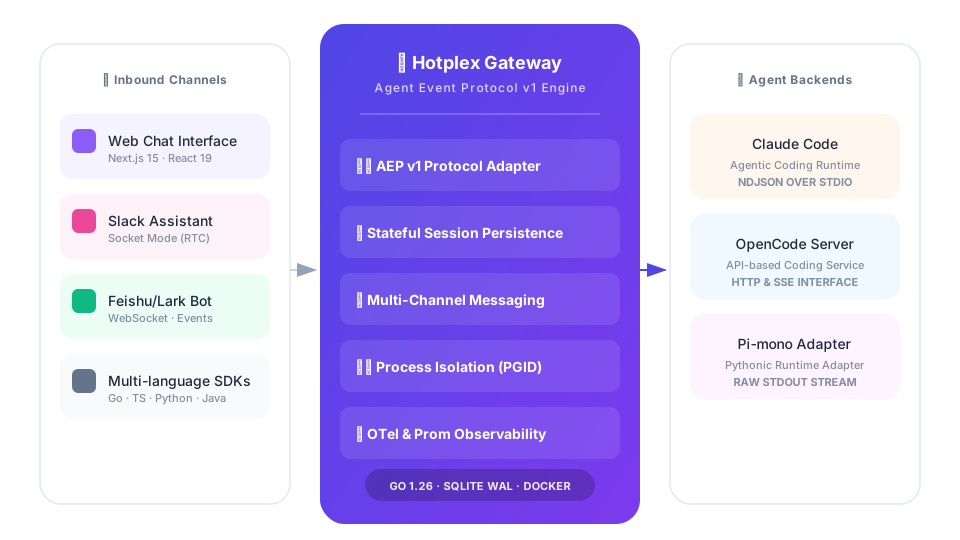
┌──────────┐   ┌──────────┐   ┌──────────┐
│  Web UI  │   │  Slack   │   │  Feishu  │
└────┬─────┘   └────┬─────┘   └────┬─────┘
     │              │              │
     └──────────────┼──────────────┘
                    │  WebSocket / AEP v1
              ┌─────┴─────┐
              │  HotPlex  │  Session · Auth · Retry · Config
              │  Gateway  │  Metrics · Tracing · Admin API
              └─────┬─────┘
     ┌──────────────┼──────────────┐
     │              │              │
┌────┴─────┐  ┌────┴──────┐  ┌───┴───────┐
│  Claude  │  │  OpenCode │  │  Pi-mono  │
│  Code    │  │  Server   │  │           │
└──────────┘  └───────────┘  └───────────┘
🔗 SDKs & Libraries
| Language | Path | Features |
|---|---|---|
| Go | client/ |
Full-featured, channel-based events, production-grade |
| TypeScript | examples/typescript-client/ |
Streaming, multi-turn chat, React compatible |
| Python | examples/python-client/ |
Asyncio, session resume, CLI ready |
| Java | examples/java-client/ |
Enterprise AEP v1 implementation |
🛠️ Configuration
| Key | Default | Description |
|---|---|---|
agent_config.enabled |
true |
Enable agent personality/context injection |
agent_config.config_dir |
~/.hotplex/agent-configs/ |
Config files directory (SOUL.md, AGENTS.md, etc.) |
gateway.addr |
:8888 |
WebSocket gateway address |
admin.addr |
:9999 |
Admin API address |
db.path |
~/.hotplex/data/hotplex.db |
SQLite database path |
log.level |
info |
Log level: debug, info, warn, error |
[!TIP] See Config Reference for the full list of environment variables and YAML settings.
📖 Documentation
| Area | Guide |
|---|---|
| Getting Started | Quick Start · Reference Manual · Whitepaper |
| Protocol | AEP v1 Specification |
| Architecture | Gateway Design · Agent Config Design |
| Security | Authentication · SSRF Protection |
| Operations | Admin API · Observability · Testing |
👥 Contributing
We welcome contributions! Please see CONTRIBUTING.md for details.
- Fork the repository
- Create your feature branch (
git checkout -b feat/AmazingFeature) - Commit with conventional messages (
git commit -m 'feat: add AmazingFeature') - Push to the branch (
git push origin feat/AmazingFeature) - Open a Pull Request
[!NOTE] All build/test/lint operations must use
maketargets. Seemake helpfor the full list.
🛡️ Security
If you discover a security vulnerability, please do NOT open a public issue. Report it via SECURITY.md or contact maintainers directly.
📜 License
Distributed under the Apache License 2.0.