
Markdown and LaTeX > kibi2/tirenvi.nvim
Edit Markdown and CSV tables with lossless round-trip.
tirenvi.nvim



Markdown & CSV table editor for Neovim — structural editing, pure text, always valid.
Supports Markdown and CSV out of the box, and can be extended to other formats via custom parsers.
Markdown (GFM)
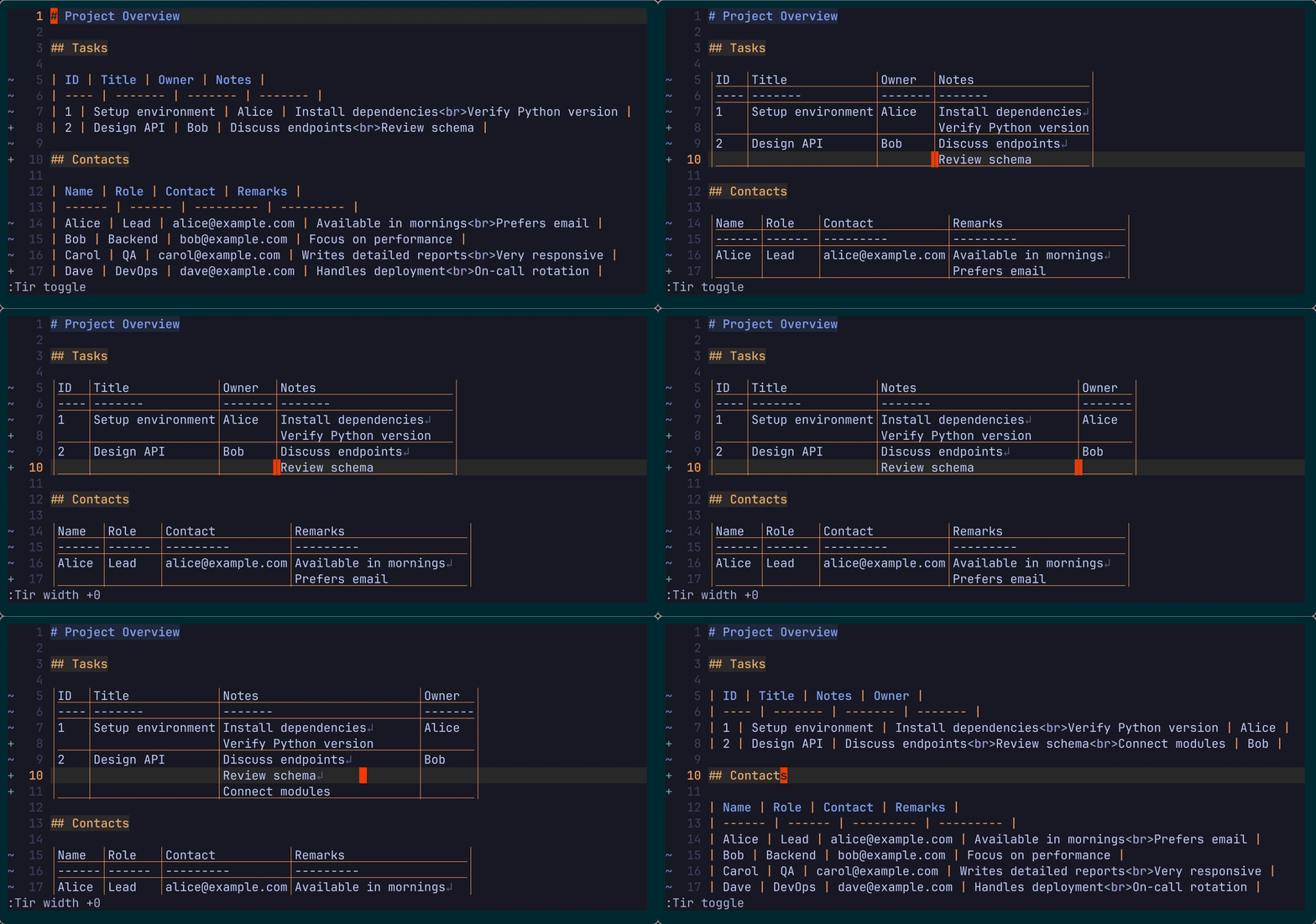
Edit Markdown tables structurally.
Raw → aligned → edit → back to raw (lossless).
CSV / TSV
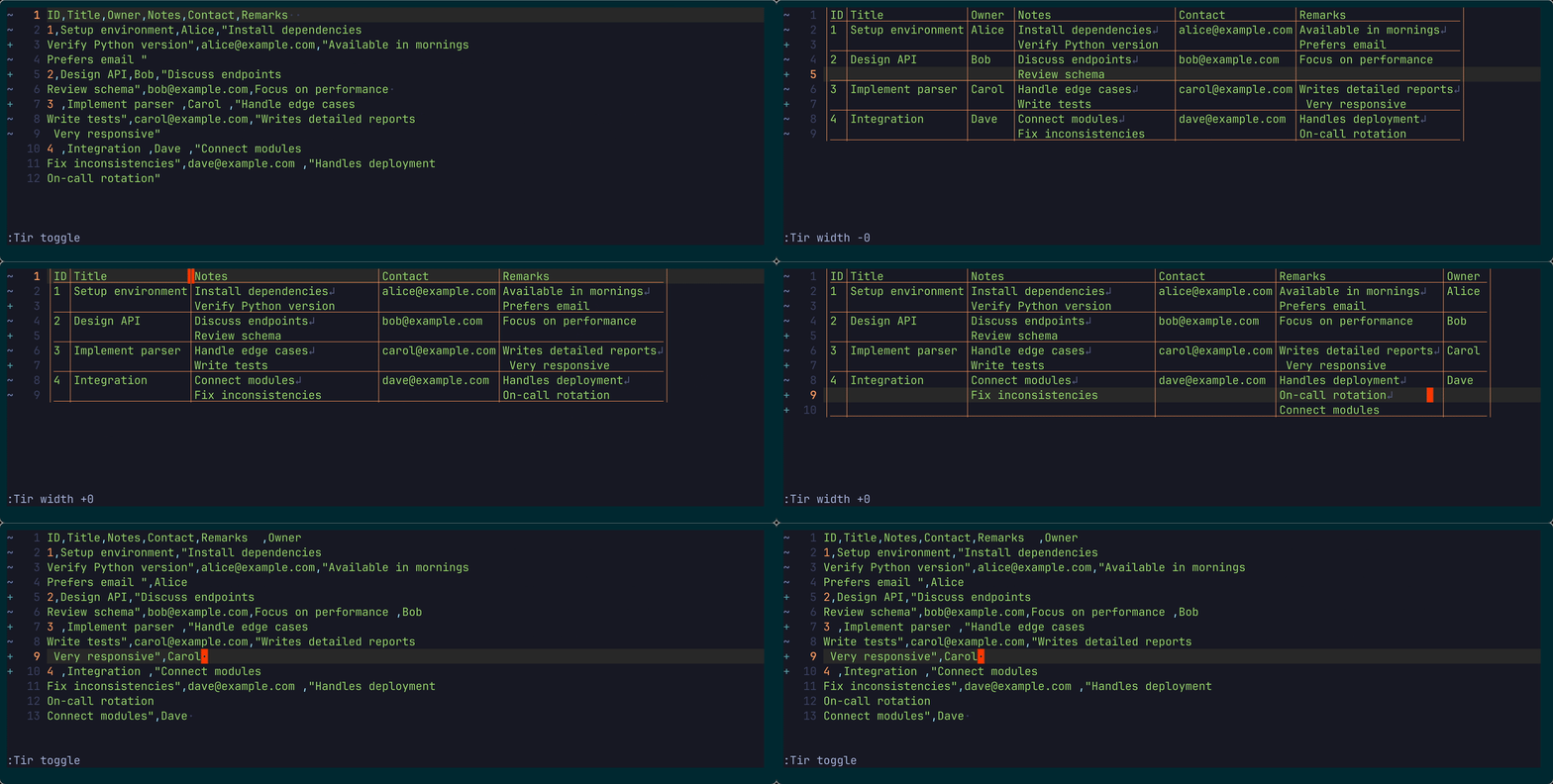
Raw → aligned → edit → back to raw (lossless).
Design Philosophy
- Vim-first
- Text-only buffer
- Structurally safe
- Fully reversible transformation
- No hidden metadata
- Always valid
Why?
Markdown and CSV are text — but they represent structure.
Tirenvi lets you edit tabular data structurally, while staying in Vim’s native editing model.
You edit text. Tirenvi preserves structure.
Core Architecture
At the center is: TIR — Tabular Intermediate Representation
flat (gfm markdown, csv, tsv, ...)
        ↓ external parser
TIR (intermediate representation)
        ↓ tirenvi
tir-vim (structured buffer view)
Editing happens in tir-vim format.
On save:
tir-vim → TIR → original flat format
Key principles:
- The buffer contains only text
- No hidden state
- No shadow buffer
- No custom buffer type
- Transformations are reversible
- The buffer is always structurally valid
Edit tables directly in Vim — without breaking structure.
Features
- Render CSV/TSV/GFM into an aligned structured view
- Preserve original file format on save
- Toggle raw ↔ structured view
- Automatic structural correction
- Multiline cell support with preserved line breaks
- Column width control with wrapping support
- Grid-aware join that preserves column structure
- Column text objects for structural editing
- Works with all native Vim motions and operators
- External parser architecture (extensible)
- No learning curve
Structural Integrity Model
Tirenvi is a strict editor.
- Invalid structural edits are detected
- In Normal mode: corrected immediately
- In Insert mode: corrected after leaving Insert
- Undo tree integrity is preserved
- Only leaf undo states are auto-corrected
Structural integrity is preserved in the current editing state.
Tirenvi respects Vim’s undo tree. Historical undo states are not modified, even if they contain temporary structural inconsistencies.
Installation
lazy.nvim
{
  "kibi2/tirenvi.nvim",
  dependencies = {
    "tpope/vim-repeat", -- optional: enables '.' repeat for column width operations
  },
  config = function()
    require("tirenvi").setup {}
  end,
}
vim-plug
Plug 'kibi2/tirenvi.nvim'

" Optional: enables '.' repeat for column width operations
Plug 'tpope/vim-repeat'
Requirements
- Neovim >= 0.9
- UTF-8 environment
Install parsers:
pip install tir-gfm-lite
pip install tir-csv
pip install tir-pukiwiki
Usage
Automatically activates based on filetype (via parser_map):
csvtsvmarkdownpukiwiki
Custom parser mapping:
require("tirenvi").setup({
  parser_map = {
    csv = { executable = "tir-csv", required_version = "0.1.4" },
    tsv = { executable = "tir-csv", options = { "--delimiter", "\t" }, required_version = "0.1.4" },
    markdown = { executable = "tir-gfm-lite", allow_plain = true, required_version = "0.1.6" },
    pukiwiki = { executable = "tir-pukiwiki", allow_plain = true, required_version = "0.1.1" },
  }
})
Commands
| Command | Description |
|---|---|
:Tir redraw |
Normalize table layout (trim padding and re-align cells) |
:Tir toggle |
Switch raw ↔ structured table view |
:Tir width[=+-][count] |
Adjust column width by count (=: set, +/-: increment/decrement) |
All native Vim editing works.
dd,yy,p,D,o,R,J, and more- Command-line command
- Visual mode command
No special editing mode.
Column Editing
Columns are structural units.
To modify a column:
- Select a column using text objects (
vil,val,v3al) - Apply standard operators (
d,p, etc.)
require("tirenvi").setup({
  textobj = {
    column = "l",
  },
})
Operations that would break structure are automatically corrected.
Column width operations support . repeat when
vim-repeat is installed.
Pipe Motions
Fast horizontal navigation across cells.
vim.keymap.set({ 'n', 'o', 'x' }, '<leader>tf', require('tirenvi').motion.f, { expr = true })
vim.keymap.set({ 'n', 'o', 'x' }, '<leader>tF', require('tirenvi').motion.F, { expr = true })
vim.keymap.set({ 'n', 'o', 'x' }, '<leader>tt', require('tirenvi').motion.t, { expr = true })
vim.keymap.set({ 'n', 'o', 'x' }, '<leader>tT', require('tirenvi').motion.T, { expr = true })
They behave like Vim’s f/F/t/T,
but target table separators.
; and , continue to repeat as usual.
Note: There are two types of pipes (continuation and non-continuation), so motions may behave differently across lines.
What Tirenvi Is Not
- Not a spreadsheet
- Not a new editing mode
- Not a hidden AST editor
- Not a file-format converter
It is a structured text editor layer.
Roadmap
In Progress
- Text objects (table, row, column, cell)
Planned
- Column formatting presets
- Outline mode
- Optional non-strict mode (experimental)
Comparison
| Feature | Tirenvi | csv.vim | Spreadsheet tools |
|---|---|---|---|
| Native Vim editing | ✅ | ⚠️ | ❌ |
| Always structurally valid | ✅ | ❌ | ⚠️ |
| No file format change | ✅ | ❌ | ❌ |
| No custom buffer type | ✅ | ❌ | ❌ |
| Toggle raw view | ✅ | ❌ | ❌ |
| Markdown | ✅ | ❌ | ❌ |
| Automatic wrapping | ✅ | ❌ | ⚠️ |
| Grid-aware join | ✅ | ❌ | ❌ |
Tirenvi prioritizes structural safety with Vim purity.
Contributing
The architecture centers around:
- flat ↔ TIR (external)
- TIR ↔ tir-vim (internal)
Large changes should respect this separation.
Please open an issue before major design proposals.
License
MIT License.