
iosMath
A library for displaying beautifully rendered math equations. Enables typesetting LaTeX math formulae in iOS.
iosMath

iosMath is a library for displaying beautifully rendered math equations
in iOS and macOS applications. It typesets formulae written using LaTeX in
a UIView/NSView subclass, using the same typesetting rules as TeX so
equations look exactly as LaTeX would render them — no WebView required.
It is similar to MathJax or
KaTeX for the web but for native iOS or
macOS applications, and significantly faster than a UIWebView.
Examples
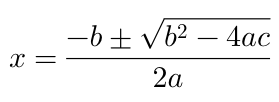
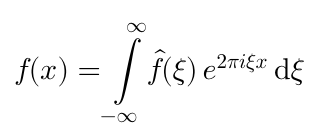
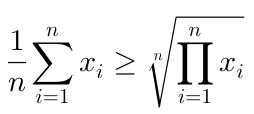
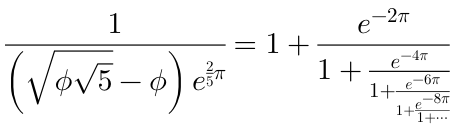
The EXAMPLES.md file contains more examples.
Requirements
iosMath requires iOS 18+ or macOS 15+. It depends on the following
Apple frameworks: Foundation, CoreGraphics, QuartzCore, CoreText, and
UIKit (iOS) or AppKit (macOS).
Installation
iosMath is distributed via Swift Package Manager.
In Xcode: File → Add Package Dependencies… and enter the repository URL.
In Package.swift:
dependencies: [
    .package(url: "https://github.com/kostub/iosMath.git", from: "2.0.0"),
],
targets: [
    .target(
        name: "YourTarget",
        dependencies: ["iosMath"]
    ),
]
Usage
Simple usage — UIKit / AppKit
Create an MTMathUILabel, set its latex property, and add it as a subview:
import iosMath

let label = MTMathUILabel()
label.latex = #"x = \frac{-b \pm \sqrt{b^2-4ac}}{2a}"#
view.addSubview(label)
Objective-C
@import iosMath;

MTMathUILabel *label = [[MTMathUILabel alloc] init];
label.latex = @"x = \\frac{-b \\pm \\sqrt{b^2-4ac}}{2a}";
[self.view addSubview:label];
Simple usage — SwiftUI
MTMathUILabel is a UIView/NSView subclass. Wrap it for SwiftUI using
UIViewRepresentable / NSViewRepresentable:
import SwiftUI
import iosMath

#if os(iOS)
struct MathView: UIViewRepresentable {
    let latex: String
    func makeUIView(context: Context) -> MTMathUILabel { MTMathUILabel() }
    func updateUIView(_ view: MTMathUILabel, context: Context) {
        view.latex = latex
    }
}
#elseif os(macOS)
struct MathView: NSViewRepresentable {
    let latex: String
    func makeNSView(context: Context) -> MTMathUILabel { MTMathUILabel() }
    func updateNSView(_ view: MTMathUILabel, context: Context) {
        view.latex = latex
    }
}
#endif
Then use it in any SwiftUI view:
MathView(latex: #"e^{i\pi} + 1 = 0"#)
    .frame(height: 50)
A complete cross-platform SwiftUI wrapper with font, color, and alignment
support is available in SwiftMathExample/MathLabel.swift.
Supported formula types
- Simple algebraic equations
- Fractions and continued fractions
- Exponents and subscripts
- Trigonometric formulae
- Square roots and n-th roots
- Calculus symbols — limits, derivatives, integrals
- Big operators (e.g. product, sum)
- Big delimiters (using
\leftand\right) - Greek alphabet
- Combinatorics (
\binom,\chooseetc.) - Geometry symbols (e.g. angle, congruence etc.)
- Ratios, proportions, percents
- Math spacing
- Overline and underline
- Math accents
- Matrices
- Equation alignment
- Bold, roman, caligraphic and other font styles (
\bf,\text, etc.) - Most commonly used math symbols
- Colors
Example app
A runnable Swift example app is in SwiftMathExample/.
It has two tabs: a curated Examples tab showing named formulae, and a
Gallery tab with the full rendering test suite.
Open SwiftMathExample.xcodeproj in Xcode, or build from the command line:
xcodebuild build -project SwiftMathExample.xcodeproj \
  -scheme SwiftMathExample \
  -sdk iphonesimulator \
  -destination 'platform=iOS Simulator,name=iPhone 16'
Advanced configuration
Math mode
MTMathUILabel supports Display mode (equivalent to $$ in LaTeX) and Text
mode (equivalent to $). The default is Display. To switch:
label.mode = .text
Objective-C
label.labelMode = kMTMathUILabelModeText;
Text alignment
The default alignment is left. To center or right-align:
label.textAlignment = .center
Objective-C
label.textAlignment = kMTTextAlignmentCenter;
Font size
The default font size is 20pt:
label.fontSize = 30
Font
The default font is Latin Modern Math. Three fonts are bundled; you can also use any OTF math font:
label.font = MTFontManager().termesFont(withSize: 20)
Objective-C
label.font = [[MTFontManager fontManager] termesFontWithSize:20];
Color
label.textColor = .red
To change the color of individual parts of the equation, access
label.displayList and set textColor on the specific display nodes.
Objective-C
label.textColor = [UIColor redColor];
Content insets
Content insets add padding between the rendered equation and the edges of the label's bounds. This is useful when the label sits flush against other elements and you need breathing room without adding a wrapper view:
// Add 10 pt of space on the left and 20 pt on the right.
label.contentInsets = UIEdgeInsets(top: 0, left: 10, bottom: 0, right: 20)
On macOS, use NSEdgeInsets instead of UIEdgeInsets.
Objective-C
label.contentInsets = UIEdgeInsetsMake(0, 10, 0, 20);
Custom commands
Define custom LaTeX commands (similar to macros):
MTMathAtomFactory.addLatexSymbol(
    "lcm",
    value: MTMathAtomFactory.largeOperator(named: "lcm", limits: false)
)
This makes \lcm available in any LaTeX string passed to MTMathUILabel.
Objective-C
[MTMathAtomFactory addLatexSymbol:@"lcm"
                            value:[MTMathAtomFactory operatorWithName:@"lcm" limits:NO]];
Error handling
If the LaTeX string is invalid or uses unsupported commands, the error is displayed inline by default. To suppress it:
label.displayErrorInline = false
Retrieve the error programmatically:
label.latex = #"\badcommand"#
if let error = label.error {
    print(error.localizedDescription)
}
Advanced usage — programmatic math model
For editors and other programmatic use cases you can build and inspect the
math model directly using MTMathList and related types, bypassing the
LaTeX parser entirely.
Parsing LaTeX
import iosMath

// Returns nil if the string cannot be parsed.
if let list = MTMathListBuilder.build(from: #"x^2 + y^2 = z^2"#) {
    for atom in list.atoms {
        print(atom.type, atom.nucleus)
    }
}
Convert an MTMathList back to LaTeX:
let latex = MTMathListBuilder.mathList(toString: list)
Building a list programmatically
import iosMath

// Build a fraction 1/2 without parsing LaTeX.
let num   = MTMathListBuilder.build(from: "1")!
let denom = MTMathListBuilder.build(from: "2")!
let frac  = MTMathAtomFactory.fraction(numerator: num, denominator: denom)

let mathList = MTMathList()
mathList.add(frac)

let label = MTMathUILabel()
label.mathList = mathList
Atom types and the math model
MTMathList is a linked list of MTMathAtom objects. Each atom has a type
(MTMathAtomType) that determines its rendering and spacing. Subclasses
carry additional structure:
| Type | Class | Description |
|---|---|---|
| Fraction | MTFraction |
Numerator and denominator lists |
| Radical | MTRadical |
Radicand and optional degree |
| Large operator | MTLargeOperator |
\sum, \int, etc. with limits |
| Inner | MTInner |
Embedded list with optional delimiters |
| Accent | MTAccent |
\hat, \vec, etc. |
Use MTMathAtomFactory to construct atoms:
let times     = MTMathAtomFactory.times()         // ×
let frac      = MTMathAtomFactory.fraction(numerator: num, denominator: denom)
let sqrt      = MTMathAtomFactory.placeholderSquareRoot()
let alpha     = MTMathAtomFactory.atom(forLatexSymbol: "alpha")
Future enhancements
- Support for explicit big delimiters (
\bigl,\bigr, etc.) - Additional plain TeX commands
Migration from 0.9.x
Version 2.0.0 is a breaking release. The following changes are required when upgrading from 0.9.x:
- Deployment targets raised: iOS 18+ and macOS 15+ are now required (previously iOS 9+ / macOS 10.12+).
- CocoaPods support removed: distribution is via Swift Package Manager only.
- Swift API renames (Objective-C names are unchanged)
Related projects
- MathEditor: A WYSIWYG math editor for iOS.
- MathSolver: A library for solving math equations.
License
iosMath is available under the MIT license. See the LICENSE file for details.
Fonts
The following fonts are bundled with this distribution:
- Latin Modern Math: GUST Font License
- Tex Gyre Termes: GUST Font License
- XITS Math: Open Font License