
Development Environment > Gebug
- A tool that makes debugging of Dockerized Go applications super easy by enabling Debugger and Hot-Reload features, seamlessly.
A tool that makes debugging of Dockerized Go applications super easy by enabling Debugger and Hot-Reload features, seamlessly.





Installation
Homebrew (Linux/macOS)
brew install gebug
Go (Linux/Windows/macOS/any other platform supported by Go)
If you have Go 1.16+, you can install latest released version of gebug directly from source by running:
go install github.com/moshebe/gebug@latest
Usage
➜ gebug --help
Gebug helps you setup a fully suited debugging environment of Go application running inside a container.
It enables options like connecting with remote debugger and breakpoints inside the code or
use hot-reload features which auto-build and run upon new change detected on the source code.

Usage:
  gebug [command]

Available Commands:
  clean       Clean Gebug stack
  destroy     Destroy the Gebug project
  help        Help about any command
  init        Initialize a Gebug project
  start       Start Gebug services
  ui          Start Gebug web UI
  version     Gebug's version

Flags:
  -h, --help             help for gebug
  -v, --verbose          enable verbose mode
  -w, --workdir string   your Go application root directory (default ".")

Use "gebug [command] --help" for more information about a command.
Version Requirements
- Go: 1.24+ (for building from source)
- Docker: 20.10+
- Docker Compose: 2.0+
Upgrading from v1.x
Breaking changes in v2.0:
- Go 1.24 minimum (was 1.16)
- Default runtime:
golang:1.23(wasgolang:1.20) - Web UI rewrite: Vue 3 + Vite (Vue 2 removed)
- Docker image: Distroless base (~30MB vs ~1.5GB)
To upgrade:
brew upgrade gebug
cd your-project
gebug destroy && gebug init  # Regenerates config with new defaults
Demo
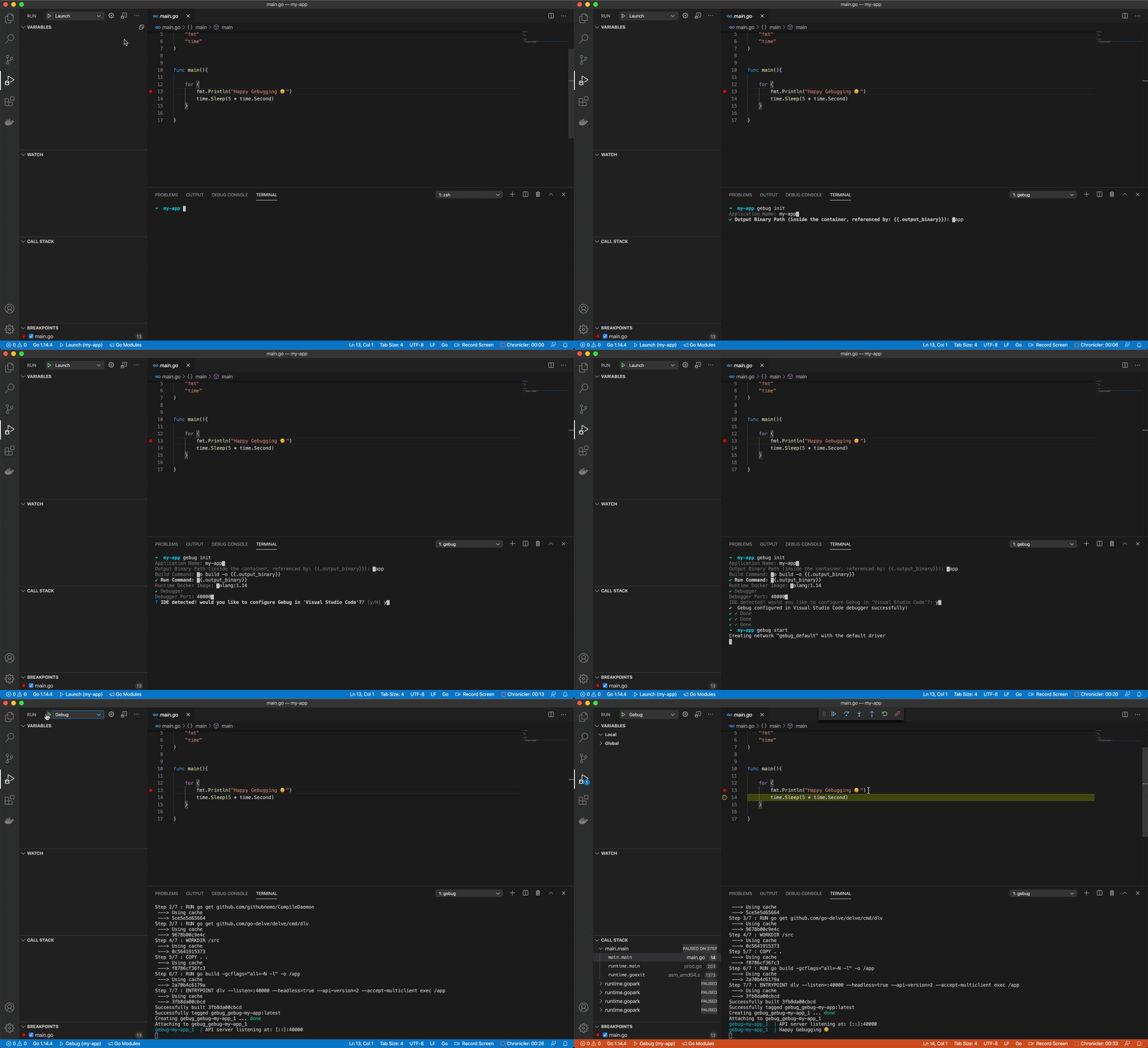
Configure workspace for Hot-Reload
Goland Debugger
Visual Studio Code Debugger
How Does It Work
Nothing special, no voodoo. Gebug just handles the Dockerfile and docker-compose configuration files generation with a easy-to-use command line utility.
You can find the generated files in your project under .gebug directory.
We are all programmers and I know you like to play with your toys, so feel free to edit any of those files in order to fit your use-case.
Just make sure to run gebug start --skip-generate so the next run won't override your changes.
Let's examine the config.yaml fields so you will feel more comfortable editing as you wish:
| Field | Default | Description |
|------------------ |---------------------------------------|----------------------------------------------------------------------------------------------------------------------------------------------------------------------------------------------------------------------------------------- |
| name | | application/project name |
| output_binary | /app | output binary artifact inside the runtime container |
| build_command | go build -o {{.output_binary}} | build command inside the runtime container. Note you can reference other configuration fields. When enabling Debugger -gcflags="all=-N -l" will be appended to the build command to stop compiler optimization and symbol removing |
| run_command | {.output_binary}} | run command, probably most of the time will just be the binary artifact path |
| runtime_image | golang:1.23 | base Docker image for the runtime container |
| debugger_enabled | false | whether to enable delve debugger inside the container or just use hot-reload |
| debugger_port | 40000 | delve debugger listen port, relevant only if debugger_enabled was set |
| expose_ports | [] | list of ports to expose inside the container. Uses the same syntax as docker-compose for mapping between host and container ports(e.g: "8080:8080"). No need to add the delve debugger listen port as it will be auto-added |
| networks | [] | list of docker external networks to join. if no network is selected, a new one will be created |
| environment | [] | list of environment variables to be set inside the container. Syntax: FOO=BAR or just FOO which will take the variable FOO from host and set it with its value |
Web UI
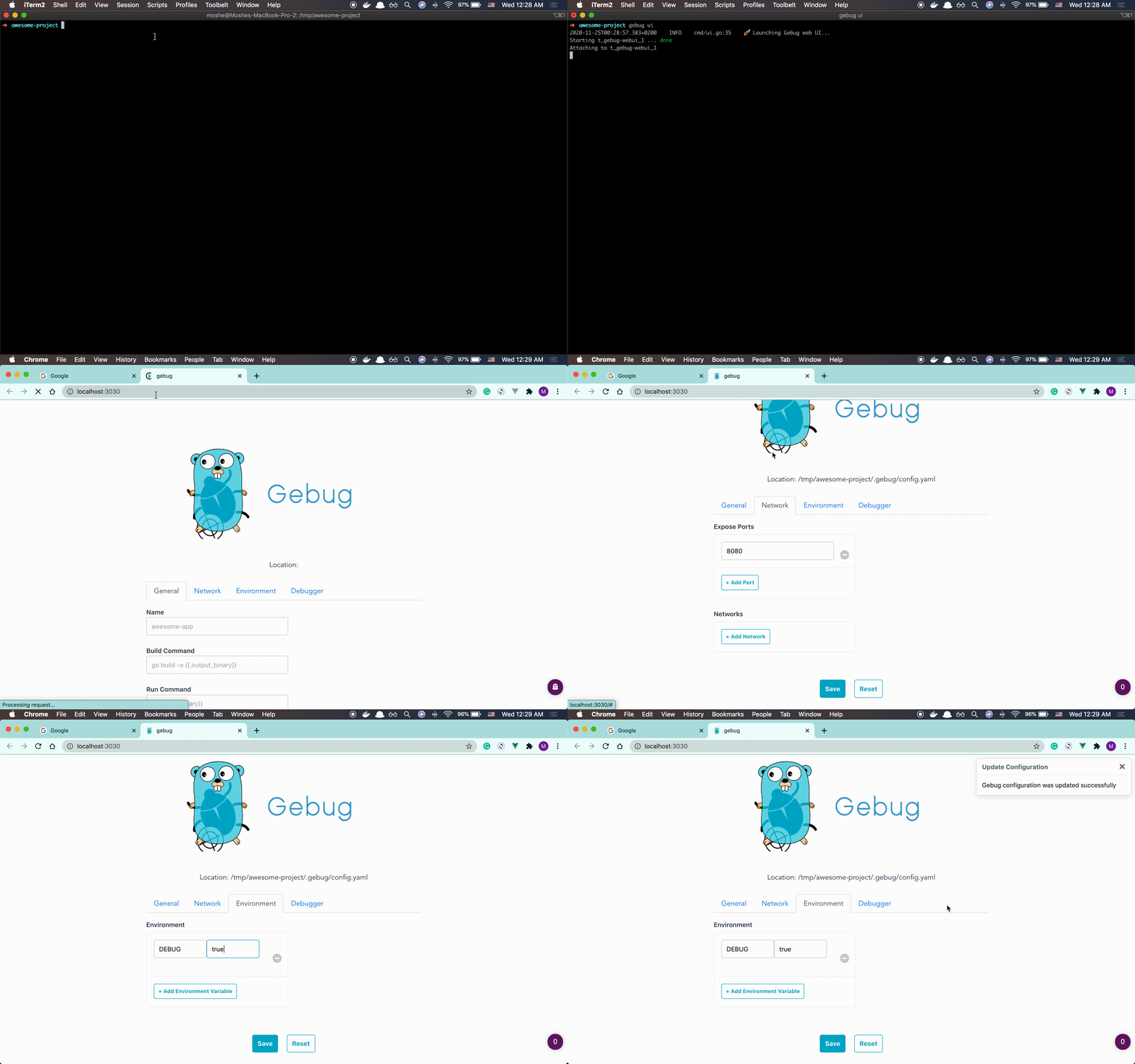
If you prefer a web interface over a terminal or YAML file, you can simply run the following command in your Gebug project directory
gebug ui
A simple web application will be opened and let you control the Gebug configuration of your project directly from your browser.
License
Gebug is released under the Apache 2.0 license. See LICENSE.