
General > claude-esp
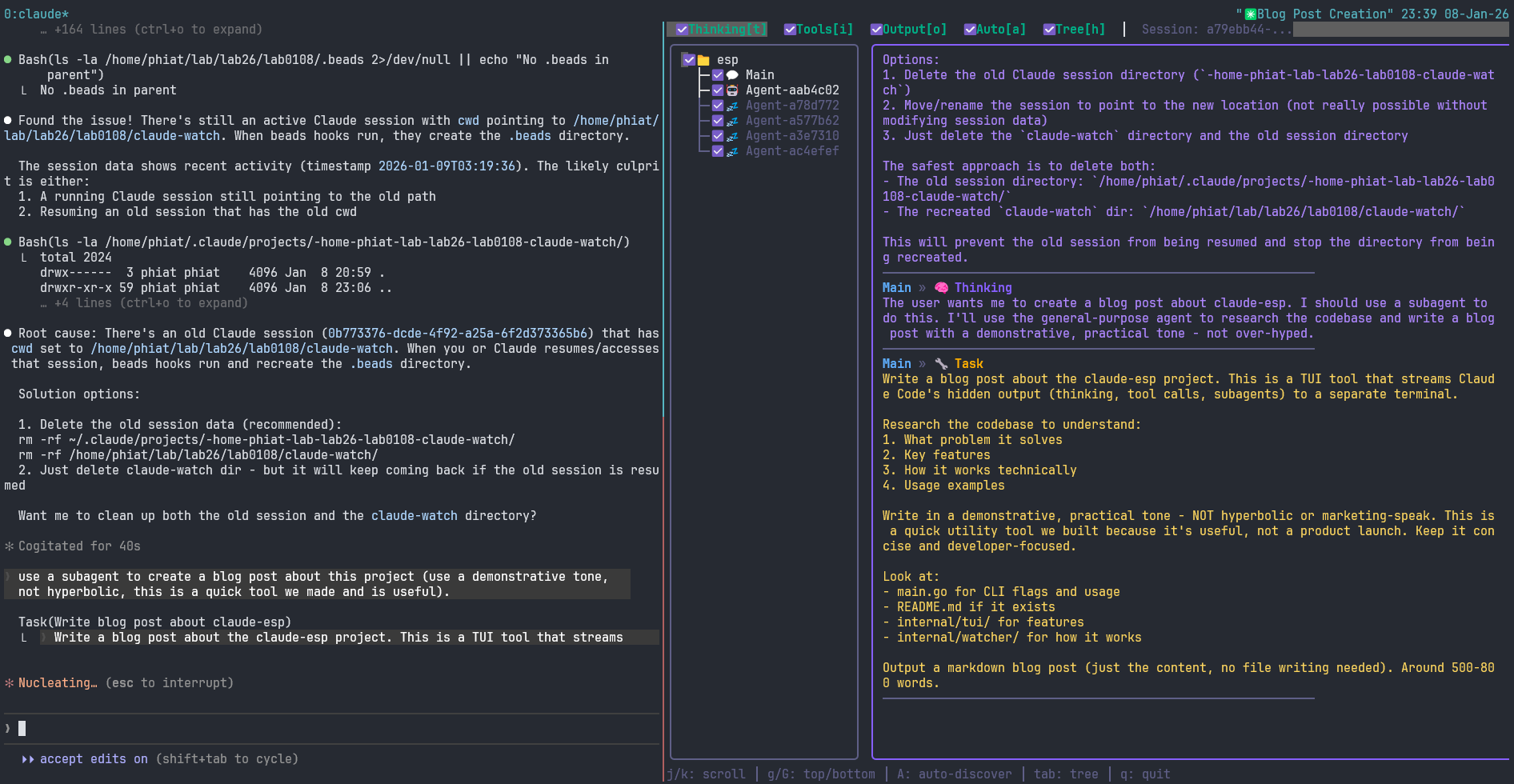
Go-based TUI that streams Claude Code's hidden output (thinking, tool calls, subagents) to a separate terminal. Watch multiple sessions simultaneously, filter by content type, and track background tasks. Ideal for debugging or understanding what Claude is doing under the hood without interrupting your main session.
claude-esp

Stream Claude Code's hidden output (thinking, tool calls, subagents) to a separate terminal in real-time.
Looking for the Rust port? See: claude-esp-rs
The Problem
When using Claude Code interactively, tool outputs and thinking are collapsed by default and require pressing Ctrl+O to toggle visibility. This tool lets you watch all that output in a separate terminal with a nice TUI, without interrupting your main Claude Code session.
Features
- Multi-session support - Watch all active Claude sessions simultaneously
- Hierarchical tree view - Sessions with nested Main/Agent nodes
- Real-time streaming - See thinking, tool calls, and outputs as they happen
- Subagent tracking - Automatically discovers and displays subagent activity
- Session events - Compaction boundaries, hook output, post-edit LSP diagnostics, and PR-link events surfaced inline
- Agent type labels - Shows agent types (Explore, code-reviewer, etc.) from
.meta.json - Token usage tracking - Cumulative input/output token counts in the header bar
- Tool execution duration - Shows how long each tool call took
- Background task visibility - See background tasks (⏳/✓) under spawning agent
- Filtering - Toggle visibility of thinking, tools, outputs per session/agent
- Auto-scroll - Follows new output, or scroll freely through history
Requirements
- Go 1.23 or later
Installation
# Install directly via go install
go install github.com/phiat/claude-esp@latest

# Or clone and build from source
git clone https://github.com/phiat/claude-esp.git
cd claude-esp
go build -o claude-esp .

# Optional: install to PATH
cp claude-esp ~/.local/bin/
Pre-built binaries
Download pre-built binaries from the Releases page. Available for Linux (amd64, arm64), macOS (amd64, arm64), and Windows (amd64).
Usage
# In your main terminal: run Claude Code as normal
claude

# In a second terminal/tmux pane: run the watcher
claude-esp
Options
| Option | Description |
|---|---|
-s <ID> |
Watch a specific session by ID |
-n |
Start from newest (skip history, live only) |
-l |
List recent sessions |
-a |
List active sessions |
-p <ms> |
Poll interval in ms (fallback mode only, default 500) |
-w <dur> |
Active window duration (default 5m, e.g. 30s, 2m) |
-m <N> |
Max sessions to show in tree (default 0 = unlimited) |
-c <dur> |
Auto-collapse sessions inactive ≥ dur (default 0 = disabled, e.g. 2m) |
-D |
Debug: surface raw type:subtype for every JSONL line type the parser would otherwise drop |
-v |
Show version |
-h |
Show help |
Environment Variables
| Variable | Description |
|---|---|
CLAUDE_HOME |
Override Claude config directory (default: ~/.claude) |
Examples
# Watch all active sessions
claude-esp

# Skip history, only show new output
claude-esp -n

# List active sessions
claude-esp -a

# Watch a specific session
claude-esp -s 0b773376

# Faster poll interval (200ms)
claude-esp -p 200

# List recent sessions
claude-esp -l
Keybindings
| Key | Action |
|---|---|
t |
Toggle thinking visibility |
i |
Toggle tool input visibility |
o |
Toggle tool output visibility |
x |
Toggle text/response visibility |
a |
Toggle auto-scroll |
h |
Hide/show tree pane |
A |
Toggle auto-discovery of new sessions |
tab |
Switch focus between tree and stream |
j/k/↑/↓ |
Navigate tree or scroll stream |
space |
On session: collapse/expand (pins on manual expand) · On agent: toggle visibility |
s |
Solo selected session/agent (toggle) |
enter |
Load background task output (when selected) |
g/G |
Go to top/bottom of stream |
q |
Quit |
Auto-Collapse
Run with -c 2m to automatically collapse sessions that have been idle for 2
minutes. Collapsed sessions show ▸ instead of ▾ in the tree and display the
count of hidden subagents (e.g. 📂▸ my-session (+2)). Children of collapsed
sessions are also filtered out of the stream pane — the whole point is to stop
sleeping sessions from dominating your view.
Press space on a collapsed session to expand it manually. Manual expansion
pins the session — it won't auto-collapse again until it wakes up (receives
new activity) and then goes idle once more. Press s to solo a session; if
it's collapsed, Solo force-expands and pins it so you can see its output.
How It Works
Claude Code stores conversation transcripts as JSONL files in:
~/.claude/projects/<project-path>/<session-id>.jsonl
Subagents are stored in:
~/.claude/projects/<project-path>/<session-id>/subagents/agent-<id>.jsonl
Background task outputs are stored in:
~/.claude/projects/<project-path>/<session-id>/tool-results/toolu_*.txt
The watcher:
- Discovers active sessions (modified in last 5 minutes)
- Uses OS-native filesystem notifications (fsnotify) to detect file changes in real-time (inotify on Linux, kqueue/FSEvents on macOS)
- Falls back to polling (configurable with
-p) on filesystems that don't support notifications (NFS, some cross-FS WSL2 setups) - Debounces rapid writes (50ms window) to efficiently handle burst output
- Parses JSON lines and extracts thinking/tool_use/tool_result
- Discovers background tasks and correlates them with spawning agents
- Renders them in a TUI with tree navigation and filtering
tmux Setup
Recommended tmux layout:
# Create a new tmux session with two panes
tmux new-session -s claude \; \
  split-window -h \; \
  send-keys 'claude-esp' C-m \; \
  select-pane -L \; \
  send-keys 'claude' C-m
Or add to your .tmux.conf:
bind-key C-c new-window -n claude \; \
  send-keys 'claude' C-m \; \
  split-window -h \; \
  send-keys 'claude-esp' C-m \; \
  select-pane -L
Then press prefix + Ctrl+C to open a Claude Code workspace.
Project Structure
claude-esp/
├── main.go                 # CLI entry point
├── internal/
│   ├── parser/
│   │   └── parser.go       # JSONL parsing
│   ├── watcher/
│   │   └── watcher.go      # File monitoring
│   └── tui/
│       ├── model.go        # Bubbletea main model
│       ├── tree.go         # Session/agent tree view
│       ├── stream.go       # Stacked output stream
│       └── styles.go       # Lipgloss styling
Development
Built with Bubbletea and Lipgloss. Issue tracking was done with beads.
# Run tests
go test ./...

# Build
go build -o claude-esp .

# Build with version injection
go build -ldflags "-X main.version=0.4.0" -o claude-esp .
License
MIT