
ICS/SCADA honeypots > GasPot
Veeder Root Gaurdian AST, common in the oil and gas industry.
GasPot v2.0 — Veeder-Root TLS ATG Honeypot
A honeypot that emulates a Veeder-Root TLS-350 / TLS-450 Automatic Tank Gauge (ATG) controller commonly found at gas stations worldwide. All connection attempts and commands are logged for threat-intelligence collection.
Originally created by Kyle Wilhoit and Stephen Hilt — modernised in 2026 with expanded command support, structured logging, and cleaner architecture.
What's New in v2.0
| Area | Before (v1) | After (v2) |
|---|---|---|
| Commands | 5 inquiry + S602xx | 21 inquiry + 3 set/write command families |
| Architecture | Globals + string concatenation | Dataclasses (Tank, StationState) + clean handler functions |
| Logging | Manual file.write() | Python logging module with dual output (file + console) |
| JSON Logs | No | --json-log flag for SIEM / Splunk / ELK ingest |
| Code duplication | S602xx copy-pasted 5× | Single consolidated cmd_S602xx() handler |
| Graceful shutdown | Ctrl-C sometimes leaked sockets | Signal handlers (SIGINT/SIGTERM) + clean socket teardown |
| Socket handling | send() (partial writes possible) |
sendall() for reliable delivery |
| SO_REUSEADDR | No (port stuck after restart) | Yes |
| Error handling | Bare except Exception |
Targeted exception types with proper logging |
| Docker | Python 3 Alpine 3.18 | Removed — see note below |
| Python | 3.x (minimal) | 3.10+ (type hints, f-strings, dataclasses) |
Supported Veeder-Root TLS Commands
Inquiry Commands (read-only)
| Command | Description |
|---|---|
I10100 |
System Status Report — serial #, software version, power/battery/printer status |
I10200 |
System Configuration — tanks, capacity, language, units |
I11100 |
Priority Alarm History Report — recent alarm events with category, type, state, timestamps (per manual 576013-635, Function Code 111) |
I20100 |
In-Tank Inventory — volume, TC volume, ullage, height, water, temp (most commonly probed) |
I20200 |
Delivery Report — fuel delivery start/end, amounts |
I20300 |
In-Tank Leak Detect Report |
I20400 |
Shift Report — starting/ending values, totals |
I20500 |
In-Tank Status Report — alarm states per tank |
I20600 |
In-Tank Alarm History — timestamped alarm/clear events |
I20700 |
In-Tank Diagnostic Report — probe, sensor, leak status |
I20800 |
Tank Test Results — last test date, pass/fail, leak rate |
I20900 |
Tank Tightness Test Results — precision test data |
I21400 |
Overfill/High Product Alarm History — timestamps, gallon levels |
I25100 |
Line Leak Test Results |
I30100 |
Sensor Status Report — sump/dispenser pan sensors |
I30200 |
Sensor Alarm History |
I60100 |
Tank Configuration Data — capacity, diameter, alarm thresholds |
I50100 |
Date/Time Query — current date, time, day of week (recon scanning) |
I60200 |
Tank Product Label Configuration |
I60900 |
Sensor Configuration Data |
I90200 |
Alarm Reset — logged as WARNING; active tampering attempt |
Set Commands (write — high-value honeypot events)
| Command | Description |
|---|---|
S50100 |
Set Date/Time — logged as WARNING; attackers changing time is significant |
S60100 |
Set Station Name — logged as WARNING |
S6020x |
Set Product Label — S60200 sets all tanks, S60201–S60204 set individual tanks |
All set commands are logged at WARNING level because they represent active tampering attempts.
Quick Start
Bare Metal
# Clone
git clone https://github.com/sjhilt/GasPot.git
cd GasPot

# Configure
cp config.ini.dist config.ini
# Edit config.ini to localise station names, products, etc.

# Run
python3 GasPot.py

# With JSON logging for SIEM ingest
python3 GasPot.py --json-log --log /var/log/gaspot.json

# Quiet mode (no console output)
python3 GasPot.py --quiet --json-log
Docker
Note: A
Dockerfilewas previously included in this repository but was contributed by an external party. It has been removed from the project. If you need to run GasPot in a container, you are welcome to write your own Dockerfile, but please review and use any community-provided container configurations with caution.
Test a Command
# Send an In-Tank Inventory request (I20100)
echo -ne '\x01I20100\n' | nc localhost 10001
Example Output
Here's what the responses look like when you send commands to GasPot. These are the same formats a real Veeder-Root TLS system would return.
I20100 — In-Tank Inventory (most commonly probed)
I20100
04/30/2026 15:10

    SHELL STATION


IN-TANK INVENTORY

TANK PRODUCT             VOLUME TC VOLUME   ULLAGE   HEIGHT    WATER     TEMP
  1  SUPER                   1906        1916      4110    33.99      0.14    52.53
  2  UNLEAD                  1406        1415      3106    33.57      0.38    50.80
  3  DIESEL                   716         720      1958    20.05      0.55    52.21
  4  PREMIUM                 4412        4430      3108    54.56      0.40    54.15
I10100 — System Status
I10100
04/30/2026 15:10

    SHELL STATION


SYSTEM STATUS REPORT

       SERIAL# : 0000112233
  SOFTWARE VER : V364.200

  POWER STATUS : AC ON
  BATTERY      : OK
  PRINTER      : ACTIVE

  COMM 1       : ENABLED  IDLE
  COMM 2       : DISABLED
I50100 — Date/Time Query
I50100
04/30/2026 15:10

    SHELL STATION


  DATE: 04/30/2026
  TIME: 15:10:04
  DAY : THURSDAY
I11100 — Priority Alarm History
I11100
04/30/2026 15:10
    SHELL STATION


PRIORITY ALARM HISTORY

ID  CATEGORY  DESCRIPTION          ALARM TYPE           STATE    DATE    TIME
    SYSTEM                         BATTERY IS OFF       CLEAR   4-30-26  9:25AM
    SYSTEM                         BATTERY IS OFF       ALARM   4-30-26  9:10AM
I20200 — Delivery Report
I20200
04/30/2026 15:10


    SHELL STATION


DELIVERY REPORT

T 1:SUPER
INCREASE   DATE / TIME             GALLONS TC GALLONS WATER  TEMP DEG F  HEIGHT

      END: 04/30/2026 08:29         1906       1916   0.11      52.32   33.99
    START: 04/30/2026 08:19         602        605    0.13      52.53   15.02
   AMOUNT:                          1304       1311
I20500 — In-Tank Status
I20500
04/30/2026 15:10


    SHELL STATION


TANK   PRODUCT                 STATUS

  1    SUPER                                    NORMAL

  2    UNLEAD                                   NORMAL

  3    DIESEL                                   NORMAL

  4    PREMIUM                                  NORMAL
Command-Line Options
usage: GasPot.py [-h] [--config CONFIG] [--log LOG] [--json-log] [--quiet] [--version]

Options:
  --config CONFIG   Configuration file path (default: config.ini)
  --log LOG         Log file path (default: gaspot.log)
  --json-log        Emit logs as JSON lines (for SIEM/Splunk/ELK)
  --quiet           Suppress console output; log only to file
  --version         Show version and exit
Configuration
The config.ini file controls tank parameters, station identity, and network settings. Copy config.ini.dist to config.ini and customise:
[host]
tcp_ip = 0.0.0.0
tcp_port = 10001
buffer_size = 1024

[products]
product1 = SUPER
product2 = UNLEAD
product3 = DIESEL
product4 = PREMIUM

[stations]
list = ['SHELL STATION', 'BP FUELS', 'EXXON STATION', ...]

[parameters]
decimal_separator = .
low_temperature = 50
high_temperature = 60
min_h2o = 0
max_h2o = 9
min_height = 25
max_height = 75
min_vol = 1000
max_vol = 9050
min_ullage = 3000
max_ullage = 9999
Tip: Localise station names and product labels to match the region where you deploy the honeypot. This makes it harder for attackers to fingerprint it as a honeypot.
Log Format
Text (default)
2026-04-30T13:42:01Z [INFO] Connection from 192.168.1.50:54321
2026-04-30T13:42:01Z [INFO] CMD I20100 from 192.168.1.50
2026-04-30T13:42:15Z [WARNING] SET CMD S50100 from 10.0.0.5 payload='2604301200'
JSON (--json-log)
{"ts":"2026-04-30T13:42:01.123456Z","level":"INFO","msg":"CMD I20100 from 192.168.1.50","remote_ip":"192.168.1.50","command":"I20100"}
{"ts":"2026-04-30T13:42:15.789012Z","level":"WARNING","msg":"SET CMD S50100 from 10.0.0.5 payload='2604301200'","remote_ip":"10.0.0.5","command":"S50100"}
Architecture
GasPot.py
├── Data Model
│   ├── Tank          — dataclass for per-tank state (volume, temp, etc.)
│   └── StationState  — dataclass for station-wide state (name, tanks[], serial#)
├── Command Handlers
│   ├── cmd_I10100()  — System Status
│   ├── cmd_I20100()  — In-Tank Inventory
│   ├── ...           — 21 inquiry handlers
│   ├── cmd_S50100()  — Set Date/Time
│   ├── cmd_S60100()  — Set Station Name
│   └── cmd_S602xx()  — Set Product Labels (consolidated)
├── Command Registry
│   ├── INQUIRY_COMMANDS dict
│   └── SET_COMMANDS dict
├── Network Server
│   ├── run_server()      — select-based TCP loop with signal handling
│   ├── handle_command()  — parse SOH prefix, dispatch to handler
│   └── _handle_client()  — per-connection read/write
└── Entry Point
    └── main()            — arg parsing, config, logging, server start
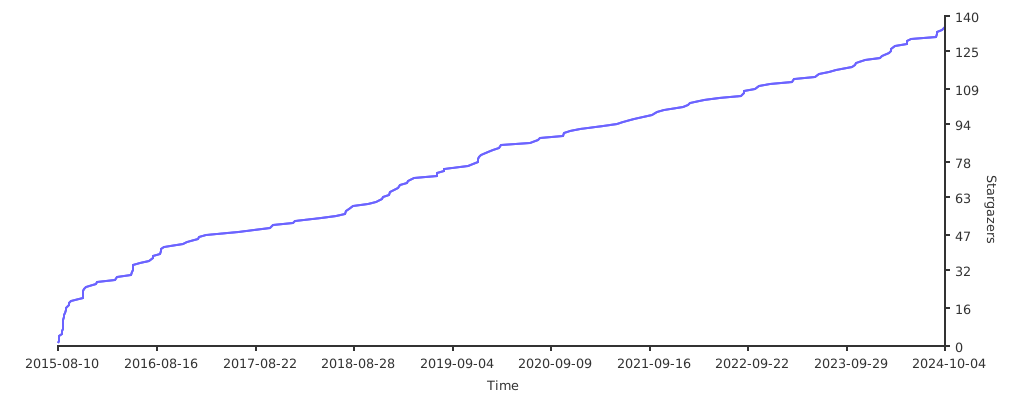
Stargazers over time
License
CC0 1.0 Universal — public domain.