
Gifit
Chrome extension to make a GIF from a YouTube video.

Making GIFs out of videos can be a bit of a pain. GIFit makes it ridiculously easy.
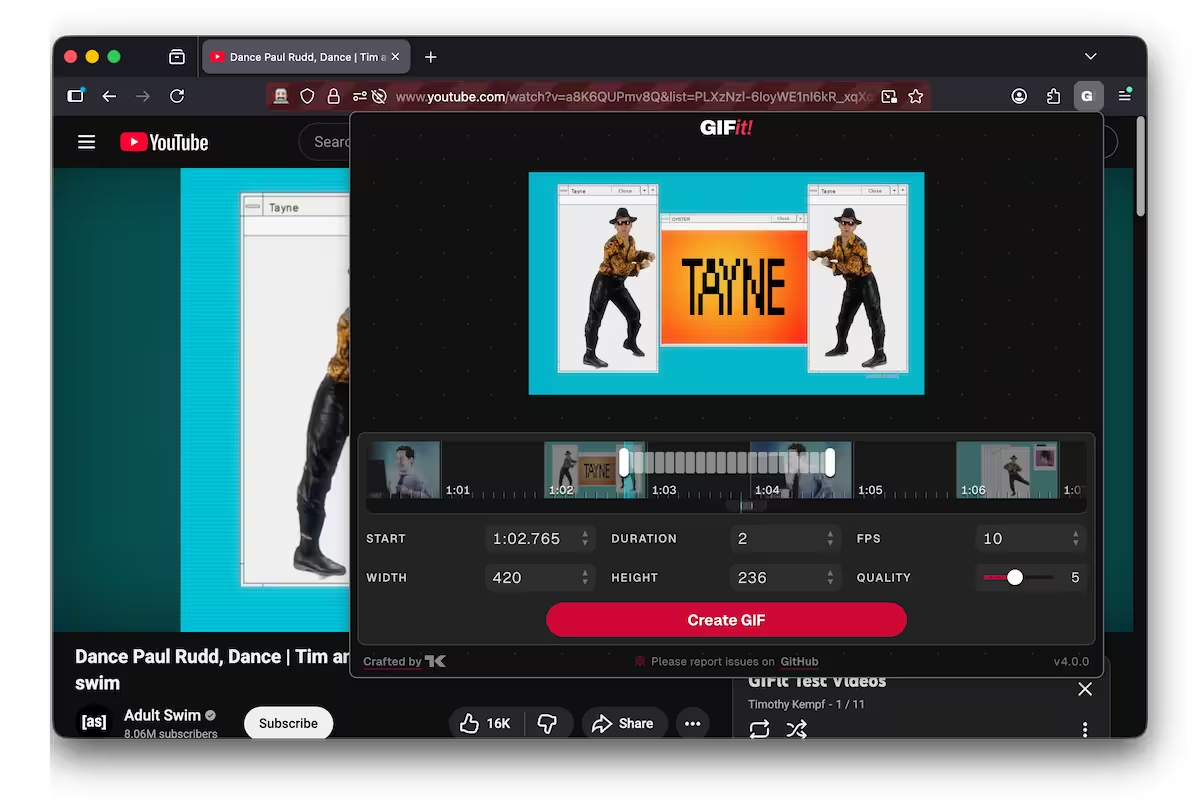
What is GIFit?
GIFit is a browser extension that seamlessly integrates with YouTube to provide an intuitive interface for creating high-quality GIFs. With GIFit, you can create a GIF out of any segment of a YouTube video, without ever leaving the browser.
How to Use
- Navigate to any YouTube video.
- You can launch GIFit in two ways:
- Click the "GIFit!" button located directly inside the YouTube video player's toolbar.
- Right-click anywhere on the page and select "Create a GIF" from the context menu.
- The GIFit poup will open. Use the timeline or input fields to specify your desired start and end times.
- Configure options like width, height, framerate, and quality.
- Click Create GIF to start processing, wait for the progress bar, and then save your new GIF!
Where to Download
Chrome Web Store (Easy Mode)
You can install the latest production version of GIFit! from the Chrome Web Store.
Compile GIFit from Source (Hard Mode)
If you prefer to build the extension yourself:
- Clone this repository, or download the ZIP file and extract it.
- Install Node.js (which includes npm) if you haven't already.
- Open your terminal, navigate to the cloned repository directory, and run
npm installto install the project dependencies. - Run
npm run extension:buildto build the extension. The unpacked extension files will be located in thepackages/extension/.output/chrome-mv3/directory. - For Chrome:
- Navigate to
chrome://extensions/. - Enable "Developer mode" (usually a toggle in the top right).
- Click "Load unpacked" and select the
packages/extension/.output/chrome-mv3directory.
- Navigate to
- Navigate to YouTube. You should now be able to use the extension.
Contributing
GIFit is structured as a monorepo utilizing npm workspaces.
The project uses WXT (powered by Vite) for the extension, React, TypeScript, and CSS Modules.
The project is pretty locked down, so as long as your new code lints, compiles, and passes the tests you should be fine.
Repository Structure
packages/extension/: The browser extension (WXT).packages/web/: A promotional/documentation website (Vite).packages/shared/: Shared React components, hooks, and logic.
Working on the Extension
The core browser extension is located in packages/extension/.
To build and run the extension locally:
- Ensure you have installed dependencies from the root directory (
npm install). - Run
npm run extension:devto build the extension and start a development server with hot reloading. The unpacked extension files will be located in thepackages/extension/.output/chrome-mv3/directory. You may need to install and configure the test browser before this works properly. - A debug browser should open with GIFit preloaded. Select it from the toolbar extension menu, or right-click the page and select "Create a GIF".
To build the extension for production, run npm run extension:build from the project root.
Working on the Website
The project includes a promotional and documentation website located in packages/web/.
To build and run the website locally:
- Ensure you have installed dependencies from the root directory (
npm install). - Run
npm run website:devto start the local Vite development server. - Open your browser to the URL provided in your terminal (usually
http://localhost:5173).
To build the website for production, run npm run website:build.
Commands
The root package.json defines several npm scripts for development:
npm install: Install dependencies for all workspaces.npm run extension:dev: Starts the WXT development server for the Chrome extension with hot reloading.npm run extension:dev:firefox: Starts the WXT development server for the Firefox extension.npm run extension:build: Builds the Chrome extension for production.npm run extension:build:firefox: Builds the Firefox extension for production.npm run extension:zip: Builds and zips the Chrome extension.npm run extension:zip:firefox: Builds and zips the Firefox extension.npm run website:dev: Starts the Vite development server for the website.npm run website:build: Builds the website for production.npm run validate: Runs the linter and TypeScript compiler.npm run test: Runs Vitest unit tests across all packages.npm run test:e2e: Runs Playwright end-to-end tests.npm run lint: Lints the codebase using ESLint.
When fixing bugs or adding features, please make NEW BRANCHES and submit pull requests. Please follow the existing code style, ensure npm run validate passes without errors, and add tests for any new functionality. If you have any problems with the extension, please file issues!