
willyelm/pulse.nvim
A single entrypoint for commands. Use prefixes to quickly access diagnostics, Git and more via pickers.

Pulse.nvim
One entry point. Total focus.
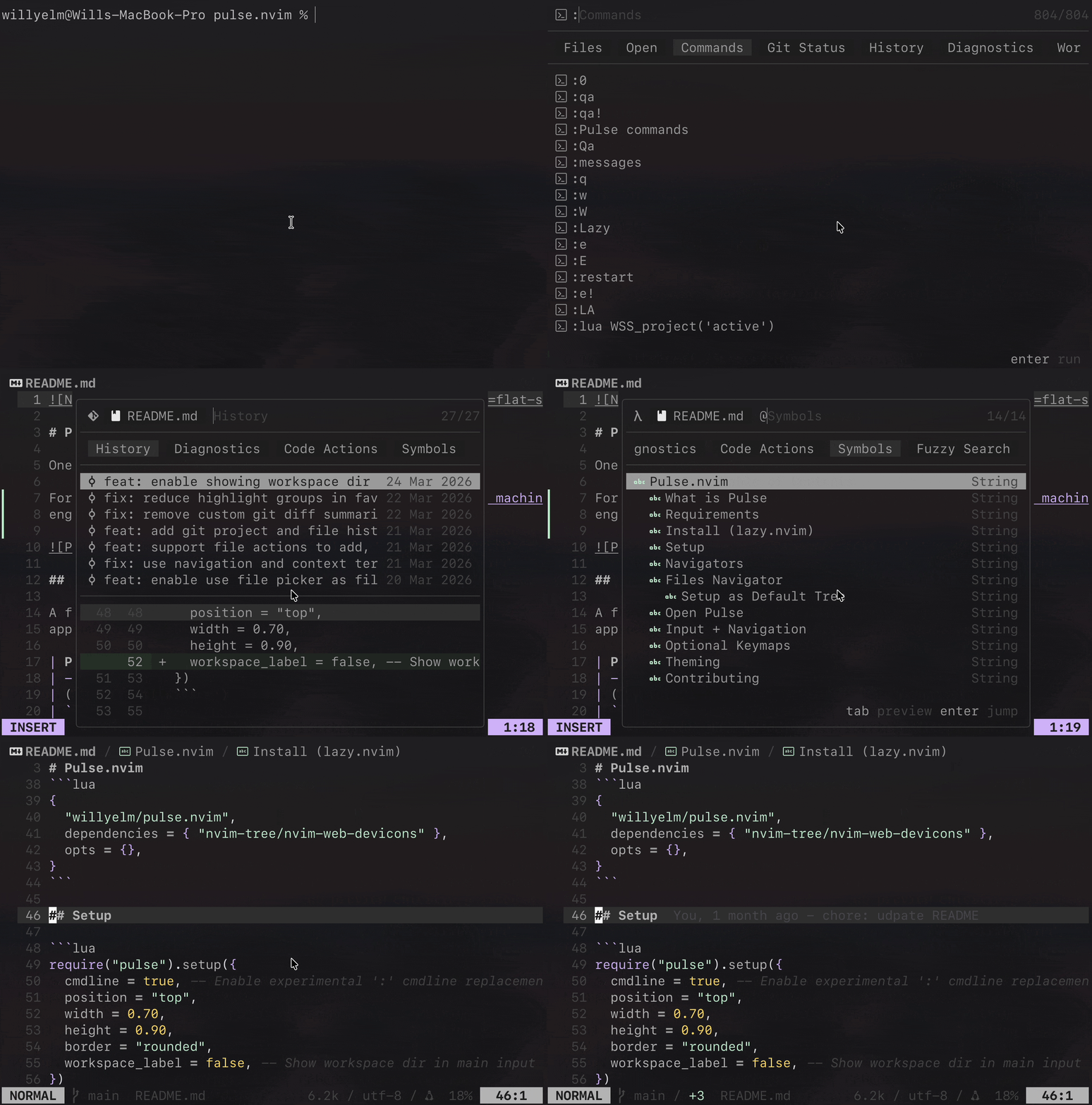
What is Pulse
A fast command palette for Neovim. Pulse uses a prefix approach to move quickly between navigator modes:
| Prefix | Mode |
|---|---|
| (no prefix) | files |
: |
commands |
~ |
git |
! |
diagnostics |
@ |
symbols (current buffer) |
# |
workspace symbols |
$ |
live grep |
? |
fuzzy search (current buffer) |
> |
code actions (current buffer) |
For more on the design motivation, see:
Requirements
- Neovim
>= 0.10 ripgrep(rg)git(for git panels and previews)nvim-tree/nvim-web-devicons(optional, recommended)
Install (lazy.nvim)
{
  "willyelm/pulse.nvim",
  dependencies = { "nvim-tree/nvim-web-devicons" },
  opts = {},
}
Setup
require("pulse").setup({
  cmdline = true, -- Enable experimental ':' cmdline replacement
  position = "top",
  width = 0.70,
  height = 0.90,
  border = "rounded",
  workspace_label = false, -- Show workspace dir in main input
})
Navigators
Navigators are the different modes you can enter in Pulse. Each navigator has its own data source, display, and actions.
You can configure which navigators to load and their config options.
Default navigators (all loaded if not specified):
files- Project files and opened bufferscommands- Vim commandsgit- Git status and project and file historydiagnostics- LSP diagnosticscode_actions- Code actions (current buffer)symbols- Symbols (current buffer)workspace_symbols- Workspace symbolslive_grep- Search with ripgrepfuzzy_search- Fuzzy search (current buffer)
To load a specific set only:
require("pulse").setup({
  navigators = { "files", "commands", "git" },
})
Each navigator can receive its own config directly through navigators:
require("pulse").setup({
  navigators = {
    files = {
      icons = false,
      filters = { "^%.git$", "%.DS_Store$" },
      git = {
        enable = true,
        ignore = false,
      },
    },
  },
})
Current files options:
iconsicon_colorfiltersgit.enablegit.ignoreopen_on_directory
Files Navigator
Pulse files navigator shows project files and opened buffers. It can be used as a file explorer and replace netrw.
Setup as Default Tree
To open Pulse files instead of netrw for directory buffers like nvim .,
set the netrw globals before setup and enable open_on_directory on
the files navigator:
-- Set in your vim config
vim.g.loaded_netrw = 1
vim.g.loaded_netrwPlugin = 1
-- Plugin
require("pulse").setup({
  navigators = {
    files = {
      open_on_directory = true,
    },
  },
})
With lazy.nvim:
-- Set in your vim config
vim.g.loaded_netrw = 1
vim.g.loaded_netrwPlugin = 1
-- Lazy plugin config
{
  "willyelm/pulse.nvim",
  lazy = false,
  dependencies = {
    "nvim-tree/nvim-web-devicons",
  },
  opts = {
    cmdline = true,
    position = "top",
    height = 0.9,
    width = 0.7,
    workspace_label = false,
    navigators = {
      files = {
        open_on_directory = true,
      },
    },
  },
}
Open Pulse
:Pulse:Pulse files:Pulse commands:Pulse git:Pulse diagnostics:Pulse code_actions:Pulse symbols:Pulse workspace_symbols:Pulse live_grep:Pulse fuzzy_search
Input + Navigation
<Down>/<C-n>: next item (from input)<Up>/<C-p>: previous item (from input)<Left>/<Right>:- from input: switch panels when the cursor is at the end of the input
- from list: switch panels directly
Esc: close navigator<Tab>:- files:
- folder: enter folder scope
- file: preview in source window and enter buffer scope
- symbols/workspace symbols: jump to location (navigator stays open)
- live grep/fuzzy search: open/jump to location (navigator stays open)
- diagnostics: jump to location (navigator stays open)
- commands: replace input with selected command
- git: preview/jump depending on the current git panel item
- files:
<CR>: submit/open and close navigator- selection wraps from last->first and first->last
When a scope token is present:
- first backspace removes the current panel prefix
- next backspace removes the scope token
In commands mode:
- No implicit first-item execution.
<CR>executes the selected command only after explicit navigation.- Otherwise
<CR>executes the typed command.
Optional Keymaps
vim.keymap.set("n", "<leader>p", "<cmd>Pulse<cr>", { desc = "Pulse" })
vim.keymap.set("n", "<leader>pg", "<cmd>Pulse git<cr>", { desc = "Pulse Git" })
vim.keymap.set("n", "<leader>pd", "<cmd>Pulse diagnostics<cr>", { desc = "Pulse Diagnostics" })
vim.keymap.set("n", "<leader>pc", "<cmd>Pulse code_actions<cr>", { desc = "Pulse Code Actions" })
vim.keymap.set("n", "<leader>ps", "<cmd>Pulse symbols<cr>", { desc = "Pulse Symbols" })
vim.keymap.set("n", "<leader>pw", "<cmd>Pulse workspace_symbols<cr>", { desc = "Pulse Workspace Symbols" })
vim.keymap.set("n", "<leader>pl", "<cmd>Pulse live_grep<cr>", { desc = "Pulse Live Grep" })
vim.keymap.set("n", "<leader>pf", "<cmd>Pulse fuzzy_search<cr>", { desc = "Pulse Fuzzy Search" })
Theming
Pulse mostly uses native Neovim highlight groups for color:
DiffAddDiffDeleteDiffChangeDirectoryLineNrTitle
Pulse-specific groups are only used where it needs custom UI treatment:
PulseDiffAddPulseDiffDeletePulseDiffNAdd- Secondary background for added lines in diffPulseDiffNDelete- Secondary background for deleted lines in diff
Example:
vim.api.nvim_set_hl(0, "PulseDiffAdd", { link = "DiffAdd" })
vim.api.nvim_set_hl(0, "PulseDiffDelete", { link = "DiffDelete" })