
Text > MarkdownDisplayView
A Markdown rendering component built on TextKit 2, providing smooth performance, rich customization options, and support for streaming AI-driven conversational interactions.
English | 中文
MarkdownDisplayView
A powerful iOS Markdown rendering component built on TextKit 2, providing smooth rendering performance and rich customization options. It also enables the streaming rendering of Markdown format in AI question-and-answer scenarios.
🚀 MarkdownDisplayView delivers streaming rendering effects comparable to leading AI terminal iOS clients like ChatGPT, Claude, Doubao, DeepSeek, and Grok, while offering even richer customization features and configuration options.
Contents
- Effects Showcase
- Demo Effects
- Features
- Requirements
- Installation
- Quick Start
- Custom Configuration
- Table of Contents
- Supported Markdown Syntax
- Complete Example
- Performance Optimization
- Advanced Usage
- Custom Extensions
- Troubleshooting
- Changelog
- Contributing
- License
- Author
- Acknowledgments
- Contact
Effects Showcase
Demo Effects
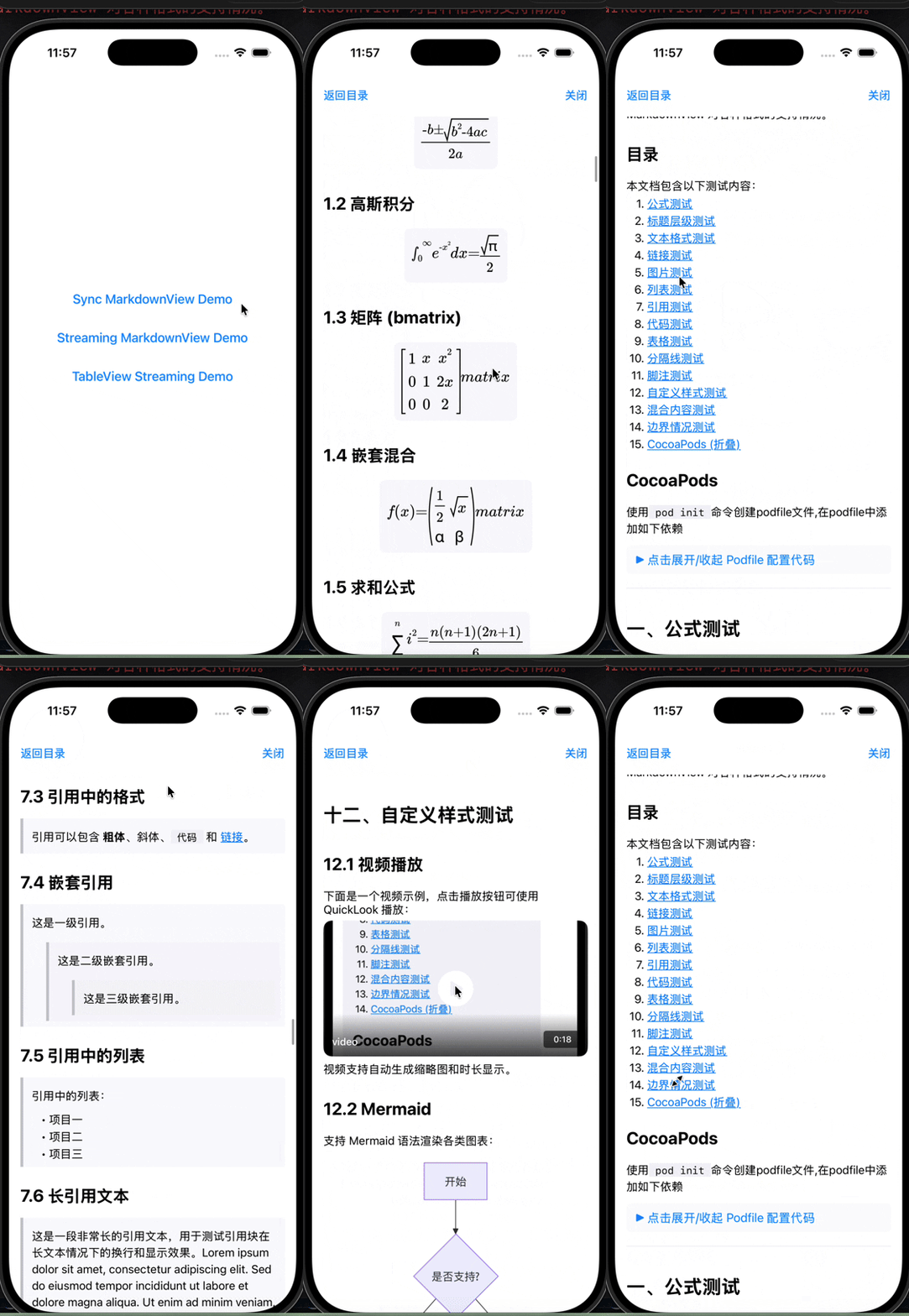
Normal Rendering
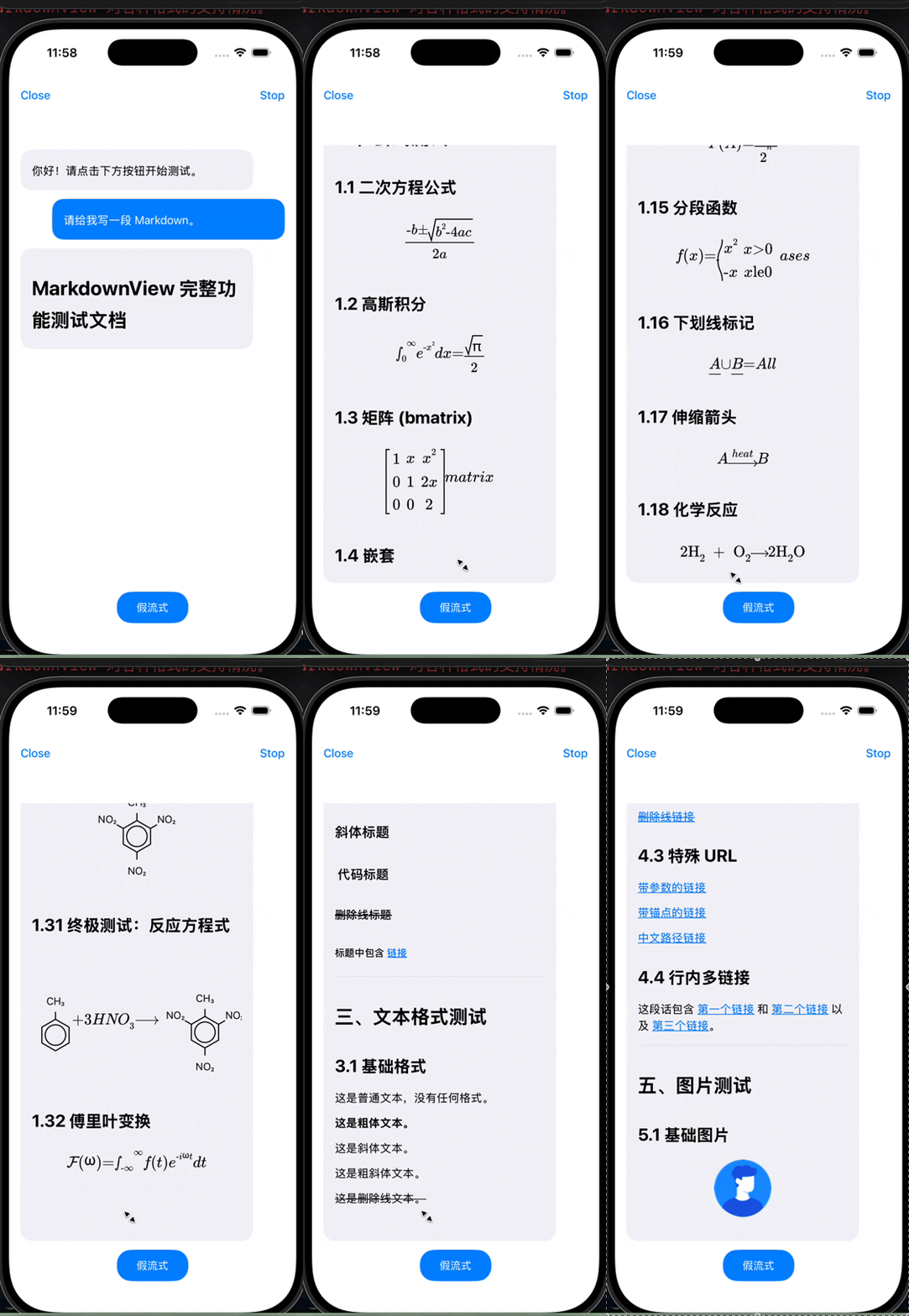
Streaming Rendering
- Simulated streaming
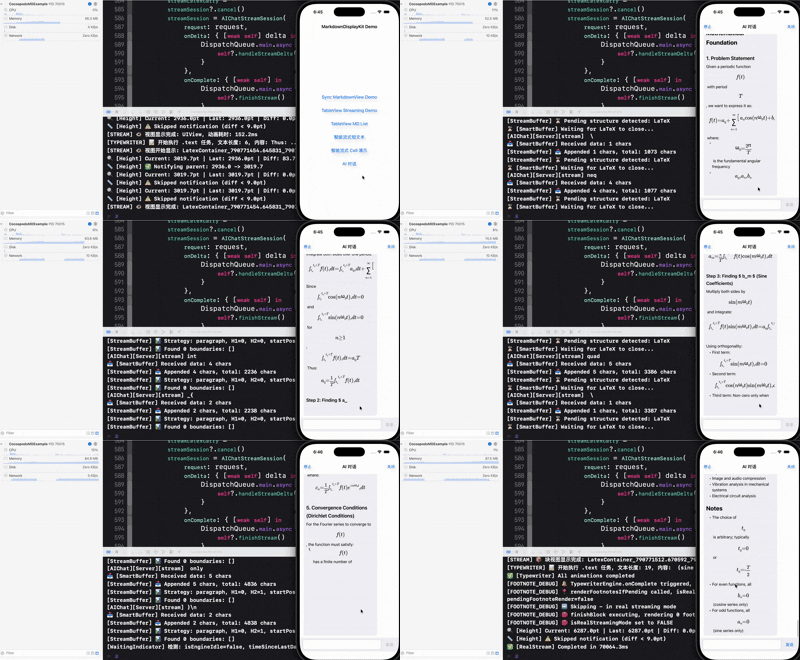
- Chat with AI model
Config.local.json structure:
// {
//   "host": "https://api.deepseek.com",
//   "path": "/chat/completions",
//   "apiKey": "",
//   "model": "deepseek-chat",
//   "systemPrompt": "You are a helpful assistant.",
//   "temperature": 0.7,
//   "stream": true,
//   "timeoutSeconds": 30
// }
Features
- 🚀 High-Performance Rendering — Based on TextKit 2, supports asynchronous rendering, incremental updates, streaming rendering, etc. Instant loading with ultra-fast first screen rendering.
- ⚡ Low CPU Usage — Streaming mode supports nested style rendering with CPU peak < 56% on iPhone 17 Pro simulator, averaging only 30%.
- 🎨 Full Markdown Support — Formula of LaTeX protocol, Headings, lists, tables, code blocks (with horizontal scrolling), blockquotes, images, and more.
- 🌈 Syntax Highlighting — Supports syntax highlighting for 20+ programming languages (Swift, Python, JavaScript, etc.).
- 📑 Automatic Table of Contents — Automatically extracts headings to generate an interactive TOC.
- 🎯 Highly Customizable — Comprehensive configuration for fonts, colors, spacing, etc.
- 🔌 Custom Extensions — Support for custom inline syntax parsing and code block renderers (e.g., Mermaid diagrams).
- 🔗 Event Callbacks — Link taps, image taps, TOC navigation.
- 📱 Native iOS — Built with UIKit and TextKit 2 for excellent performance.
- 🌓 Dark Mode — Built-in light and dark theme configurations.
- 📳 Haptic Feedback — Supports synchronized haptic feedback during streaming output for enhanced interaction experience.
Requirements
- iOS 15.0+ (due to TextKit 2 requirement)
- Swift 5.9+
- Xcode 16.0+
Installation
Swift Package Manager
Method 1: Add via Xcode
- Open your project in Xcode.
- Choose
File→Add Package Dependencies... - Enter the repository URL:
https://github.com/zjc19891106/MarkdownDisplayView.git - Select the version and click
Add Package.
Method 2: In Package.swift
Add the dependency in Package.swift:
dependencies: [
    .package(url: "https://github.com/zjc19891106/MarkdownDisplayView.git", from: "1.7.2")
]
CocoaPods
Add the following lines to your Podfile:
pod 'MarkdownDisplayKit'
Then run:
pod install
Note: MarkdownDisplayKit depends on swift-markdown for Markdown parsing. Since swift-markdown is not yet available on CocoaPods trunk, you need to add it from the GitHub source as shown above.
Quick Start
Basic Usage
import UIKit
import MarkdownDisplayView

class ViewController: UIViewController {

    private let markdownView = ScrollableMarkdownViewTextKit()

    override func viewDidLoad() {
        super.viewDidLoad()

        // Add to view hierarchy
        view.addSubview(markdownView)
        markdownView.translatesAutoresizingMaskIntoConstraints = false
        NSLayoutConstraint.activate([
            markdownView.topAnchor.constraint(equalTo: view.safeAreaLayoutGuide.topAnchor),
            markdownView.leadingAnchor.constraint(equalTo: view.leadingAnchor),
            markdownView.trailingAnchor.constraint(equalTo: view.trailingAnchor),
            markdownView.bottomAnchor.constraint(equalTo: view.bottomAnchor)
        ])

        // Set Markdown content
        markdownView.markdown = """
        # Welcome to MarkdownDisplayView

        This is a **powerful** Markdown rendering component.

        ## Key Features
        - Full Markdown syntax support
        - Code syntax highlighting
        - Automatic table of contents generation
        - Asynchronous image loading

        ### Code Example

        ```swift
        let message = "Hello, World!"
        print(message)
        ```

        [Visit GitHub](https://github.com)
        """
    }
}
Handle Link Taps
markdownView.onLinkTap = { url in
    if UIApplication.shared.canOpenURL(url) {
        UIApplication.shared.open(url)
    }
}
Handle Image Taps
markdownView.onImageTap = { imageURL in
    print("Image tapped: \(imageURL)")
    // You can implement image preview functionality here
}
Custom Configuration
Using Preset Themes
// Use default light theme
markdownView.configuration = .default

// Use dark theme
markdownView.configuration = .dark
Custom Configuration
var config = MarkdownConfiguration.default

// Custom fonts
config.bodyFont = .systemFont(ofSize: 17)
config.h1Font = .systemFont(ofSize: 32, weight: .bold)
config.codeFont = .monospacedSystemFont(ofSize: 15, weight: .regular)

// Custom colors
config.textColor = .label
config.linkColor = .systemBlue
config.linkUnderlineEnabled = false    // Disable link underline
config.codeBackgroundColor = .systemGray6
config.blockquoteTextColor = .secondaryLabel

// Custom spacing
config.paragraphSpacing = 16
config.headingSpacing = 20
config.imageMaxHeight = 500
config.lineSpacing = MarkdownLineSpacingConfiguration(
    body: 6,
    heading: 8,
    quote: 6,
    codeBlock: 4
)

// Apply configuration
markdownView.configuration = config
Complete Configuration Options
Font Configuration
public var bodyFont: UIFont              // Body font
public var h1Font: UIFont                // H1 heading font
public var h2Font: UIFont                // H2 heading font
public var h3Font: UIFont                // H3 heading font
public var h4Font: UIFont                // H4 heading font
public var h5Font: UIFont                // H5 heading font
public var h6Font: UIFont                // H6 heading font
public var codeFont: UIFont              // Code font
public var blockquoteFont: UIFont        // Blockquote font
Color Configuration
public var textColor: UIColor                          // Text color
public var headingColor: UIColor                       // Heading color
public var linkColor: UIColor                          // Link color
public var linkUnderlineEnabled: Bool                  // Whether links display underline (default: true)
public var codeTextColor: UIColor                      // Code text color
public var codeBackgroundColor: UIColor                // Code background color
public var blockquoteTextColor: UIColor                // Blockquote text color
public var blockquoteBarColor: UIColor                 // Blockquote border color
public var tableBorderColor: UIColor                   // Table border color
public var tableHeaderBackgroundColor: UIColor         // Table header background
public var tableRowBackgroundColor: UIColor            // Table row background
public var tableAlternateRowBackgroundColor: UIColor   // Table alternate row background
public var horizontalRuleColor: UIColor                // Horizontal rule color
public var imagePlaceholderColor: UIColor              // Image placeholder color
public var footnoteColor: UIColor                      // Footnote color
public var tocTextColor: UIColor                       // TOC text color
public var detailsSummaryTextColor: UIColor            // Details summary text color
Spacing Configuration
public var paragraphSpacing: CGFloat       // Paragraph spacing
public var headingSpacing: CGFloat         // Heading spacing
public var listIndent: CGFloat             // List indentation
public var codeBlockPadding: CGFloat       // Code block padding
public var blockquoteIndent: CGFloat       // Blockquote indentation
public var imageMaxHeight: CGFloat         // Maximum image height
public var imagePlaceholderHeight: CGFloat // Image placeholder height
Line Spacing Configuration
public var lineSpacing: MarkdownLineSpacingConfiguration // Role-based line spacing config

public struct MarkdownLineSpacingConfiguration {
    public var body: CGFloat
    public var heading: CGFloat
    public var quote: CGFloat
    public var codeBlock: CGFloat
}
LaTeX Formula Configuration
public var latexFontSize: CGFloat          // LaTeX formula font size (default: 22)
public var latexAlignment: NSTextAlignment // LaTeX formula alignment (.left, .center, .right)
public var latexBackgroundColor: UIColor   // LaTeX formula background color
public var latexPadding: CGFloat           // LaTeX formula padding (default: 20)
Blockquote Configuration
public var blockquoteBackgroundColor: UIColor  // Blockquote background color
public var blockquoteBarWidth: CGFloat         // Blockquote left bar width (default: 4)
public var blockquoteContentSpacing: CGFloat   // Blockquote content spacing (default: 8)
public var blockquoteContentPadding: CGFloat   // Blockquote content padding (default: 12)
Table Configuration
public var tableMinColumnWidth: CGFloat    // Table minimum column width (default: 80)
public var tableMaxColumnWidth: CGFloat    // Table maximum column width (default: 200)
public var tableRowHeight: CGFloat         // Table row height (default: 44)
public var tableCellPadding: CGFloat       // Table cell padding (default: 16)
public var tableSeparatorHeight: CGFloat   // Table separator height (default: 1)
public var autoFixMalformedTables: Bool    // Auto-fix malformed table text from streaming/LLM output (default: true)
List Configuration
public var listItemSpacing: CGFloat        // List item spacing (default: 4)
public var listMarkerMinWidth: CGFloat     // List marker minimum width (default: 20)
public var listMarkerSpacing: CGFloat      // List marker to content spacing (default: 4)
public var listTopPadding: CGFloat         // Whole-list top padding (default: 0)
public var listBottomPadding: CGFloat      // Whole-list bottom padding (default: 0)
Details (Collapsible) Configuration
public var detailsSummaryFont: UIFont          // Details summary font
public var detailsSummaryTextColor: UIColor    // Details summary text color
public var detailsSummaryMinHeight: CGFloat    // Details summary minimum height (default: 40)
public var detailsContentPadding: CGFloat      // Details content padding (default: 12)
public var detailsSpacing: CGFloat             // Details internal spacing (default: 8)
Syntax Highlighting Configuration
public var syntaxColors: SyntaxHighlightColors      // Syntax highlighting colors (light theme)
public var syntaxColorsDark: SyntaxHighlightColors  // Syntax highlighting colors (dark theme)

// SyntaxHighlightColors structure
public struct SyntaxHighlightColors {
    public var keyword: UIColor       // Keyword color
    public var string: UIColor        // String color
    public var number: UIColor        // Number color
    public var comment: UIColor       // Comment color
    public var type: UIColor          // Type color
    public var function: UIColor      // Function color
    public var property: UIColor      // Property color
    public var preprocessor: UIColor  // Preprocessor color

    public static var xcode: SyntaxHighlightColors      // Xcode light theme
    public static var xcodeDark: SyntaxHighlightColors  // Xcode dark theme
}
Streaming Haptic Feedback Configuration
public var streamingHapticFeedbackStyle: StreamingHapticFeedbackStyle  // Haptic feedback style (default: .none)
public var streamingHapticMinInterval: TimeInterval                    // Minimum interval between haptics (default: 0.05s)

// StreamingHapticFeedbackStyle enum
public enum StreamingHapticFeedbackStyle {
    case none    // No haptic feedback (default)
    case light   // Light haptic feedback
    case medium  // Medium haptic feedback
    case heavy   // Heavy haptic feedback
    case soft    // Soft haptic feedback (iOS 13+)
    case rigid   // Rigid haptic feedback (iOS 13+)
}

// Usage example
var config = MarkdownConfiguration.default
config.streamingHapticFeedbackStyle = .light  // Enable light haptic feedback
config.streamingHapticMinInterval = 0.05      // 50ms minimum interval
markdownView.configuration = config
Table of Contents
Get Auto-Generated TOC
// Markdown content automatically parses headings to generate TOC
let tocItems = markdownView.tableOfContents

for item in tocItems {
    print("Level \(item.level): \(item.title)")
}
Generate TOC View
// Automatically generate clickable TOC view
let tocView = markdownView.generateTOCView()

// Add to interface
view.addSubview(tocView)
Scroll to Heading
// Scroll to corresponding position when TOC item is tapped
markdownView.onTOCItemTap = { item in
    markdownView.scrollToTOCItem(item)
}
Supported Markdown Syntax
Headings
# H1 Heading
## H2 Heading
### H3 Heading
#### H4 Heading
##### H5 Heading
###### H6 Heading
Text Formatting
**Bold text**
*Italic text*
***Bold and italic***
~~Strikethrough~~
`Inline code`
Lists
Unordered Lists
- Item 1
- Item 2
  - Nested item 2.1
  - Nested item 2.2
Ordered Lists
1. First item
2. Second item
   1. Nested 2.1
   2. Nested 2.2
Task Lists
- [x] Completed task
- [ ] Pending task
Links and Images
[Link text](https://example.com)

Blockquotes
> This is a blockquote
> Can contain multiple lines
>> Nested blockquotes are supported
Code Blocks
Supported programming languages for syntax highlighting:
- Swift, Objective-C
- JavaScript, TypeScript, Python, Ruby
- Java, Kotlin, Go, Rust
- C, C++, Shell, SQL
- HTML, CSS, JSON, YAML
- And more...
```swift
func greet(name: String) -> String {
    return "Hello, \(name)!"
}
print(greet(name: "World"))
```
Tables
| Column1 | Column2 | Column3 |
|---------|---------|---------|
| A1      | B1      | C1      |
| A2      | B2      | C2      |
Horizontal Rules
---
***
___
Details (Collapsible Sections)
<details>
<summary>Click to expand</summary>

This is the collapsed content
Can contain any Markdown syntax

</details>
Footnotes
This is text with a footnote[^1]

[^1]: This is the footnote content
Complete Example
Check out the complete example project in the Example/ExampleForMarkdown directory, which includes:
- All Markdown syntax rendering effects
- Custom configuration examples
- Event callback handling
- Performance testing
Run the example project:
cd Example/ExampleForMarkdown
open ExampleForMarkdown.xcodeproj
Performance Optimization
- Asynchronous Rendering - Markdown parsing and rendering execute in background queue, not blocking the main thread
- Incremental Updates - Uses Diff algorithm, only updates changed parts
- Lazy Image Loading - Images load asynchronously with caching mechanism
- Regex Caching - Syntax highlighting regex expressions are cached and reused
- View Reuse - Efficient view update strategy
Advanced Usage
Using Core View Directly (Without Scrolling)
let markdownView = MarkdownViewTextKit()
// You need to manage the scroll container yourself
Monitor Height Changes
let markdownView = MarkdownViewTextKit()

markdownView.onHeightChange = { newHeight in
    print("Content height changed to: \(newHeight)")
    // Can be used to dynamically adjust container height
}
// Set link tap callback
markdownView.onLinkTap = { [weak self] url in
    // Handle link tap
    if UIApplication.shared.canOpenURL(url) {
        UIApplication.shared.open(url)
    }
}
markdownView.onImageTap = { imageURL in
    // Get image if already loaded
    _ = ImageCacheManager.shared.image(for: imageURL)
}
markdownView.onTOCItemTap = { item in
    print("title:\(item.title), level:\(item.level), id:\(item.id)")
}
Using Scrollable View (Recommended)
let scrollableView = ScrollableMarkdownViewTextKit()
view.addSubview(scrollableMarkdownView)

scrollableMarkdownView.translatesAutoresizingMaskIntoConstraints = false

NSLayoutConstraint.activate([
    scrollableMarkdownView.topAnchor.constraint(
                equalTo: view.topAnchor, constant: 88),
    scrollableMarkdownView.leadingAnchor.constraint(equalTo: view.leadingAnchor),
    scrollableMarkdownView.trailingAnchor.constraint(equalTo: view.trailingAnchor),
    scrollableMarkdownView.bottomAnchor.constraint(equalTo: view.bottomAnchor),
])
// Built-in UIScrollView, automatically handles scrolling
scrollableMarkdownView.onLinkTap = { [weak self] url in
    // Handle link tap
    if UIApplication.shared.canOpenURL(url) {
        UIApplication.shared.open(url)
    }
}
scrollableMarkdownView.onImageTap = { imageURL in
    // Get image if already loaded
    _ = ImageCacheManager.shared.image(for: imageURL)
}
scrollableMarkdownView.onTOCItemTap = { item in
    print("title:\(item.title), level:\(item.level), id:\(item.id)")
}
scrollableMarkdownView.markdown = sampleMarkdown
// Back to table of contents
scrollableMarkdownView.backToTableOfContentsSection()
Streaming Markdown Display
- Other aspects are consistent with the scrollable markdown view above
    // Difference is in displaying content
    private func loadSampleMarkdown() {
        // Streaming render (typewriter effect)
        scrollableMarkdownView.startStreaming(
            sampleMarkdown,
            unit: .word,
            unitsPerChunk: 2,
            interval: 0.1,
        )
    }

    // If you need to show all content immediately (e.g., user clicks skip)
    @objc private func skipButtonTapped() {
        scrollableMarkdownView.markdownView.finishStreaming()
    }
Real-Time Streaming (LLM/Network APIs) - New in 1.5.0
For real-time streaming from LLM APIs (like ChatGPT, Claude) where content arrives in chunks:
class ChatViewController: UIViewController {
    private let scrollableMarkdownView = ScrollableMarkdownViewTextKit()

    // Start real streaming mode
    func startLLMStream() {
        scrollableMarkdownView.markdownView.startRealStreaming()
    }

    // Append chunks as they arrive from the API
    func onChunkReceived(_ chunk: String) {
        scrollableMarkdownView.markdownView.appendStreamContent(chunk)
    }

    // Call when stream completes
    func onStreamComplete() {
        scrollableMarkdownView.markdownView.finishStreaming()
    }
}
Recommended configuration for streaming AI chat in table/collection cells:
var config = MarkdownConfiguration.default
config.typewriterTextMode = .append
config.typewriterHeightUpdateInterval = 20
config.streamMinModuleLength = 20
scrollableMarkdownView.markdownView.configuration = config
Key Features:
- Smart Buffering: Automatically buffers incomplete Markdown structures (unclosed code blocks, tables, LaTeX)
isPlainText()Detection:MarkdownStreamBufferdetects non-Markdown content- Faster Plain Text Streaming: For plain text without Markdown markers, module submission can happen at
\nboundaries instead of strictly waiting for\n\n - Markdown Behavior Unchanged: Markdown content still waits for
\n\nparagraph boundaries - Incremental Rendering: Renders complete modules immediately while buffering incomplete content
- Typewriter Effect: Smooth character-by-character animation for rendered content
Custom Extensions
MarkdownDisplayKit supports custom extensions to add your own Markdown syntax and rendering.
Built-in Video Extension
Register the video extension in AppDelegate:
import MarkdownDisplayKit

func application(_ application: UIApplication, didFinishLaunchingWithOptions launchOptions: [UIApplication.LaunchOptionsKey: Any]?) -> Bool {
    // Register video extension
    MarkdownCustomExtensionManager.shared.registerVideoExtension()
    return true
}
Syntax: [video:filename]
## Video Demo

[video:myVideo]

Supported formats: .mov, .mp4, .m4v
Features:
- Auto-generates video thumbnail
- Displays video duration
- Click to play with QuickLook
Creating Custom Extensions
Implement three protocols to create your own extension:
1. Custom Parser
class MentionParser: MarkdownCustomParser {
    let identifier = "mention"
    let pattern = "@([a-zA-Z0-9_]+)"  // Regex pattern

    func parse(match: NSTextCheckingResult, in text: String) -> CustomElementData? {
        guard let range = Range(match.range(at: 1), in: text) else { return nil }
        let username = String(text[range])

        return CustomElementData(
            type: "mention",
            rawText: "@\(username)",
            payload: ["username": username]
        )
    }
}
2. Custom View Provider
class MentionViewProvider: MarkdownCustomViewProvider {
    let supportedType = "mention"

    func createView(
        for data: CustomElementData,
        configuration: MarkdownConfiguration,
        containerWidth: CGFloat
    ) -> UIView {
        let label = UILabel()
        label.text = data.rawText
        label.textColor = .systemBlue
        label.font = configuration.bodyFont
        label.backgroundColor = UIColor.systemBlue.withAlphaComponent(0.1)
        label.layer.cornerRadius = 4
        label.sizeToFit()
        return label
    }

    func calculateSize(
        for data: CustomElementData,
        configuration: MarkdownConfiguration,
        containerWidth: CGFloat
    ) -> CGSize {
        let text = data.rawText as NSString
        let size = text.size(withAttributes: [.font: configuration.bodyFont])
        return CGSize(width: size.width + 8, height: size.height + 4)
    }
}
3. Custom Action Handler
class MentionActionHandler: MarkdownCustomActionHandler {
    let supportedType = "mention"

    func handleTap(data: CustomElementData, sourceView: UIView, presentingViewController: UIViewController?) {
        guard let username = data.payload["username"] else { return }
        print("Navigate to user profile: \(username)")
    }
}
4. Register Extensions
let manager = MarkdownCustomExtensionManager.shared
manager.register(parser: MentionParser())
manager.register(viewProvider: MentionViewProvider())
manager.register(actionHandler: MentionActionHandler())
Supported Custom Syntax Patterns
| Extension | Syntax | Description |
|---|---|---|
| Video | [video:filename] |
Embed video with QuickLook playback |
| Mention* | @username |
User mention (example) |
| Emoji* | ::emoji_name:: |
Custom emoji (example) |
*Example implementations, not included by default
Code Block Renderers
In addition to inline syntax extensions, you can also create custom code block renderers for specific languages:
Mermaid Diagram Renderer Example
public final class MermaidRenderer: MarkdownCodeBlockRenderer {
    public let supportedLanguage = "mermaid"

    public func renderCodeBlock(
        code: String,
        configuration: MarkdownConfiguration,
        containerWidth: CGFloat
    ) -> UIView {
        // Use WKWebView to render Mermaid diagrams
        let view = MermaidWebView(code: code, frame: ...)
        return view
    }

    public func calculateSize(
        code: String,
        configuration: MarkdownConfiguration,
        containerWidth: CGFloat
    ) -> CGSize {
        // Estimate height based on diagram type
        return CGSize(width: containerWidth - 32, height: estimatedHeight)
    }
}
Register Code Block Renderer
let manager = MarkdownCustomExtensionManager.shared
manager.register(codeBlockRenderer: MermaidRenderer())
Supported Diagram Types (via Mermaid.js):
- Flowchart (flowchart/graph)
- Sequence Diagram (sequenceDiagram)
- Class Diagram (classDiagram)
- State Diagram (stateDiagram)
- Gantt Chart (gantt)
- Mind Map (mindmap)
Troubleshooting
1. Build Error: Cannot find UIKit
Problem: Build fails when using swift build on macOS
Solution: This library only supports iOS platform, must be built in Xcode targeting iOS simulator or device
2. Images Not Displaying
Problem: Images in Markdown don't display
Causes:
- Image URL is invalid or inaccessible
- Network permissions not configured
Solutions:
- Check network permission configuration in Info.plist
- Use valid image URLs
3. Swift Concurrency Warnings
Problem: Sendable-related warnings appear
Solution: Library is built with Swift 5.9 to avoid strict concurrency checking
Changelog
1.7.4 (2026-04-10)
- 📏 Height Measurement Stabilization - Hardened
notifyHeightChangewith width fallback, frame-height fallback, and transient-zero suppression to avoid0 ↔ actual heightjumps during initial layout or rapid updates. - 🌊 Paragraph-Level Streaming Fallback - Real streaming now emits single-heading or heading-less Markdown by paragraph boundaries when heading-based segmentation is unavailable, while skipping fenced code blocks.
- 📐 Whole-List Top/Bottom Padding - Added
listTopPaddingandlistBottomPaddingso the entire list wrapper can apply configurable top/bottom spacing without changing per-item layout.
1.7.2 (2026-04-04)
- ➕
isPlainText()Detection - AddedisPlainText()inMarkdownStreamBufferto identify non-Markdown content. - ⚡ Faster Plain-Text Output - For plain text without Markdown markers, modules can now be submitted at
\nboundaries instead of requiring\n\n, enabling faster typewriter output. - ✅ Markdown Flow Unchanged - Markdown content behavior is unchanged and still waits for
\n\nparagraph boundaries.
1.7.1 (2026-04-03)
- 🐛 Ordered List Height Consistency Fix - Fixed an issue where the first ordered-list item could be stretched taller than following items in some stack/reuse layouts.
- 🧱 List Layout Constraint Hardening - Adjusted list wrapper constraints (
bottom <=) and strengthened vertical hugging/compression priorities to prevent extra height from being absorbed by the first item. - 🧹 List Content Normalization - Added normalization/cleanup for invisible list text nodes (leading/trailing newlines, zero-width/control whitespace) to avoid phantom height.
1.7.0 (2026-04-03)
- 📊 Markdown Table Column Alignment - Added support for table alignment syntax (
:---,:---:,---:) and applied alignment per column. - 🛠 Malformed Table Auto-Fix - Added
autoFixMalformedTables(default:true) to normalize common broken table output (isolated|, accidental blank lines inside table blocks). - ✍️ Configurable Line Spacing - Added
lineSpacingconfiguration forbody,heading,quote,codeBlock, replacing fixed line spacing constants. - 🔗 Table Link Tap Callback - Table cells keep using
UILabelfor better scrolling performance; link tap now routes through table cell selection and triggers existingonLinkTap. - 🐛 Touch Routing Fix - Fixed gesture conflict where outer TextKit tap handling could swallow table attachment touches.
- ⚠️ Configuration Cleanup - Removed table-level alignment override config; table text alignment now follows Markdown table syntax (fallback: left).
1.6.9 (2026-03-17)
- 🔗 Link Underline Control - Added
linkUnderlineEnabledconfiguration option to control whether links display underlines- New property
linkUnderlineEnabled: BoolinMarkdownConfiguration(default:true) - Affects all link types: inline Markdown links (
[text](https://github.com/zjc19891106/MarkdownDisplayView/blob/HEAD/url)) and TOC navigation links - Root cause fix: Implemented
NSTextLayoutManagerDelegate.renderingAttributesForLink(_:at:defaultAttributes:)to properly intercept TextKit 2's built-in link rendering pipeline, which previously ignoredNSAttributedStringunderline attributes entirely
- New property
1.6.8 (2026-02-06)
- 📜 Code Block Horizontal Scrolling - Code blocks now support horizontal scrolling to view complete long code lines
- Implemented using
NSTextAttachmentViewProviderpattern, consistent with LaTeX formula and table rendering architecture - New
CodeBlockAttachmentandCodeBlockAttachmentViewProviderclasses for code block rendering - Code text no longer wraps; users can scroll horizontally to view full code content
- Maintains original syntax highlighting, background color, and corner radius styling
- Implemented using
1.6.2 (2026-02-05)
- 📳 Haptic Feedback Timing Optimization - Haptic feedback now syncs precisely with TypewriterEngine output rhythm
- Text haptics: Only triggers when
revealCharacteractually displays new characters - Block haptics: Triggers when block element animation completes (image, LaTeX, etc.)
- Removed unnecessary haptics for container views (
.show) and small elements (.label) - Haptic feedback no longer triggers on data arrival, but on actual content display
- Text haptics: Only triggers when
1.6.1 (2026-02-02)
- 📳 Streaming Haptic Feedback - Added haptic feedback support during streaming output for enhanced user experience
- New
StreamingHapticFeedbackStyleenum with options:.none,.light,.medium,.heavy,.soft,.rigid - New configuration options:
streamingHapticFeedbackStyle(feedback intensity) andstreamingHapticMinInterval(minimum interval) - Supports both real streaming (
appendStreamData,appendBlock) and fake streaming (startStreaming) modes
- New
1.6.0 (2026-01-30)
- 🎨 Comprehensive Configuration Options - Added extensive customization for all Markdown elements:
- LaTeX Formula:
latexFontSize,latexAlignment(left/center/right),latexBackgroundColor,latexPadding - Blockquote:
blockquoteBackgroundColor,blockquoteBarWidth,blockquoteContentSpacing,blockquoteContentPadding - Table:
tableMinColumnWidth,tableMaxColumnWidth,tableRowHeight,tableCellPadding,tableSeparatorHeight - List:
listItemSpacing,listMarkerMinWidth,listMarkerSpacing - Details:
detailsSummaryFont,detailsSummaryTextColor,detailsSummaryMinHeight,detailsContentPadding,detailsSpacing - Syntax Highlighting:
syntaxColors,syntaxColorsDarkwithSyntaxHighlightColorsstruct (keyword, string, number, comment, type, function, property, preprocessor) - TOC:
tocTextColor
- LaTeX Formula:
- 🐛 Bug Fix -
tableRowBackgroundColornow properly applied to table rows - 📝 Documentation - Updated README with complete configuration options
1.5.9 (2026-01-26)
- 🚀 Typewriter Append - Add
.appendmode with throttled height updates to reduce layout jumps during cell streaming - ⚙️ Streaming Config - Expose
typewriterTextMode,typewriterHeightUpdateInterval,streamMinModuleLength - 🧹 Memory Cleanup - Add cache clearing helpers and Mermaid WebView cleanup to reduce retained memory
- 🧪 Example Update - AI chat stream uses safer LaTeX normalization (code regions ignored) and recommended config
1.5.8 (2026-01-23)
- 📝 Docs Update - Refresh README content
- 🐛 SPM Fix - Fix simulator build error in Swift Package Manager example project
1.5.2 (2026-01-08)
- 🐛 Crash Fix - Serialize
swift-markdownparsing to avoidcmark_parser_attach_syntax_extensionrace crash in concurrent renders - 🧹 Reuse Safety - Add
resetForReuse()to clear internal caches/state forUITableViewCellreuse scenarios - 🧪 Example Update - Add crash reproduction screen and incremental row insert demo for table view usage
1.5.1 (2026-01-07)
- 🐛 Bug Fix - Fixed potential crash when processing Unicode characters (emoji, CJK characters) in streaming mode
MarkdownStreamBuffer.extractModule: Use safe string index withlimitedByto prevent out-of-bounds crashTypewriterEngine.calculateDelay: Use safe string index to prevent crash when calculating delay for special characters
1.5.0 (2026-01-04)
- 🚀 Real Streaming Support - New
MarkdownStreamBufferfor intelligent real-time streaming from network/LLM APIs- Smart module detection: automatically detects complete Markdown blocks (headings, code blocks, tables, LaTeX)
- Handles incomplete structures: waits for closing tags before rendering (e.g., unclosed ``` or $$)
- Incremental rendering: renders complete modules immediately while buffering incomplete content
- 💫 Smart Waiting Indicator - In real streaming mode, automatically shows waiting animation when TypewriterEngine queue is empty and no network data arrives
- 🏗️ Code Refactoring - Extracted
MarkdownTextViewTK2,MarkdownStreamBuffer, andTypewriterEngineinto separate files for better maintainability - 🐛 Streaming Fixes - Multiple fixes for real streaming mode stability and rendering issues
1.4.1 (2026-01-02)
- 🐛 Bug Fix - Fixed code blocks not rendering properly in real streaming mode when content arrives in multiple chunks
1.4.0 (2025-12-31)
- 🚀 Instant Loading - Significantly optimized loading speed with ultra-fast first screen rendering
- ⚡ CPU Optimization - Streaming mode with nested style rendering now uses much less CPU (iPhone 17 Pro simulator peak < 56%, average 30%)
- 🔌 Enhanced Custom Extensions - New
MarkdownCodeBlockRendererprotocol for custom code block rendering (e.g., Mermaid diagrams) - 🎨 Mermaid Support - Example project now includes Mermaid diagram renderer supporting flowcharts, mind maps, and more
1.0.0 (2025-12-15)
- 🎉 Initial release
- ✅ Full Markdown syntax support
- ✅ 20+ language code highlighting
- ✅ Automatic table of contents generation
- ✅ Dark mode support
- ✅ High-performance asynchronous rendering
Contributing
Issues and Pull Requests are welcome!
Before submitting a PR, please ensure:
- Code compiles successfully
- Follows existing code style
- Adds necessary tests
License
This project is licensed under the MIT License - see the LICENSE file for details.
Author
MarkdownDisplayView is created and maintained by @zjc19891106. If this library saved you time, consider supporting me. Thanks to everyone who has supported me so far.
Support the author
WeChat

AliPay

Paypal

Acknowledgments
- swift-markdown - Markdown parsing library
- KaTeX - Math formula rendering fonts
- Apple TextKit 2 - High-performance text rendering framework
- Gemini3 Pro&Claude&Grok&GPT
- All contributors and users
- All friends who provided suggestions and feedback
Contact
If you have questions or suggestions, please contact via:
Submit GitHub Issue
Send email to: 984065974@qq.com or luomobancheng@gmail.com
QQ Group

WeChat Group

Telegram

Discord
**If you find this project helpful, please give it a Star ⭐️ for support!